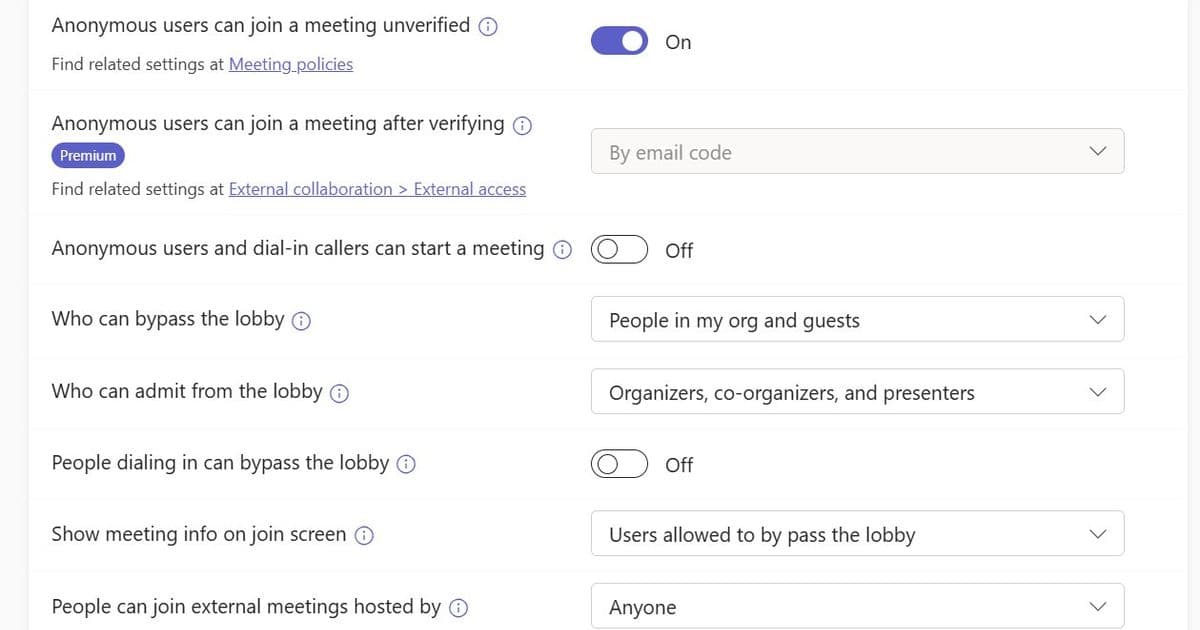
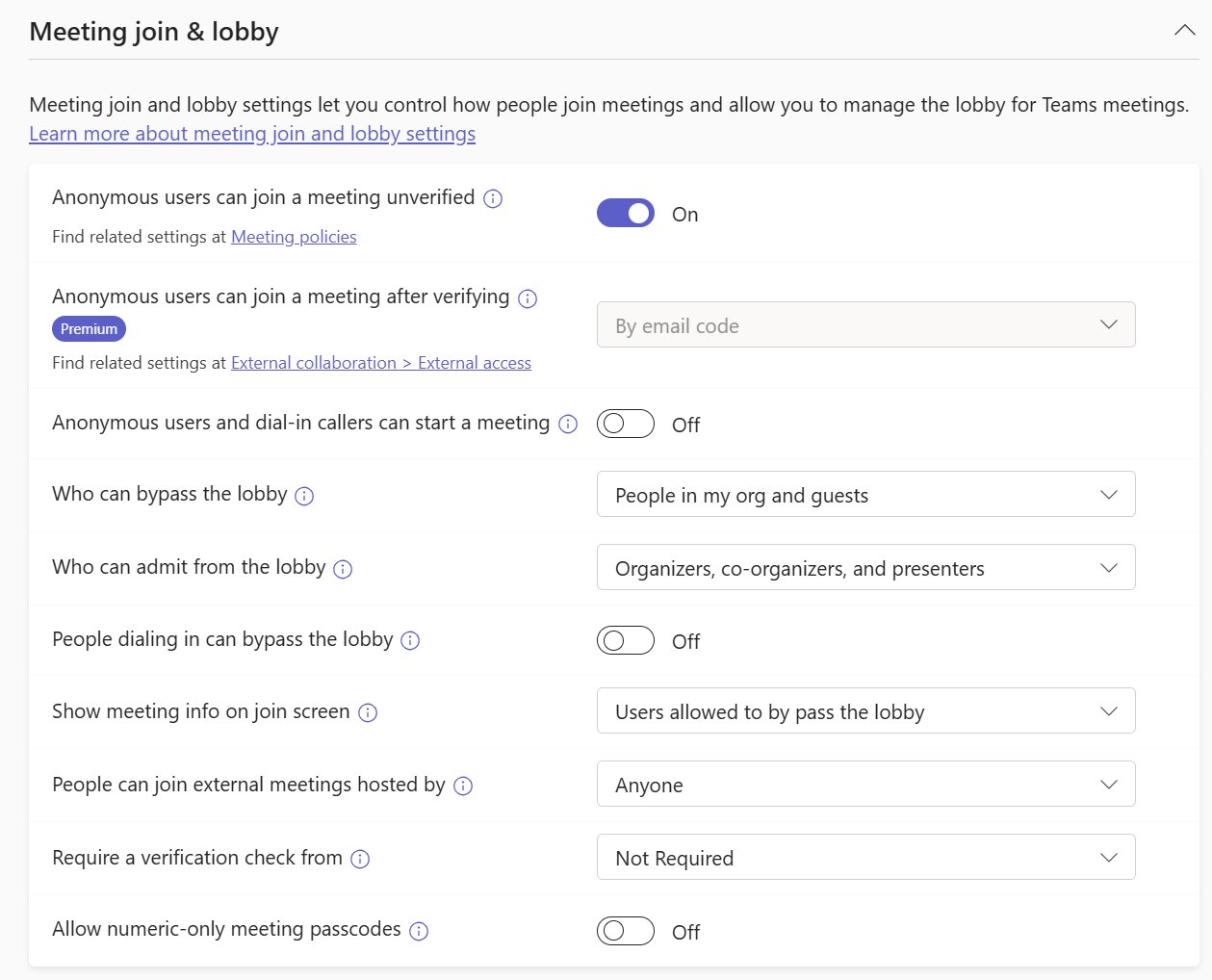
External attendees in Teams are classified as Guest, Trusted External, or Unverified, each governed by tenant‑wide settings, organizer policies, and per‑meeting options. Mapping these three layers clarifies why joins succeed or fail and guides administrators in configuring access without compromising security.
What changed
Microsoft Teams has always allowed people outside your organization to join meetings, but the decision logic behind who gets in and how they appear has become more explicit. The platform now treats external participants as three distinct identity types—Guest, Trusted External, and Unverified (anonymous or email‑verified). Each type is evaluated against three configuration layers:
- Org‑wide tenant settings (global defaults for anonymous join, guest access, and external access trusts).
- Per‑organizer meeting policies (custom policies that can override the global defaults, including Teams Premium options for email‑code verification).
- Per‑meeting options (lobby behavior, verification requirements, and admission rules set by the meeting organizer). Understanding this stack replaces the old “one‑size‑fits‑all” view and gives support teams a clear troubleshooting path.
Provider comparison – Teams vs. competing collaboration suites
| Feature | Microsoft Teams | Zoom | Google Meet |
|---|---|---|---|
| Guest handling | Requires a guest object in Azure AD; can be disabled per‑tenant. | Guest can join via a simple link; no directory object needed. | Guest joins as a consumer Google account; no explicit guest provisioning. |
| Trusted external orgs | Mutual external access trust must be configured; domain allow‑list/ block‑list applies. | No concept of trusted orgs; relies on meeting passwords or waiting rooms. | Uses domain‑based allow‑list for Google Workspace‑to‑Workspace meetings. |
| Anonymous join | Controlled by org‑wide setting; can be blocked entirely or allowed with lobby/verification. | Anonymous join is default; host can require a password or waiting room. | Anonymous join allowed if host enables “Anyone with the link can join”. |
| Policy granularity | Global, per‑policy (assignable to groups), and per‑meeting options; changes propagate in up to 24 h. | Account‑level settings; limited per‑meeting controls (waiting room, passcode). | Organization‑wide defaults; per‑meeting controls limited to host toggles. |
| Pricing impact | Guest access is free; Trusted External requires Azure AD (included in most M365 plans). Teams Premium adds email‑code verification for anonymous users at $10 /user / month. | Free tier allows unlimited participants; advanced security features require Business/Enterprise plans. | Free tier caps participants at 100; Workspace Enterprise adds security controls. |
Key takeaways
- Teams provides the most granular control over external identities, which is valuable for regulated industries.
- The trade‑off is complexity: administrators must manage three layers of settings and ensure policy propagation.
- Competitors favor simplicity—anyone with a link can join—but sacrifice the ability to enforce strict identity verification.
Business impact
Faster incident resolution
When an external participant is stuck in the lobby, the support checklist now follows a predictable order:
- Identify the participant’s identity type (Guest, Trusted External, Unverified).
- Verify the tenant‑wide setting that governs that type (e.g., is anonymous join allowed?).
- Confirm the meeting policy assigned to the organizer (does it override the global default?).
- Review the meeting options (lobby rules, verification requirement). By anchoring troubleshooting to these three ideas—who, what the organization allows, and what the organizer chose—most failures are resolved within minutes rather than hours of back‑and‑forth.
Security and compliance alignment
Enterprises that must meet GDPR, HIPAA, or ISO‑27001 can now enforce a zero‑anonymous stance at the tenant level while still permitting Guest access for vetted partners. Trusted External relationships can be whitelisted on a domain‑by‑domain basis, ensuring that only pre‑approved suppliers bypass the lobby.
Cost considerations
- Enabling Guest access does not increase licensing costs; it leverages existing Azure AD.
- Deploying Teams Premium for email‑code verification adds a predictable per‑user fee, but it eliminates the need for separate MFA solutions for anonymous joiners.
- Mis‑configured policies can generate support tickets that cost organizations an average of $150 per incident in labor. Streamlined troubleshooting reduces that overhead.
Practical steps for administrators
- Audit tenant settings – In the Teams admin center, verify that Anonymous join is set according to your risk appetite.
- Define policy groups – Create a “Customer‑Facing” policy that permits anonymous join with email verification, and a “Sensitive‑Internal” policy that blocks all external access.
- Communicate organizer guidelines – Provide a quick‑reference sheet showing how to adjust meeting options (lobby, verification) from the Teams client.
- Monitor policy propagation – Remember that changes may take up to 24 hours; use the PowerShell
Get-CsTeamsMeetingPolicycmdlet to confirm effective settings. - Leverage logs – Azure AD sign‑in logs and Teams meeting reports pinpoint whether a participant was classified as Guest, Trusted External, or Unverified.
Bottom line
External join outcomes in Microsoft Teams are no longer a mystery; they are the product of three intersecting layers—identity type, tenant policy, and organizer choice. By mapping each failed join to this stack, administrators can quickly pinpoint the root cause, apply the correct policy adjustment, and maintain a secure yet collaborative meeting environment.
Further reading
Comments
Please log in or register to join the discussion