
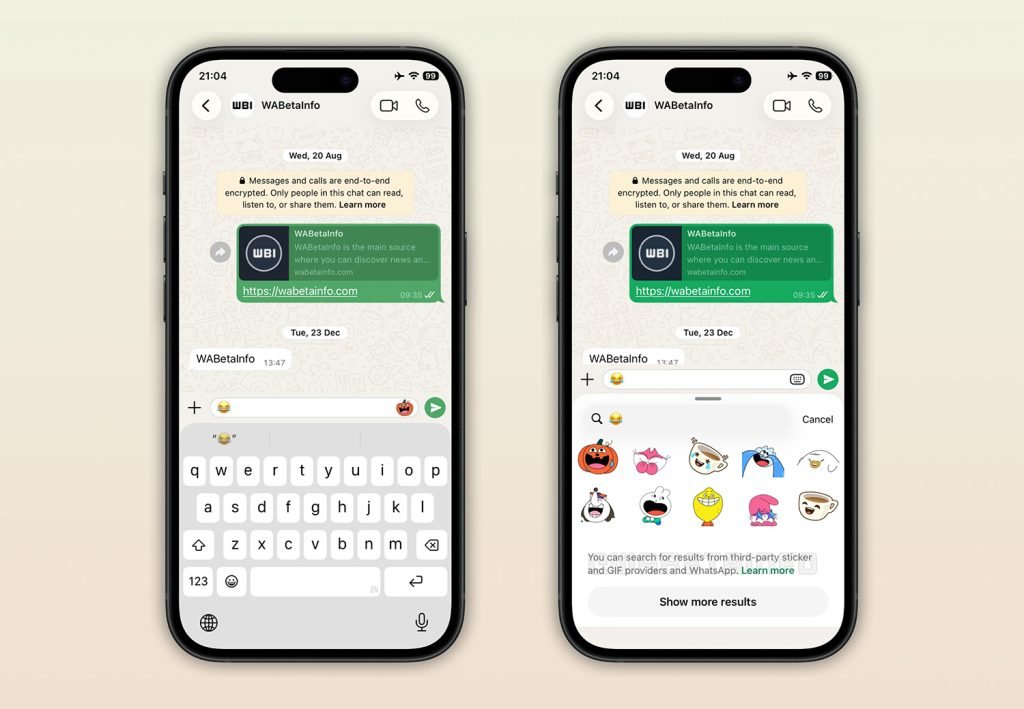
The latest WhatsApp TestFlight build for iOS introduces a context-aware sticker suggestion system that surfaces relevant stickers directly in the message composer when users type emojis, eliminating the need to manually browse sticker panels.
WhatsApp is testing a new sticker suggestion feature in its iOS beta that fundamentally changes how users discover and send stickers during conversations. The feature, spotted in version 26.1.10.72 by WABetaInfo, uses emoji metadata to surface relevant stickers directly in the message input field, reducing the cognitive load of navigating through potentially dozens of sticker packs.
How the System Works
When you type an emoji in the message composer, WhatsApp now displays a small sticker icon on the right side of the input field, positioned next to the send button. Tapping this icon opens a results view showing stickers and GIFs that are tagged with that specific emoji. A "Show more results" button allows users to expand the selection without leaving the current conversation context.
This approach mirrors the behavior already available in the Android beta, creating feature parity across platforms. The key difference is that iOS users can now access this functionality without the extra step of opening the full sticker panel and manually searching through categories.
Metadata-Driven Discovery
The feature relies entirely on emoji associations embedded in sticker metadata during the creation process. According to WABetaInfo, only stickers that include these predefined emoji-to-sticker links will appear as suggestions. This ensures results remain contextually relevant rather than showing random sticker packs.
Third-party sticker creation apps on iOS already support assigning multiple emojis to a single sticker, which increases the likelihood of appearing in suggestions. This existing ecosystem means the feature could gain immediate traction if widely adopted by sticker creators.
Platform-Specific Limitations
Interestingly, the current implementation has a notable gap: stickers created using WhatsApp's built-in sticker creator don't support emoji associations yet. This means users who create custom stickers directly within WhatsApp won't see them appear in suggestions, at least for now. The company could address this before the feature graduates from beta.
For developers and power users who maintain custom sticker libraries, this limitation matters. If you're building stickers for WhatsApp distribution, consider using third-party tools that support emoji metadata to ensure compatibility with this new discovery mechanism.
Impact on User Experience
The shift from manual browsing to context-aware suggestions represents a meaningful UX improvement. For users with extensive sticker libraries spanning multiple packs, finding the right sticker often requires scrolling through categories or remembering which pack contains specific designs. By surfacing suggestions based on emoji context, WhatsApp reduces this friction.
From a cross-platform perspective, this also aligns iOS behavior with Android, which is important for users who switch between devices or for developers maintaining documentation and tutorials across platforms.
Rollout Timeline
As with most WhatsApp beta features, this is currently available to TestFlight users on iOS. The feature will likely remain in testing for several weeks while WhatsApp gathers feedback and refines the suggestion algorithm. A wider rollout to the stable channel depends on how well the metadata system performs with real-world usage patterns.
For sticker creators, this represents an opportunity to optimize existing packs by adding emoji associations through third-party tools, potentially increasing visibility once the feature reaches general availability.
Comments
Please log in or register to join the discussion