
The race for perfect node-based UIs has sparked a deep dive into collision detection algorithms. New benchmarking reveals that sometimes the simplest solution is the most effective, even when dealing with hundreds of UI elements.
When Nodes Collide: The Surprising Science Behind Collision Detection in Node-Based UIs
The world of node-based user interfaces is experiencing a renaissance. From creative tools to AI agents, visual programming interfaces are becoming increasingly sophisticated. But as these systems grow more complex, a fundamental challenge emerges: how to handle overlapping UI elements without creating visual chaos or performance bottlenecks.

A new wave of node-based UI tools has emerged in recent months, each bringing innovative approaches to visual programming. Fuser has launched with a compelling vision of why every creative tool is becoming a node canvas. Vercel has introduced an AI SDK with workflow UI elements. Weavy is pushing into flow-based UIs with the goal of integrating generative AI directly into design toolchains. And OpenAI surprised everyone with its node-based Agent Builder.
What's remarkable is that many of these tools are built on React Flow, highlighting the growing importance of robust node-based UI frameworks. But as these applications scale, developers face a subtle yet critical challenge: preventing nodes from overlapping while maintaining smooth performance.
The Collision Conundrum
When working with node-based interfaces, overlaps can create visual confusion and make it difficult for users to understand relationships between elements. As developers, we need algorithms that can detect when nodes collide and automatically reposition them to maintain clarity.
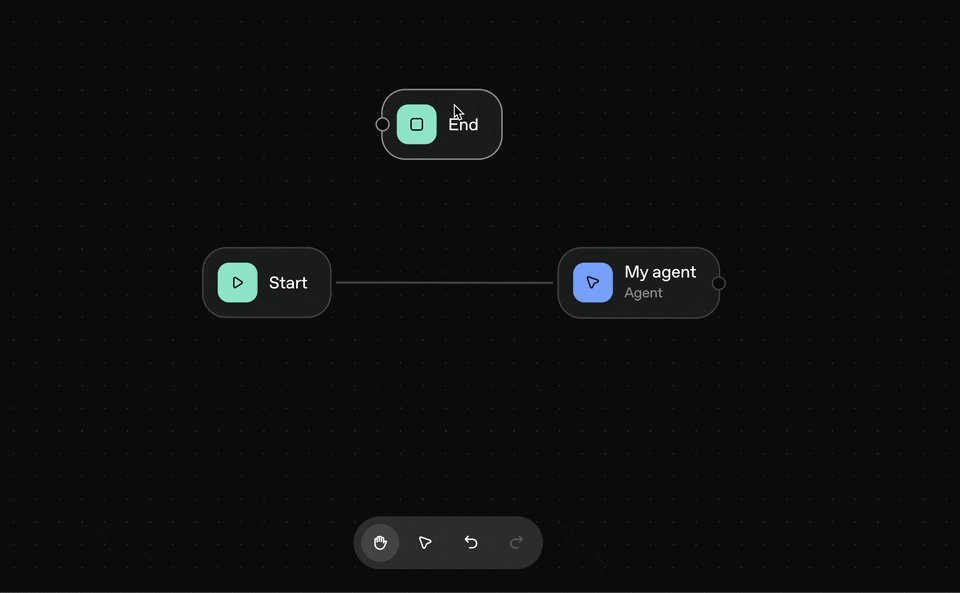
This is precisely the problem OpenAI tackled with its Agent Builder. The tool automatically separates overlapping nodes, creating a clean, readable interface even as users build complex AI workflows. When the React Flow team encountered this implementation, they recognized it as a valuable feature they had been considering for their own library.
"OpenAI's Agent Builder automatically separates overlapping nodes," the team noted, highlighting how this seemingly simple feature dramatically improves user experience in complex node-based interfaces.
The Naive Approach
Before diving into complex optimizations, the React Flow team took a step back and implemented the most straightforward solution they could imagine. This "naive" approach follows a simple yet effective algorithm:
function resolveOverlaps(nodes, margin):
    overlapFound = true

    while overlapFound:
        overlapFound = false

        for each pair of nodes (A, B):
            if A and B overlap (considering margin):
                overlapFound = true

                overlapX = amount of overlap along x-axis
                overlapY = amount of overlap along y-axis

                if overlapX < overlapY:
                    # Move along x-axis
                    move A left by overlapX / 2
                    move B right by overlapX / 2
                else:
                    # Move along y-axis
                    move A up by overlapY / 2
                    move B down by overlapY / 2

    return nodes
This implementation defines bounding boxes for each node, checks all possible pairs for collisions, and resolves overlaps by moving nodes along the axis with the smallest overlap. The process repeats until no overlaps remain.
Benchmarking Methodology
To truly understand performance characteristics, the team developed a comprehensive benchmarking approach using Vitest with tinybench. They created three synthetic datasets that reflect real-world scenarios:
{{IMAGE:5}}
- Separated: Nodes with no overlaps
- Clustered: Groups of nodes with few overlaps
- Packed: Tightly packed nodes with many overlaps
These datasets were tested across three node counts: 15, 100, and 500. The team also welcomed community contributions, encouraging developers to submit their own real-world datasets to make the benchmarks more representative.
Surprising Results
The benchmarking revealed some unexpected findings about the naive algorithm's performance:
- For 15 nodes: ~0.3µs (separated), ~0.7µs (clustered), ~2µs (packed)
- For 100 nodes: ~8µs (separated), ~0.5ms (clustered), ~0.5ms (packed)
- For 500 nodes: ~0.2ms (separated), ~1.1ms (clustered), ~150ms (packed)
"These results may have just created a (blazingly?) fast algorithm — one that's going to be pretty hard to beat," the team noted.
The key insight is that collision detection doesn't need to run continuously or on every frame. It only executes when a node is dropped or changes are submitted, making millisecond-range runtimes acceptable for most use cases.
Optimized Approaches
While the naive algorithm performed well, the team also explored more sophisticated approaches using spatial acceleration structures:
- quadtree-ts: Uses quadtrees that recursively subdivide space
- RBush: Implements a packed Hilbert R-tree
- Flatbush: A static R-tree implementation optimized for memory efficiency
These structures reduce the O(n²) complexity of the naive approach by limiting comparisons to only relevant neighboring nodes.
{{IMAGE:5}}
The benchmark results showed that for typical use cases with fewer than 100 nodes, the naive algorithm actually outperformed the more complex alternatives. However, for scenarios with 500+ nodes, Flatbush demonstrated clear advantages, especially in tightly packed configurations.
Implications for Developers
The findings have important implications for developers working with node-based UIs:
Don't underestimate simple solutions: The naive algorithm performed remarkably well across most scenarios, often beating more complex alternatives.
Consider your specific use case: If your application typically handles fewer than 500 nodes, the simpler approach may be sufficient and easier to maintain.
Optimize for real-world patterns: Focus on the scenarios that actually occur in your application rather than theoretical worst cases.
Benchmark with representative data: Use datasets that reflect your actual usage patterns to make informed decisions about optimization.
Looking Ahead
The React Flow team has open-sourced their benchmarking implementation and welcomes community contributions. They're particularly interested in seeing how the algorithms perform across different hardware configurations and with real-world datasets from production applications.
As node-based UIs continue to evolve, collision detection will remain a critical component of user experience. The surprising effectiveness of the naive algorithm demonstrates that sometimes the simplest solution is the best—especially when backed by thorough benchmarking and a deep understanding of the specific requirements.
For developers interested in exploring these algorithms further, the complete implementation and benchmarking code are available on the React Flow GitHub repository. The team encourages experimentation and contributions to help refine these solutions for the growing ecosystem of node-based applications.
Comments
Please log in or register to join the discussion