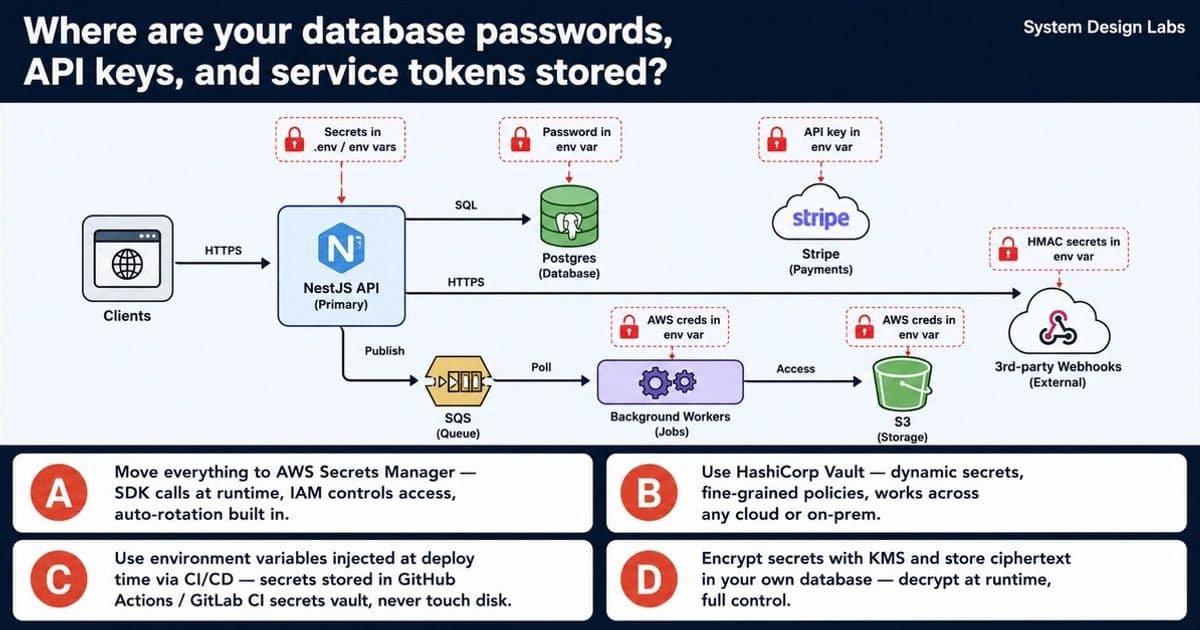
A startup discovered that credentials were scattered across .env files, Lambda env vars, and Slack messages. To achieve SOC 2 compliance without downtime, the pragmatic choice is to migrate all secrets to AWS Secrets Manager, leveraging IAM, CloudTrail, and built‑in rotation.
The Problem: Secrets Everywhere, Audits Nowhere
Your audit report reads like a horror story:
- Database passwords, API keys, and service tokens live in committed
.envfiles. - Three credentials are hard‑coded in Lambda environment variables.
- One secret is buried in a 2023 Slack message.
- Six services run across four environments with zero rotation and no audit trail.
For a SOC 2 audit, the regulator expects:
- Centralized, encrypted storage of secrets.
- Fine‑grained access control tied to identity.
- Immutable audit logs of every secret read.
- A rotation strategy that can be automated.
Any solution must satisfy these requirements without taking the services offline.
Solution Candidate A – AWS Secrets Manager (the right answer)
Core Benefits
| Feature | Why It Matters for SOC 2 |
|---|---|
| KMS‑backed encryption | Secrets are encrypted at rest with a customer‑managed CMK. No plaintext on disk. |
| IAM‑based policies | Access is granted per‑service, per‑environment. You can give a specific Lambda role permission to read only the DB password it needs. |
| CloudTrail integration | Every GetSecretValue call is logged, providing the immutable audit trail auditors demand. |
| Native rotation | RDS‑compatible secrets rotate automatically; custom Lambda rotators can handle Stripe keys, S3 credentials, and webhook HMACs. |
| Zero‑downtime migration | You can replace a static env var with a call to SecretsManager in a rolling deployment. Once the new code is live, retire the old credential. |
| Cost predictability | $0.40 per secret per month (as of 2026). For ~20 secrets the monthly bill is under $10 – negligible compared to the risk of a breach. |
Migration Path – No Service Interruptions
- Create a secret for each credential in the AWS console or via CloudFormation. Import the current plaintext values.
- Add IAM policies to each service role, granting
secretsmanager:GetSecretValueon the specific secret ARN. - Update code to fetch the secret at runtime. In a NestJS app you can wrap the SDK call in a provider that caches the value for the life of the process.
- Deploy with a rolling update (ECS, EKS, or Lambda versioning). Old containers continue using the env var while new ones read from Secrets Manager.
- Validate that the new containers can connect to Postgres, Stripe, SQS, etc. Once 100 % of traffic is on the new version, delete the old env vars and the plaintext entries from the repository.
- Enable rotation – for PostgreSQL use the built‑in RDS rotator; for Stripe and webhook HMACs write a small Lambda that generates a new key, updates the third‑party configuration, and stores the new value back into Secrets Manager.
Operational Guardrails
- Least‑privilege IAM: each Lambda role gets a policy like
{"Effect":"Allow","Action":"secretsmanager:GetSecretValue","Resource":"arn:aws:secretsmanager:region:account-id:secret:my‑db‑pwd"}. - CloudWatch Alarms on
AccessDeniederrors to catch mis‑configured policies before they cause outages. - Rotation frequency: start with 30‑day rotation for static credentials; move to shorter windows as you gain confidence.
- Backup: enable automatic secret versioning; you can roll back to a previous version if a rotation script fails.
Why the Other Options Fall Short
B – HashiCorp Vault
Vault offers dynamic secrets and multi‑cloud flexibility, but it introduces a new operational surface:
- You must provision a Raft cluster, manage unsealing, and ensure high availability.
- If the Vault cluster becomes unavailable, all services lose access to credentials, causing a cascade failure.
- For a small, AWS‑native team, the operational overhead outweighs the benefits. Vault shines when you need multi‑cloud or on‑prem secrets, not when you already live inside AWS.
C – CI/CD‑Injected Environment Variables
Storing secrets in GitHub Actions or GitLab CI is perfect for build‑time credentials (Docker Hub tokens, Terraform keys). However, runtime secrets—database passwords, Stripe keys, webhook HMACs—must be available to services after deployment. Injecting them as static env vars defeats rotation and audit requirements. CI/CD injection can complement Secrets Manager (e.g., feeding the initial secret value during deployment) but cannot replace a runtime secret store.
D – DIY KMS + Custom Database
Building your own secret store re‑creates problems that managed services already solve:
- You must secure the encryption keys, implement rotation logic, and build an audit log.
- The “bootstrapping problem” appears: what protects the credentials that protect the store itself?
- Maintenance cost skyrockets, and the risk of a mis‑configuration is high. This approach is only justified for highly regulated environments where you cannot trust any third‑party service—a rarity for a typical startup.
Trade‑offs and Final Recommendation
| Aspect | AWS Secrets Manager | Vault | CI/CD Env Vars | DIY KMS + DB |
|---|---|---|---|---|
| Operational overhead | Low – fully managed | High – self‑hosted cluster | Low for build‑time, high for runtime | Very high – custom code & ops |
| AWS integration | Native (IAM, CloudTrail) | Possible via plugins | Indirect | Manual |
| Rotation | Built‑in for RDS, custom Lambda for others | Dynamic per‑request secrets | Manual, not runtime | Custom implementation required |
| Auditability | CloudTrail logs every read | Needs separate audit backend | Limited to CI logs | Must build yourself |
| Cost | $0.40/secret/mo | Infrastructure + licensing | Free (CI limits) | Development + infra cost |
| Failure mode | Service continues with cached secret | Entire cluster outage blocks all secrets | Env var leakage possible | Store becomes single point of failure |
Given the startup’s constraints—AWS‑centric stack, limited ops bandwidth, immediate SOC 2 compliance, and zero‑downtime requirement—AWS Secrets Manager is the clear choice. It delivers the security guarantees auditors demand while keeping the migration path simple and cost‑effective.
Next Steps for the Team
- Audit current secret locations and create an inventory spreadsheet.
- Provision Secrets Manager entries for each credential, tagging them with
environment=prod|staging|dev. - Update IAM roles to grant least‑privilege access.
- Refactor NestJS providers to lazily fetch secrets via the AWS SDK.
- Roll out a canary deployment for one service (e.g., the background worker) and verify secret retrieval.
- Enable rotation for each secret, starting with the database password.
- Remove all plaintext secrets from the repo, CI pipelines, and Slack history.
By following this roadmap, the company will close the biggest compliance gaps, eliminate the risk of leaked credentials, and set a foundation for automated secret management that scales as the product grows.
Comments
Please log in or register to join the discussion