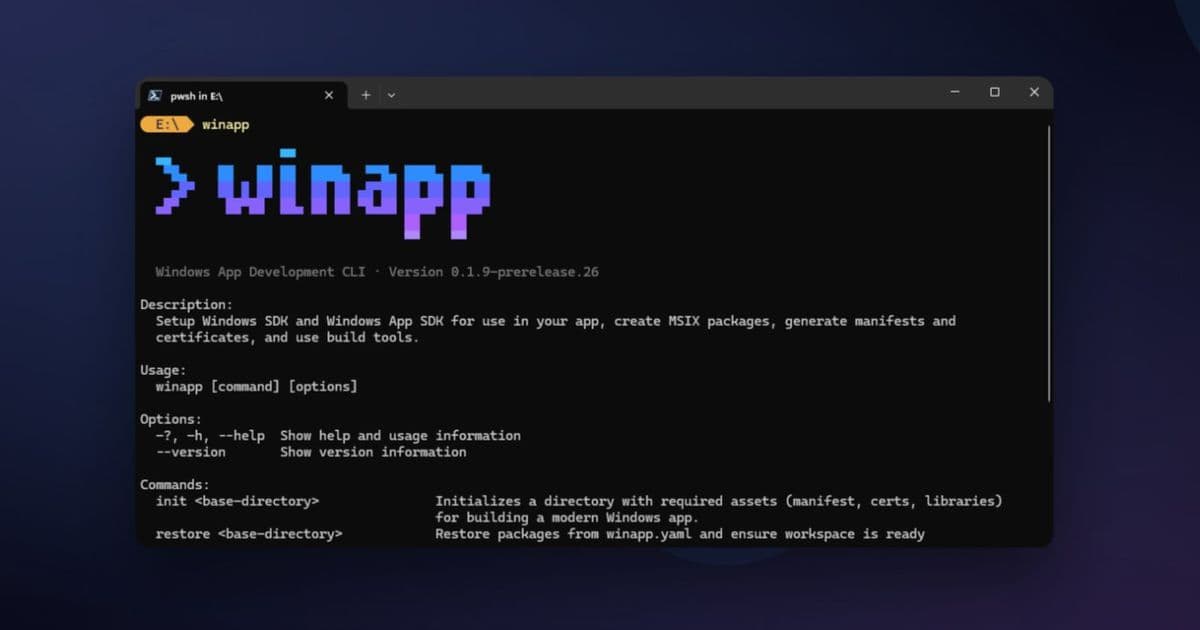
Microsoft's new winapp CLI streamlines Windows app development by unifying environment setup, package identity, manifest management, and MSIX packaging into a single command-line tool.
The Windows development ecosystem has long been a complex landscape of SDKs, manifests, certificates, and packaging requirements that can overwhelm even experienced developers. Microsoft's latest offering aims to change that narrative with the public preview of the Windows App Development CLI (winapp), an open-source command-line tool designed to streamline the entire Windows application development lifecycle.
A Unified Approach to Windows Development
The winapp CLI represents a significant shift in how developers interact with Windows development tools. Rather than navigating the traditional maze of Visual Studio, MSBuild, and multiple SDKs, this tool provides a consistent interface across frameworks and toolchains. Whether you're building with Electron, CMake, .NET, Rust, or Dart, winapp promises to handle the underlying complexity while you focus on building great applications.
At its core, the CLI addresses a fundamental pain point in Windows development: the fragmented setup process. Traditionally, getting a Windows project ready for development meant juggling multiple tools, manually configuring manifests, generating certificates, and ensuring all dependencies were properly aligned. The winapp CLI consolidates these tasks into intuitive commands that work consistently across different development environments.
One-Command Environment Setup
The winapp init command exemplifies the tool's philosophy of simplification. What previously required multiple error-prone manual steps—downloading SDKs, generating projections, configuring manifests, creating certificates—is now a single command that bootstraps your entire workspace. This command automatically downloads necessary SDK packages, generates C++/WinRT projections (with more projections planned), and configures your project for development.
For teams working across multiple machines or developers, the winapp restore command ensures consistent environment states by recreating the exact configuration defined in your project files. This is particularly valuable for CI/CD pipelines, where the GitHub and Azure DevOps actions can automatically install the CLI and maintain consistent build environments.
Breaking Down Package Identity Barriers
One of the most innovative features of winapp addresses a longstanding frustration in Windows development: the requirement for package identity to access modern Windows APIs. APIs like Windows AI, security features, notifications, and MCP hosts traditionally required developers to fully package and install their applications just to test a single feature. This created a significant bottleneck in the development workflow.
The winapp create-debug-identity command changes this dynamic entirely. By adding package identity to your executable with a single command, developers can maintain their existing development loop while accessing APIs that previously required full packaging. This means you can test and debug Windows AI APIs, security features, or shell integrations without the overhead of creating and installing a full package for every iteration.
Streamlined Manifest and Certificate Management
Manifest creation and certificate management have historically been stumbling blocks for Windows developers, particularly those new to the platform. The winapp CLI automates these processes while still providing granular control when needed. The init command handles manifest and certificate generation automatically, but developers can also use specific commands for more targeted operations.
The winapp manifest update-assets command simplifies the process of managing application assets. Rather than manually editing XML and ensuring correct aspect ratios, developers can update all image assets referenced in their appxmanifest.xml from a single source image. Similarly, the winapp cert generate command creates self-signed development certificates that can be used for testing and sideloading without additional configuration.
Simplified MSIX Packaging
When it's time to distribute your application, the winapp pack command handles the entire MSIX packaging process. The CLI takes care of packing and signing, producing store-ready or sideload-ready packages from your build output. This eliminates the complexity traditionally associated with MSIX packaging, making it accessible to developers who might otherwise avoid the format due to its perceived complexity.
Enhanced Electron Integration
For Electron developers, winapp offers particularly compelling features. The CLI is available as an npm package, bridging the gap between Node.js and native Windows code. It can scaffold C++ or C# native addons pre-configured to access the Windows App SDK and Windows SDK, making it easier than ever to integrate high-performance native features or AI capabilities like Phi Silica directly into Electron applications.
The winapp node add-electron-debug-identity command is especially noteworthy for Electron developers. It injects package identity directly into running Electron processes, allowing developers to test and debug APIs that require identity simply by calling npm start. This maintains the familiar Node.js development workflow while providing access to powerful Windows capabilities.
Experimental AI Capabilities
Microsoft is also leveraging winapp to explore new frontiers in Windows development. The company has begun building experimental NodeJS projections for APIs such as LanguageModel, with the @microsoft/winapp-windows-ai npm package enabling direct use of Windows AI APIs from NodeJS. This represents an interesting direction for the tool, potentially expanding its role beyond development workflow management into API exploration and experimentation.
Getting Started and Future Development
The winapp CLI is available now in public preview, with installation options tailored to different development workflows. General users can install via WinGet with winget install microsoft.winappcli, while Electron developers can use npm install --save-dev @microsoft/winappcli. The project is hosted on GitHub, where developers can find documentation, guides, and file issues.
Microsoft has positioned this as an early-stage tool, explicitly seeking feedback and feature requests from the developer community. This approach suggests that winapp will evolve based on real-world usage patterns rather than predetermined roadmaps. The company acknowledges that many Windows development scenarios are still in the works, but the public preview represents a commitment to community-driven development.
Implications for Windows Development
The introduction of winapp represents a significant shift in Microsoft's approach to Windows development tooling. By creating a unified CLI that works across frameworks and toolchains, Microsoft is acknowledging the diverse ecosystem of developers building for Windows and the need for consistent, simplified tools.
For cross-platform developers, winapp could significantly lower the barrier to entry for Windows development. The ability to maintain familiar development workflows while accessing Windows-specific capabilities could encourage more developers to target the platform. For existing Windows developers, the tool promises to reduce friction in the development process, potentially accelerating iteration cycles and reducing the cognitive load associated with managing complex development environments.
The focus on package identity and AI capabilities also suggests Microsoft's strategic priorities for Windows development. By making it easier to access modern Windows APIs, Microsoft is positioning Windows as a platform for innovative, AI-enhanced applications while maintaining compatibility with existing development practices.
Looking Forward
As winapp evolves from public preview to a mature tool, several areas warrant attention. The expansion of supported projections beyond C++/WinRT will be crucial for broader adoption. The tool's integration with emerging Windows capabilities, particularly around AI and security, will likely define its long-term value proposition.
The success of winapp will ultimately depend on its ability to deliver on its promise of simplification without sacrificing power or flexibility. If Microsoft can maintain this balance while responding to community feedback, winapp could become an essential tool in the Windows developer's toolkit, fundamentally changing how applications are built for the platform.
For developers interested in exploring Windows development or streamlining their existing workflows, winapp represents an opportunity to engage with a tool that's actively being shaped by its user community. The public preview phase offers a chance to influence the direction of Windows development tooling while benefiting from the immediate productivity gains the CLI provides.
Comments
Please log in or register to join the discussion