Microsoft's KB5062660 preview update for Windows 11 24H2 introduces groundbreaking self-healing capabilities, including a redesigned Black Screen of Death and the Quick Machine Recovery tool, aimed at minimizing downtime from system failures. This release, part of the Windows Resiliency Initiative unveiled at Ignite 2024, also adds AI-powered settings assistance and fixes for persistent bugs, signaling a strategic shift toward autonomous system recovery.
Microsoft is doubling down on system reliability with its latest Windows 11 24H2 preview update, KB5062660, which rolls out 29 new features and fixes—many focused on the newly announced Windows Resiliency Initiative. This optional update, now available through Windows Update or the Microsoft Update Catalog, elevates build numbers to 26100.4770 and previews enhancements destined for August's Patch Tuesday. But beyond routine tweaks, it introduces tools that could fundamentally alter how Windows handles catastrophic failures.
The Heart of Resilience: Quick Recovery and a New Black Screen
At the core of this update is Quick Machine Recovery, a feature designed to automatically diagnose and repair widespread boot issues using the Windows Recovery Environment (WinRE). When enabled—default for home users—it allows devices to connect to Microsoft servers for targeted fixes via Windows Update, bypassing manual troubleshooting.
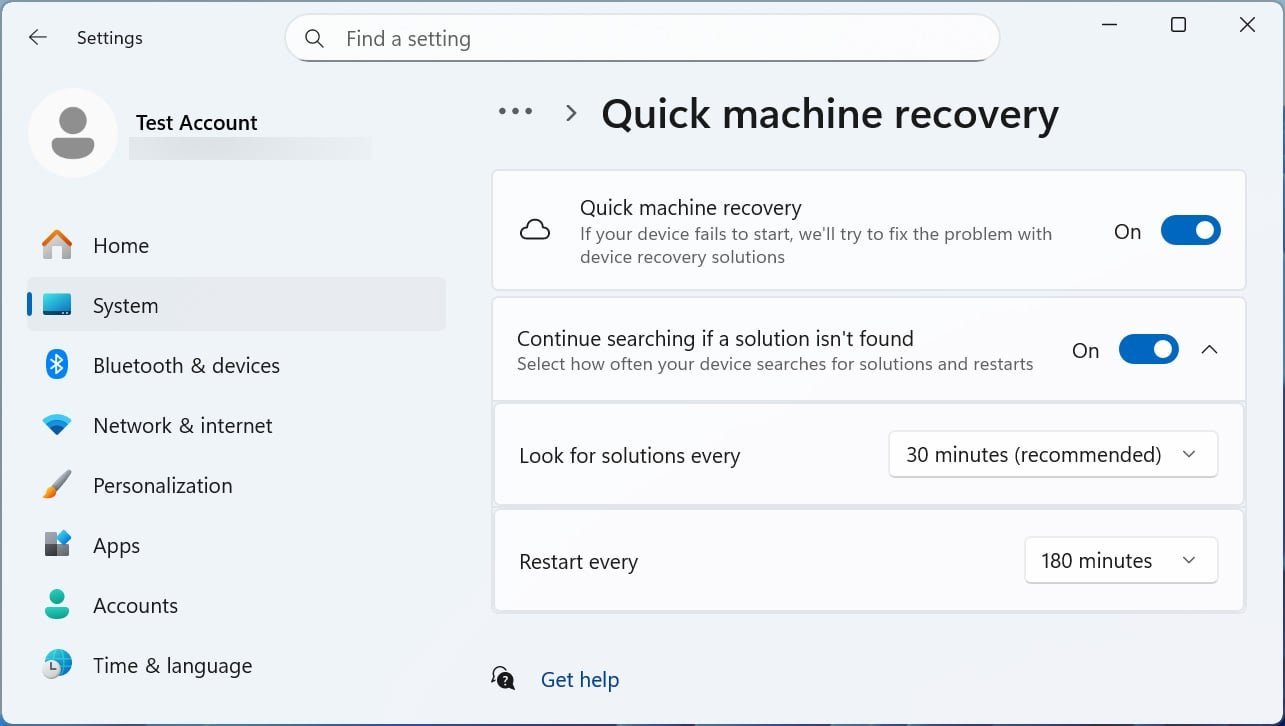
"This reduces downtime and avoids the need for manual fixes," Microsoft notes, emphasizing its utility for IT admins who can manage it via Intune’s RemoteRemediationCSP. Paired with this is a redesigned Black Screen of Death, now sporting a cleaner, Windows 11-aligned interface that prioritizes readability during unexpected restarts, helping users resume work faster.
Beyond Resilience: AI-Powered Settings and Input Upgrades
The update isn’t just about damage control. A new AI-driven settings agent debuts on Copilot+ PCs, allowing users to describe issues like "my mouse pointer is too small" for automated troubleshooting—a response to the perennial struggle of navigating Windows configurations. Currently limited to English and Snapdragon devices, it signals Microsoft’s push toward conversational computing.
Input methods also see refinements:
- Gamepad keyboard enhancements improve navigation for PIN sign-ins and child keys.
- Fixes for IME glitches in Traditional Chinese and phonetic keyboards address instability introduced in prior updates.
Critical Fixes and Enterprise Implications
Microsoft resolves several nagging issues, including:
- File Explorer glitches that caused incomplete folder displays or sluggish SharePoint performance.
- Event 2042 errors in Windows Firewall logs, which falsely signaled configuration failures.
- Memory exhaustion bugs in ReFS during large-file backups, a critical fix for sysadmins.
For developers, the update underscores a broader trend: automation in system maintenance. Features like Quick Machine Recovery reduce the burden on IT teams, while the Settings agent hints at future AI integrations that could simplify DevOps workflows. As Lawrence Abrams reports for BleepingComputer, this release finally silences known issues, offering a stable testbed for enterprises evaluating Windows 11 24H2.
A Quiet Revolution in System Stewardship
While flashy AI tools often dominate headlines, KB5062660’s focus on resilience reveals Microsoft’s quieter ambition: transforming Windows into a self-healing ecosystem. For developers and IT leaders, this shift means less firefighting and more innovation—turning system recovery from a reactive chore into a seamless, background process. As Windows increasingly mends its own wounds, the industry inches closer to an era where downtime is the exception, not the rule.
Comments
Please log in or register to join the discussion