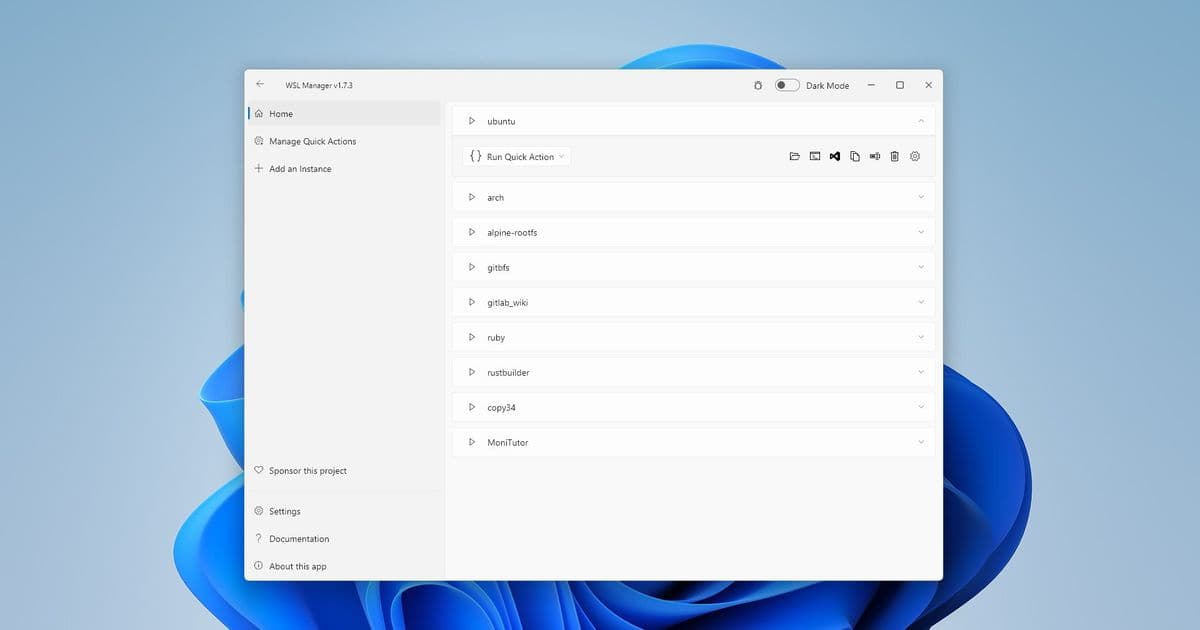
Eric Trenkel's open-source application simplifies WSL distribution management with an intuitive interface, eliminating the need for command-line expertise.
Windows Subsystem for Linux (WSL) has transformed how developers work on Windows, but managing multiple distributions has remained a command-line affair until now. Enter WSL Distro Manager, a free and open-source application that brings graphical interface simplicity to WSL administration.
The application, created by developer Eric Trenkel (@bostrot), addresses a common pain point for developers who regularly work with Linux environments on Windows. While WSL provides excellent compatibility with Linux tools, managing distributions—installing, updating, backing up, or configuring settings—has traditionally required familiarity with command-line operations.
"WSL Distro Manager is designed to make managing your Linux distributions on Windows as straightforward as possible," explains Trenkel in the project's GitHub repository. "Whether you're just starting with WSL or you're a power user, this tool aims to enhance your experience by providing an intuitive interface for all your WSL needs."
The application offers several key features that significantly improve the WSL experience:
Distribution Management: Users can easily install, uninstall, update, backup, and restore WSL distributions through a simple graphical interface.
One-Click Launch: Configure settings and launch distributions with a single click, streamlining the workflow.
Docker Integration: Download and use Docker images as WSL instances without requiring Docker to be installed, expanding the flexibility of WSL deployments.
Quick Actions: Execute pre-defined scripts directly on instances for quick configurations, automating repetitive tasks.
Container Support: Experimental support for Turnkey and other LXC containers, with WordPress containers already tested.
Cross-Machine Sharing: Share distros between multiple machines, enabling consistent development environments across different Windows installations.
Custom Repository Support: Use your own repository for root filesystems or LXC containers, providing maximum flexibility for advanced users.
The application is built using Flutter, Google's cross-platform framework, allowing it to maintain a consistent experience across Windows installations. The source code is available under the GPL-3.0 license, encouraging community contributions and transparency.
"What sets this tool apart is its focus on the entire WSL lifecycle," notes Trenkel. "It's not just about installing distributions—it's about making them easy to manage, share, and customize according to your specific needs."
The project has been made available through multiple installation channels, including the Microsoft Store, direct download, Winget, and Chocolatey, ensuring accessibility for different user preferences. Nightly builds are also available for those who want to test the latest features.
For developers who maintain multiple Linux distributions or frequently switch between different WSL environments, WSL Distro Manager represents a significant quality-of-life improvement. By abstracting away the command-line complexity, it lowers the barrier to entry for new WSL users while providing power users with tools to streamline their workflows.
The project's GitHub repository has already attracted contributions from the community, indicating strong interest in a GUI-based WSL management solution. As the WSL ecosystem continues to evolve with features like WSL 2 and GPU support, tools like WSL Distro Manager will likely become increasingly valuable to developers working across Windows and Linux environments.

For those interested in contributing to the project or reporting issues, the GitHub repository includes a detailed contributing guide. The project's wiki provides additional documentation for users who want to explore advanced features or troubleshoot specific scenarios.
As Microsoft continues to invest in WSL with each Windows release, third-party tools like WSL Distro Manager play a crucial role in expanding the ecosystem's accessibility and functionality. This project demonstrates how open-source development can fill gaps in platform tools, creating value for the entire developer community.
Comments
Please log in or register to join the discussion