
When user requests trigger multiple operations simultaneously, your system can buckle under pressure. Message queues provide an elegant solution by decoupling components and processing tasks asynchronously, allowing your system to handle traffic spikes gracefully.
Your System Shouldn't Process Everything Instantly — That's Why Message Queues Exist
In the early days of web development, we built systems that responded immediately to every user request. The request comes in, we process it, update the database, send an email, and return a response—all in one synchronous operation. This approach works fine for small applications, but as traffic grows, this synchronous processing pattern becomes a liability.
The Problem: Synchronous Processing Bottlenecks
Consider a typical user registration flow:
- User submits registration form
- System validates input
- System creates user record in database
- System sends welcome email
- System adds user to mailing list
- System logs registration event
- System returns success response to user

Under normal conditions, this flow completes quickly. But what happens when:
- The database is slow or temporarily unavailable
- The email service is experiencing delays
- The logging service is overwhelmed
Suddenly, your entire request pipeline blocks. The user waits longer, and your system becomes increasingly unresponsive. Multiply this by hundreds of concurrent requests, and you've got a system that's grinding to a halt.
This synchronous approach creates several critical problems:
1. Cascading Failures
When one component fails, it affects the entire request flow. If your email service is down, user registrations fail completely, even though the core functionality (creating the user record) might work fine.
2. Poor User Experience
Users wait for operations that don't need to be completed before they receive a response. Why should a user wait for an email to be sent before they can start using your application?
3. Resource Contention
All operations compete for the same resources (database connections, memory, CPU). Under load, this contention leads to timeouts and failures across the board.
4. Limited Scalability
Synchronous systems scale vertically (more powerful servers) rather than horizontally (more servers). Eventually, you hit the limits of a single server, regardless of how powerful it is.
The Solution: Asynchronous Processing with Message Queues
Message queues solve these problems by decoupling system components and introducing asynchronous processing. Instead of handling all operations within a single request, we separate the immediate response from background tasks.
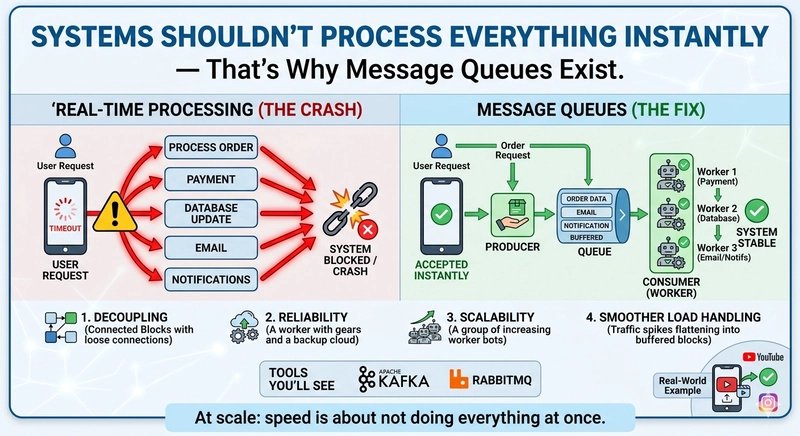
The revised flow looks like this:
- User submits registration form
- System validates input
- System creates user record in database
- System publishes a 'user_registered' message to a queue
- System returns success response to user
- Separate worker processes messages from the queue:
- Sends welcome email
- Adds user to mailing list
- Logs registration event
This approach immediately addresses all the problems of synchronous processing:
- No cascading failures: If the email service is down, the message remains in the queue and can be processed later
- Better user experience: Users receive immediate feedback without waiting for background operations
- Reduced resource contention: Background operations use separate resources
- Improved scalability: Workers can be scaled independently of your main application
How Message Queues Work
A message queue system consists of three core components:
1. Producers
Producers are applications or services that create and send messages to the queue. In our example, the user registration API acts as a producer when it publishes the 'user_registered' message.
2. Queue
The queue is a buffer that stores messages until they can be processed. Messages are typically stored in FIFO (first-in, first-out) order, though some queues support priority or other ordering patterns.
3. Consumers
Consumers are workers that retrieve and process messages from the queue. Multiple consumers can work in parallel to process messages from the same queue.

Benefits of Message Queues
1. System Decoupling
Message queues create loose coupling between components. Producers don't need to know about consumers, and vice versa. This allows teams to develop and deploy services independently.
2. Traffic Spikes Handling
During traffic spikes, messages accumulate in the queue while consumers process them at their own pace. This prevents your system from being overwhelmed by sudden bursts of requests.
3. Load Balancing
Multiple consumers can process messages from the same queue, distributing the workload automatically. If one consumer fails, others can take over its pending messages.
4. Reliability
Messages remain in the queue until they're successfully processed. If a consumer crashes while processing a message, the message can be returned to the queue for another consumer to process.
5. Flexibility
You can add new types of processing without modifying existing producers. For example, you could add a new consumer that analyzes registration patterns without changing the registration API.
Trade-offs and Considerations
While message queues solve many problems, they're not a silver bullet. Implementing them introduces new considerations:
1. Increased Complexity
Your system becomes more complex with additional components to manage, monitor, and troubleshoot.
2. Eventual Consistency
Background operations happen after the response is returned, which means your system may be temporarily inconsistent. In most cases, this is acceptable, but for some operations, you may need stronger guarantees.
3. Ordering Guarantees
Not all message queues guarantee message ordering. If you need to process messages in the exact order they were received, you'll need to choose a queue that supports this or implement ordering logic in your consumers.
4. Dead Letter Queues
What happens when a message repeatedly fails processing? Without proper handling, these messages can accumulate and consume resources. Most queue systems support dead letter queues that move problematic messages for special handling.
Implementation Patterns
1. Request-Response with Background Tasks
The pattern we've discussed: immediate response with background processing.
2. Event-Driven Architecture
Use message queues to propagate events across your system. When a user registers, an event is published, and various services subscribe to handle their specific reactions.
3. Work Queues
For CPU-intensive tasks that would block your main application, offload them to specialized worker processes.
4. Message Aggregation
Instead of processing each message individually, consumers can batch multiple messages together for more efficient processing.
Popular Message Queue Technologies
Several excellent message queue implementations are available:
RabbitMQ
A mature, feature-rich message broker that supports multiple messaging protocols. It's particularly good for complex routing scenarios.
Apache Kafka
Designed for high-throughput, streaming data processing. Kafka excels at handling massive volumes of messages and is ideal for event sourcing and stream processing.
Amazon SQS
Amazon's managed message queue service. SQS is highly scalable and integrates well with other AWS services.
Redis Streams
https://redis.io/docs/data-types/streams/
Redis Streams provide a lightweight message queue solution that's ideal if you're already using Redis for other purposes.
Best Practices
1. Idempotent Consumers
Design consumers to handle the same message multiple times without causing side effects. This is crucial for reliability when messages are retried after failures.
2. Proper Error Handling
Implement comprehensive error handling that includes retry logic and dead letter queues for messages that repeatedly fail.
3. Monitoring and Alerting
Monitor queue length, processing rates, and error rates. Set up alerts for abnormal conditions like growing queue backlogs.
4. Security
Implement proper authentication and authorization for producers and consumers. Ensure messages are encrypted if they contain sensitive data.
Real-World Example: E-commerce Order Processing
Consider an e-commerce platform that needs to process orders:
- User places an order
- System validates inventory
- System creates order record
- System charges payment
- System prepares shipping notification
- System updates inventory
- System sends confirmation email
With synchronous processing, any delay in payment processing or email sending would block the entire order flow.
With message queues:
- User places an order
- System validates inventory
- System creates order record
- System publishes 'order_placed' event
- System returns confirmation to user
- Separate workers:
- Process payment
- Prepare shipping notification
- Update inventory
- Send confirmation email
Now, if the payment processor is slow or the email service is down, the order is still created and the user receives immediate confirmation. The other operations complete when their respective services are available.
Conclusion
Message queues aren't just a technical detail—they're a fundamental architectural pattern that enables scalable, resilient systems. By decoupling components and introducing asynchronous processing, you can build systems that handle real-world traffic patterns gracefully.
If your system struggles under load, chances are you're trying to do too much synchronously. Introducing message queues might be the solution you need to improve reliability, scalability, and user experience.
Start by identifying operations that don't need to complete before returning a response. Offload these to background workers using message queues, and you'll immediately see the benefits of this powerful pattern.
Remember, good systems don't process everything instantly—they queue and scale. That's the secret to building applications that can grow with your user base.
Comments
Please log in or register to join the discussion