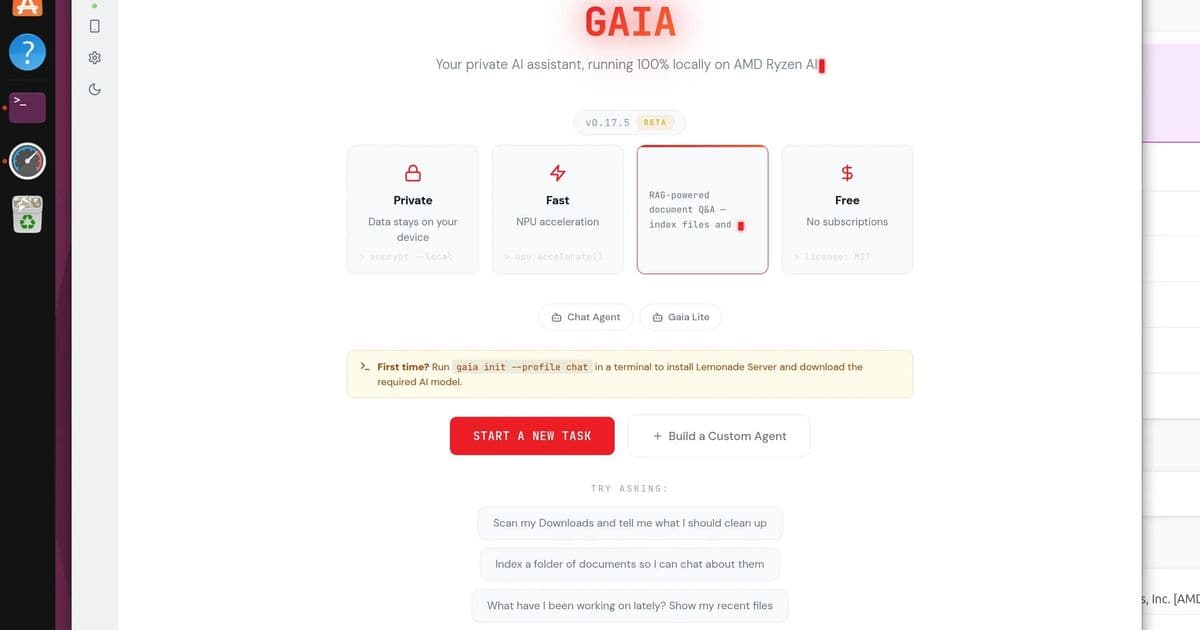
AMD's latest GAIA update replaces the default model with Gemma 4 E4B, improves performance, and adds new features while maintaining focus on local AI processing across AMD hardware.
AMD continues to push forward with their local AI initiative, releasing GAIA 0.17.5, an update that significantly improves the open-source software for running AI agents locally on Windows and Linux systems. This latest version demonstrates AMD's commitment to making local AI processing more accessible and efficient across their entire hardware ecosystem, from CPUs to GPUs and NPUs.
Model Upgrade: Gemma 4 E4B Takes Center Stage
The most significant change in GAIA 0.17.5 is the replacement of Qwen 3.5 35B with Gemma 4 E4B as the default model. This switch represents a substantial improvement in both capability and efficiency. According to AMD's release announcement, Gemma 4 E4B "(Gemma-4-E4B-it-GGUF) replaces Qwen 3.5 35B and the separate Qwen 3-VL-4B as the single default across the LLM and VLM roles, the installer profiles, the CLI, the Agent UI, and the eval suite)."
The advantages of this model switch are compelling:
- Native multimodal capabilities with ~4.5B effective parameters
- 128K context window for handling longer conversations and documents
- Apache 2.0 license for permissive commercial use
- Single model coverage for what previously required loading two separate models
Performance benchmarks show clear improvement, with the post-swap eval baseline "beats the pre-swap Qwen baseline 14/15 vs 13/15 across the bundled scenarios." This represents a 7% improvement in task completion rates.
New Feature Enhancements
GAIA 0.17.5 introduces several noteworthy features that enhance the user experience and expand functionality:
Native OpenAI tool_calls path support: This compatibility layer makes it easier for developers familiar with OpenAI's API to integrate with GAIA.
Chat Lite agent: A new built-in agent designed for systems with limited resources. The "chat-lite" option provides a lighter alternative to the 35B parameter model, making local AI accessible on less powerful hardware.
Semantic code search via CodeAgent: This feature adds developer-focused capabilities, allowing for more intelligent code analysis and search within the GAIA framework.
Bundled agent UI: The React-based user interface is now included directly in the PyPi wheel, simplifying deployment. Users can now access the full UI with a simple command:
pip install amd-gaia[ui] && gaia chat --ui
Installation and User Experience
The installation process has been streamlined in this release. The bundling of the UI in the PyPi wheel eliminates additional setup steps that were previously required. This approach aligns with AMD's goal of making local AI more accessible to average users while still providing powerful tools for developers.
In testing, the author reports that GAIA 0.17.5 provided "the smoothest I've had it up and running yet after a few tries in the past." This improvement in user experience is significant, as previous versions had some installation and configuration challenges.
For those interested in trying GAIA, the project is available on GitHub, where users can find the source code, documentation, and community discussions.
Performance Analysis
While the new Gemma 4 E4B model shows improved benchmark performance, actual real-world usage reveals some interesting patterns:
- GPU utilization: The Radeon 890M GPU in the test AMD Ryzen AI 9 HX 370 laptop was actively utilized during AI processing
- NPU utilization: Despite having AMDXDNA supported kernel and Lemonade 10.3, the Ryzen AI NPU showed 0% utilization across different agents and tasks
This discrepancy suggests that while GAIA is making progress in leveraging AMD's hardware, there's still work to be done in optimizing NPU utilization. The NPU, designed specifically for AI acceleration, represents significant potential power efficiency gains when properly utilized.
Build Recommendations for GAIA Users
Based on the 0.17.5 release, here are some recommendations for different user scenarios:
For Enthusiast/Homelab Builders
- Hardware: AMD Ryzen AI 300 series with Radeon 700M/800M series GPUs
- Memory: Minimum 32GB RAM, preferably 64GB for larger models
- Storage: NVMe SSD with at least 500GB free space for model downloads and caching
- OS: Ubuntu 26.04 with latest kernel for best NPU support
- Installation:
pip install amd-gaia[ui]for full UI experience
For Developer Workstations
- Hardware: AMD Ryzen 7000 series with Radeon RX 7000 series GPUs
- Memory: 64GB RAM for optimal performance
- Storage: 1TB NVMe SSD
- OS: Windows 11 or Ubuntu 22.04+ with Lemonade SDK
- Usage: Focus on CodeAgent for semantic code search and tool_calls integration
For Budget-Constrained Setups
- Hardware: AMD Ryzen 5000 series with integrated Radeon graphics
- Memory: 16GB RAM minimum
- Storage: 256GB NVMe SSD
- OS: Ubuntu 22.04 LTS
- Usage: Leverage the new "chat-lite" agent for lighter workloads
Future Outlook
GAIA's steady improvements indicate AMD's serious commitment to local AI processing. The switch to Gemma 4 E4B demonstrates that AMD is not just focusing on model availability but on selecting models that provide the best balance of performance and efficiency for their hardware ecosystem.
The persistent NPU utilization issues highlight an area for future improvement. As AMD continues to develop their AI hardware, optimizing software to fully leverage these specialized components will be crucial for achieving the power efficiency and performance potential that local AI promises.
For users interested in following GAIA's development, the GitHub repository provides the best source of information, while the official documentation offers deeper technical insights into the Lemonade SDK that powers GAIA.
As local AI continues to evolve, tools like GAIA will play an increasingly important role in enabling users to leverage AI capabilities without relying on cloud services, addressing concerns about privacy, latency, and ongoing subscription costs.
Comments
Please log in or register to join the discussion