
The Eclectic Light Company’s Viable, ViableS, Vimy, and Liviable tools show macOS virtualisation maturing from a curiosity into a serious way to test, isolate, and study modern Apple systems.
Thesis
The latest updates gathered on The Eclectic Light Company’s Apple silicon virtualisation page are small in release-note terms, yet they point to a larger change in the Mac’s technical character. Apple silicon virtual machines are no longer merely a developer convenience or an exotic demonstration of the Virtualization framework. They are becoming a practical layer in ordinary Mac work, a way to test operating systems, inspect suspicious material, run alternate environments, and think about macOS as something that can be instantiated, constrained, copied, and discarded.
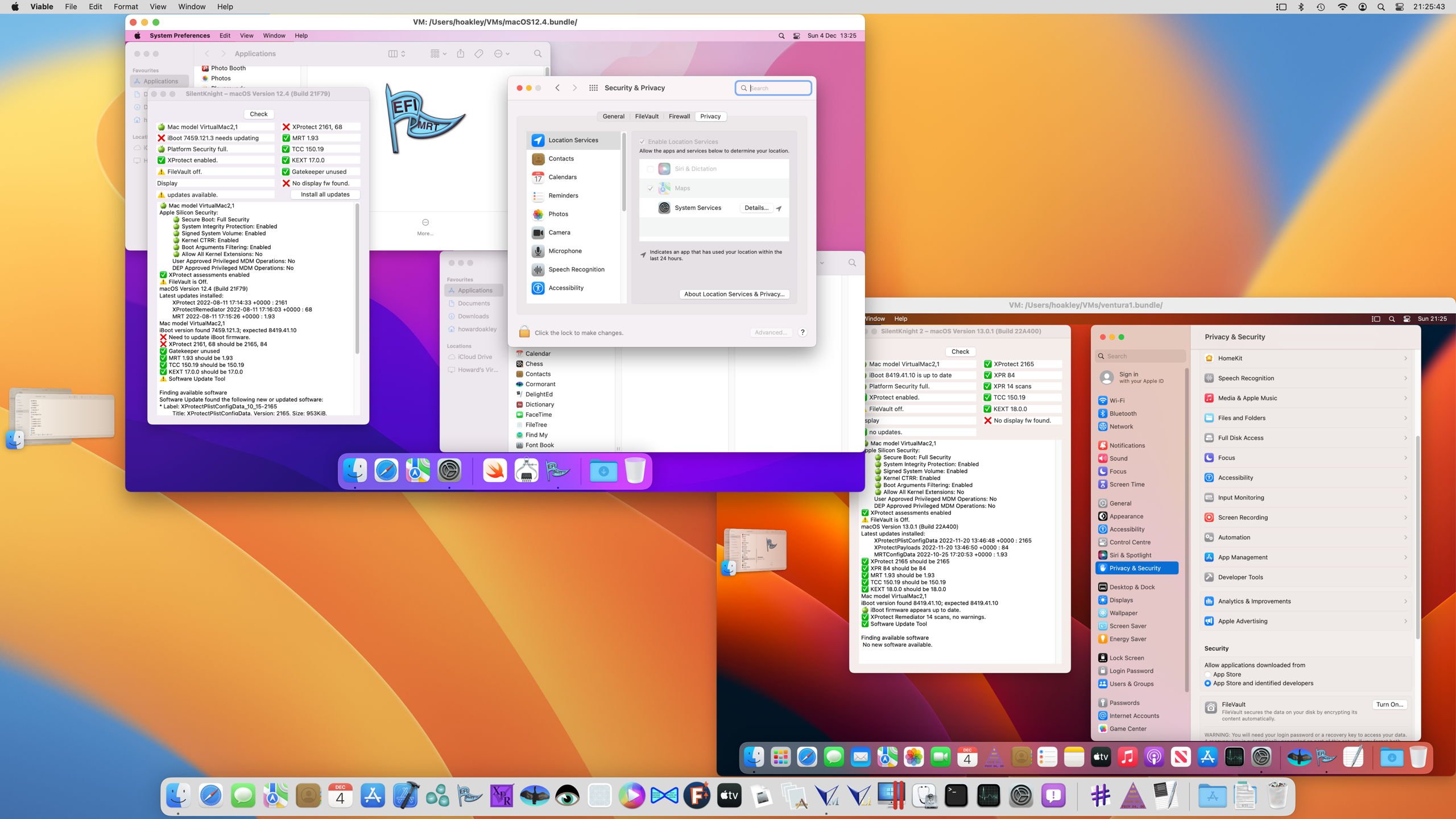
The core argument is that lightweight virtualisation on Apple silicon has matured less through one dramatic feature than through an accumulation of careful utilities: Viable for creating and running macOS virtual machines from IPSW images, ViableS for locked-down research use, Vimy for opening prepared VMs with a double click, and Liviable for GUI Linux guests. Each tool occupies a distinct point on a spectrum between convenience and containment. Together, they reveal a philosophy of virtualisation suited to Apple’s current hardware: close to the host, efficient by design, but also bounded by Apple’s security model and platform decisions.
Key Arguments
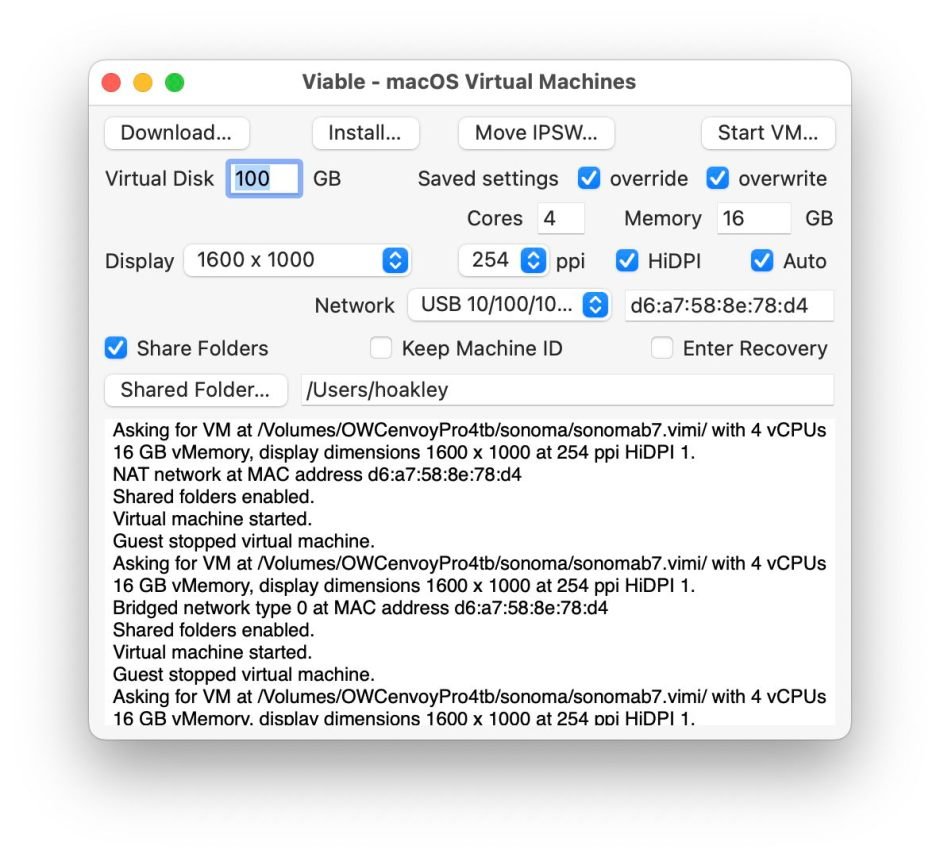
Viable is the central instrument in this collection because it turns Apple’s lower-level virtualisation machinery into a repeatable workflow. It can take a macOS IPSW image, either supplied by the user or downloaded within the app, and create a macOS virtual machine with chosen CPU thread count, memory, display resolution, shared folders, and, on newer systems, iCloud Drive support. That matters because the hardest part of virtualisation is often not the hypervisor itself, but the conversion of an abstract capability into a form that ordinary testing habits can absorb.
A VM becomes useful when it can be recreated. It becomes trustworthy when its identity, storage, display, and host boundaries are explicit. Viable’s support for multiple VMs with set Machine IDs speaks directly to that need. Testers can compare behavior across versions, repeat upgrade experiments, and observe how macOS handles identity-sensitive services without turning the host Mac into the experiment. On Apple silicon, where macOS installation media comes in the form of IPSW restore images rather than the older Intel-era habits of bootable installers and generic disk images, that workflow is especially valuable.
The newest Viable beta 12, version 1.0.12, is described mainly as a bug-fix release, correcting a problem when restoring a minimized window. That sounds modest, but the significance is partly ergonomic. Virtual machines become routine only when their surrounding app behavior stops demanding attention. A minimized-window restoration bug is not an architectural breakthrough, but it is exactly the sort of flaw that makes a tool feel experimental during daily use. Fixes like this mark the slow conversion of virtualisation from laboratory technique into desk habit.
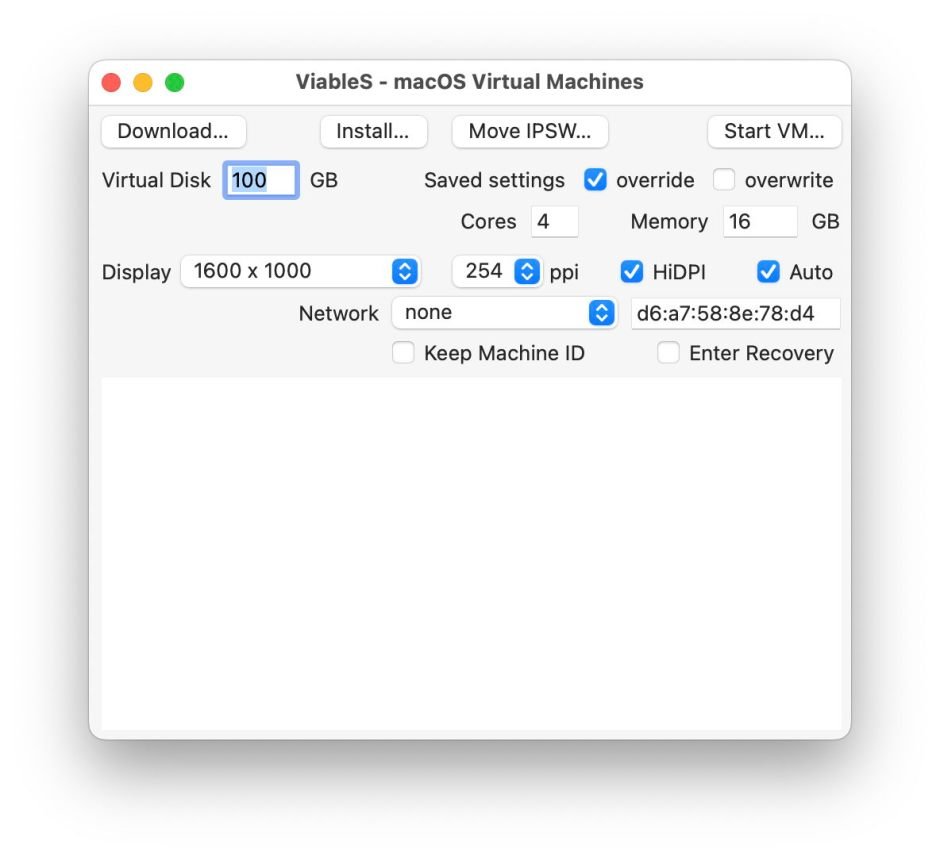
ViableS sharpens the opposite side of the problem: isolation. It is a sandboxed and locked-down variant that does not share folders or the clipboard with the host, which makes it better suited to research, suspicious documents, and cases where convenience is less valuable than the absence of accidental crossing. This distinction is philosophically important because virtualisation is often spoken of as if it were a single guarantee. It is not. A VM can isolate CPU and memory execution while still exposing host folders, clipboard data, network state, Apple Account behavior, or user mistakes. ViableS treats those edges as first-class design concerns.
Vimy represents a third idea: once a VM has been created and configured, running it should feel as simple as opening a document. The tool has almost no interface apart from its Open command, and it typically uses around 35 MB of memory plus whatever is assigned to the VM. That small footprint matters. It suggests a future in which virtual machines are not always heavyweight management projects, but portable work objects. A developer might keep a prepared Sequoia VM for one family of tests, a Sonoma VM for another, and a constrained research VM for risky inputs, opening each as needed with little ceremony.
Liviable extends the same Apple silicon virtualisation approach to Linux guests. It takes a bootable ISO installer distribution and creates a GUI virtual machine with selected CPU threads, memory, and resolution. It can run as many VMs as the host Mac can support, shares folders through virtiofs, and supports Rosetta 2 so Intel Linux binaries can run inside the guest. That last detail is unusually revealing. Apple silicon Mac virtualisation is not simply about imitating an older PC model. It combines Arm-native guests, Apple-managed hardware virtualisation, host-integrated file sharing, and translation technology into a layered compatibility system.
For Linux users, the practical result is a thinner path from macOS into distributions such as Debian, Fedora Workstation, Gentoo, Kali, Rocky Linux, and Ubuntu. The point is not that Liviable replaces every use of QEMU, UTM, Docker, or remote development. It is that Apple’s native stack is now good enough for a class of GUI Linux work that previously felt awkward on Apple silicon, especially when paired with shared folders and binary translation.
The supporting evidence across these tools is a repeated attention to boundaries: how many virtual cores a VM receives, how much memory it consumes, how its display scales on Retina hardware, whether folders cross between host and guest, whether clipboard contents travel, whether iCloud Drive appears, whether Apple Account features work, and whether Rosetta 2 is available in Linux. These are not incidental settings. They are the substance of modern virtualisation. A VM is not just a second computer inside the first. It is a negotiated relationship between two operating systems, mediated by policy, hardware, and trust.
Apple’s own design makes that negotiation distinctive. The Virtualization framework gives developers a supported way to create and run virtual machines, but it also reflects Apple’s preference for controlled integration over unconstrained emulation. macOS guests on Apple silicon are fast and elegant because they are close to the host architecture. They are also limited in ways users of older Intel hypervisors may find surprising. The Eclectic Light page notes limited Apple Account support in Sequoia when using macOS lightweight virtualisation, and the long list of linked articles shows recurring friction around shared folders, App Store behavior, core allocation, disk images, audio-video sync, and OS updates.
Implications
The first implication is that virtualisation is becoming part of Mac literacy. A careful Mac user may increasingly treat a VM as the proper place to open a suspicious document, test a beta, inspect a phishing attachment, compare macOS versions, or preserve an older workflow. This does not eliminate risk, but it changes the ritual of risk. Instead of asking whether the host machine can survive the experiment, the user asks what degree of contact the VM should have with the host.
The second implication is that Apple silicon has made efficiency a design expectation. Traditional desktop virtualisation often carried the social meaning of heaviness: large disk images, complex control panels, noisy fans, and a sense that the host had been partially surrendered. These tools suggest a different norm. Vimy’s tiny app footprint, Viable’s HiDPI and autoscaling support, and Liviable’s ability to run multiple guests within the host’s capacity all point toward virtual machines as ordinary, low-friction instruments. The philosophical shift is subtle but real: the VM becomes less like renting another room and more like opening another mode of the same machine.
The third implication concerns software testing and identity. Machine IDs, Apple Account limitations, iCloud Drive support, and fixed VM configurations all matter because modern software is no longer merely installed on a computer. It is bound to accounts, entitlements, cloud state, hardware claims, notarization flows, security policies, and update channels. A macOS VM is therefore not only a clean operating system. It is a controlled identity container, imperfect but valuable, in which developers can observe how software behaves when the surrounding institutional machinery changes.
The fourth implication is that Linux on Apple silicon continues to occupy a hybrid position. Native Linux on Apple silicon hardware remains a separate project with its own ambitions, but Liviable offers a more pragmatic middle path: run Linux as a guest, keep macOS as the host, share selected folders, and use Rosetta 2 where Intel binaries remain necessary. That arrangement may not satisfy purists, but it serves a large class of real work. Many developers want access to Linux tools, package ecosystems, and GUI environments without giving up the Mac’s battery life, display quality, security model, and native applications.
There is also a broader lesson about platform power. Virtualisation is often imagined as liberation from the host, yet on Apple silicon it also reveals the host’s authority. Apple decides which APIs exist, what guest features receive official support, how identity services behave, how graphics and storage are exposed, and how far virtual machines may resemble physical Macs. The result is productive tension. Apple’s control makes the experience efficient and coherent, but it also sets ceilings that independent tools must work beneath.
Counter-Perspectives
A skeptical reading would say that these tools remain too constrained to represent a major step. macOS guests still face Apple Account and service limitations, OS updates can behave unpredictably, shared folders have had version-specific problems, and the supported guest range depends on Apple’s framework choices. Users who need broad hardware emulation, non-Apple operating systems beyond supported paths, or highly configurable networking may still prefer other tools, remote machines, or dedicated test hardware.
That criticism is fair, but it misunderstands the direction of travel. The significance of Viable, ViableS, Vimy, and Liviable is not that they make Apple silicon virtualisation universal. They make it usable within a particular philosophy: fast, native, bounded, and Mac-like. The strongest case for them is not maximum theoretical flexibility. It is the ability to create disciplined, repeatable environments for the tasks Apple silicon Macs are increasingly asked to perform.
Another counter-perspective is that Apple’s native virtualisation stack may deepen dependency on Apple’s choices. If the best way to virtualise macOS is through Apple’s blessed framework, then researchers and developers gain performance but lose some independence. This is the old bargain of integrated platforms in a new form. The user receives a machine that can create other machines elegantly, but those machines remain expressions of the parent system’s rules.
The most balanced view is that these releases mark maturation rather than completion. A minimized-window bug fix, a sandboxed variant, a double-click launcher, and a Linux VM builder with shared folders and Rosetta 2 support are not isolated conveniences. They are pieces of an emerging craft. Apple silicon virtualisation is becoming a practical discipline, one concerned with identity, containment, repeatability, and the strange modern fact that a personal computer now contains not just files and apps, but carefully bounded versions of itself.
Comments
Please log in or register to join the discussion