A new ClickFix social‑engineering attack that steals keychain data and session cookies highlights the danger of letting macOS updates sit for up to 90 days. Apple’s Terminal paste warning in macOS Sequoia and Tahoe 26.4 shows the benefit of rapid patching, and IT teams should consider tightening deferral windows to 30‑45 days.
Apple @ Work: Why the ClickFix campaign means it’s time to kill the 90‑day update deferral
The ClickFix threat in a nutshell
Netskope Threat Labs recently published a report on a macOS‑only campaign they named ClickFix. The attack chain is simple but effective:
- A user receives a fake CAPTCHA or a bogus browser‑update prompt that urges them to copy a command.
- The command is pasted into the Terminal app.
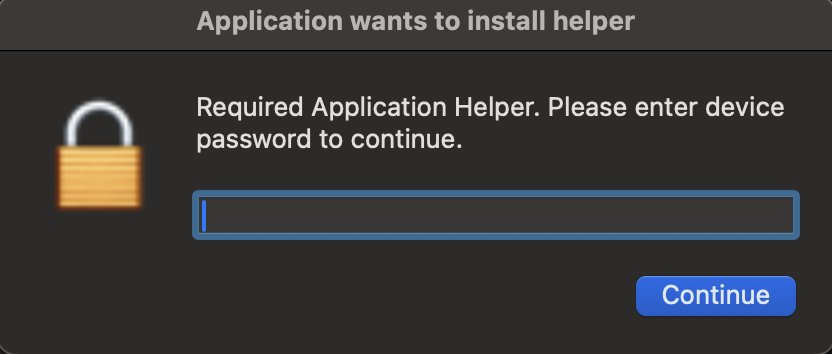
- The script launches an AppleScript dialog that mimics a native system prompt. The dialog asks for the user’s password and repeats indefinitely – there is no cancel button.
- When the password is entered, the malware extracts the entire Keychain database and grabs live session cookies from Safari, Chrome, and other browsers.
- With those cookies the attacker can bypass MFA and hijack accounts.
Because the dialog looks exactly like a macOS system alert, even seasoned users can be fooled. The attack does not rely on a vulnerability in the OS; it exploits human trust.
Apple’s response – a native Terminal warning
Starting with macOS Sequoia and continued in macOS Tahoe 26.4, Apple added a built‑in warning that appears when a paste operation contains commands from an untrusted source. The warning reads:
“You are about to paste a command from an unknown source. Running unknown commands can compromise your security.”
If the user proceeds, the warning highlights the command in a gray box and requires an explicit confirmation. This small UI change blocks the majority of ClickFix attempts because the malicious script relies on a blind paste.
Why a 90‑day deferral window is now a liability
For years, Apple allowed enterprise administrators to postpone macOS upgrades for up to 90 days through MDM policies. The rationale was clear:
- Give IT time to test internal apps.
- Verify driver and peripheral compatibility.
- Stage rollouts to avoid network spikes.
In a pre‑AI threat environment that approach made sense. Today, the situation has shifted:
- Rapid patch cycles – Apple releases security updates roughly every month, and critical mitigations (like the Terminal warning) land only in the latest major release.
- Social‑engineering speed – Attackers can craft and distribute a ClickFix script within hours of a new OS version appearing.
- Credential theft impact – Stealing a keychain and session cookies gives attackers persistent access to corporate SaaS tools, often more damaging than a typical malware infection.
If an organization sticks to a 90‑day deferral, its fleet may be running a version that lacks the Terminal paste protection for three whole months. During that window, any user who falls for a ClickFix prompt hands over privileged credentials.
Practical steps for IT teams
- Shorten the deferral policy – Reduce the maximum allowed delay to 30‑45 days. This still leaves room for testing but ensures critical security features are present on most devices.
- Automate compatibility testing – Use tools like Mosyle or Jamf to run scripted UI and API tests on a subset of devices as soon as a new macOS build is released.
- Enforce Terminal paste warnings – Deploy a configuration profile that enables the warning on all managed Macs, even on older OS versions that support it.
- Educate end users – Run a short training module that shows a real ClickFix dialog and explains why copying unknown commands is dangerous.
- Monitor for suspicious paste activity – Leverage endpoint detection solutions that can flag large paste operations in Terminal.
The broader implication for Apple’s management framework
Apple’s current deferral model assumes that the primary risk is compatibility. The ClickFix case flips that assumption: the biggest risk is exposure to social‑engineering attacks that the OS itself can mitigate when up‑to‑date. If vendors cannot certify their apps within a month, that points to a vendor‑side problem rather than an Apple‑side one.
A tighter deferral window would push software vendors to adopt more agile release practices, aligning the enterprise ecosystem with the rapid security cadence Apple has adopted for macOS.
Bottom line
The ClickFix campaign is a reminder that the weakest link in a security chain is often the human element, and the easiest way to protect that link is to keep the operating system current. Organizations that continue to rely on a 90‑day deferral are effectively choosing to stay vulnerable to a known attack vector.
Action items:
- Review your MDM policies today.
- Set the maximum deferral to 30 days.
- Deploy the Terminal paste warning via configuration profile.
- Schedule a brief user‑awareness session on copy‑and‑paste threats.
By tightening update windows and leveraging Apple’s built‑in protections, IT teams can dramatically reduce the attack surface that ClickFix and similar campaigns exploit.
Bradley Chambers is a veteran enterprise IT manager who has overseen thousands of Macs and iPads in K‑12 and higher‑education environments. He writes the "Apple @ Work" series for 9to5Mac, focusing on practical guidance for deploying Apple technology at scale.
Comments
Please log in or register to join the discussion