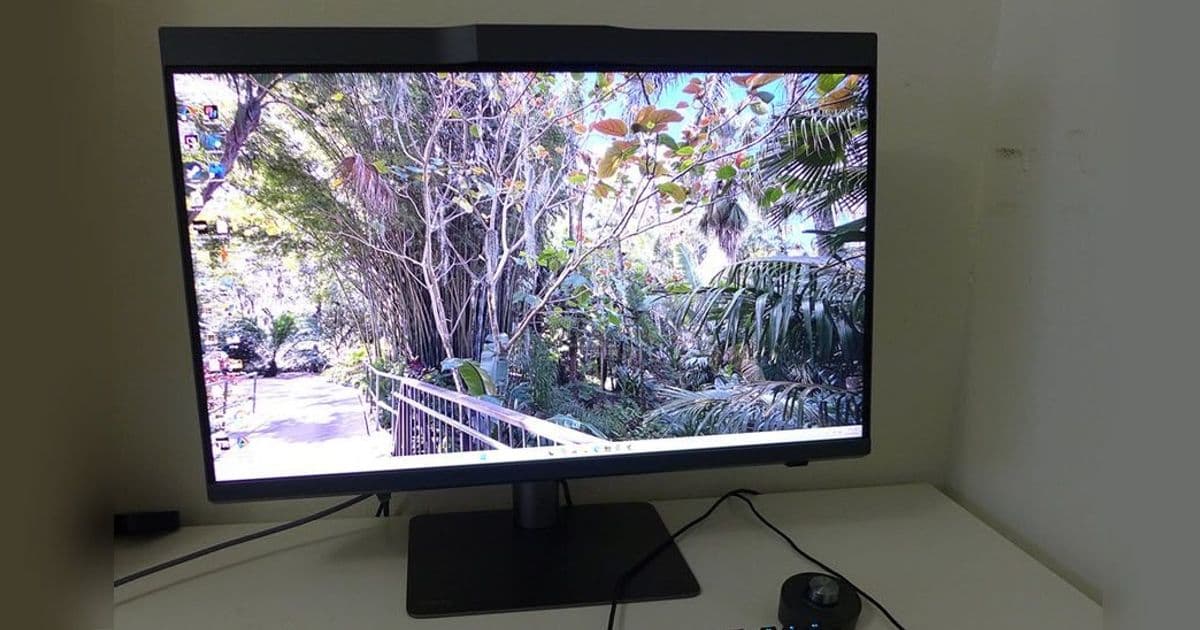
The BenQ DesignVue PD2770U delivers exceptional color accuracy with its true Adobe RGB coverage, built-in calibration sensor, and premium build quality, making it a standout choice for professional content creators despite lacking gaming features.
The BenQ DesignVue PD2770U represents a significant evolution in professional monitor technology, combining precision color accuracy with unprecedented ease of use through its innovative built-in calibration system. This 27-inch 4K display targets professional content creators who demand accuracy across multiple color spaces, particularly those working in print production where Adobe RGB coverage is essential.
True Adobe RGB Excellence
What immediately sets the PD2770U apart from competitors is its genuine Adobe RGB capability. While many professional monitors claim wide color gamut coverage, most fall short when it comes to Adobe RGB's distinctive green primary. The PD2770U achieves nearly 99% Adobe RGB coverage, addressing a common weakness in the market where displays typically miss 5-6% of this critical color space due to limitations in quantum dot technology.
This achievement is particularly significant for print professionals who rely on Pantone Matching System colors. Adobe RGB's green primary extends beyond what's achievable with standard P3 coverage, making this monitor one of the few true Adobe RGB displays available at any price point. The panel also covers approximately 96% of DCI-P3, ensuring versatility across both print and digital workflows.
Revolutionary Built-in Calibration
The most compelling feature of the PD2770U is undoubtedly its integrated colorimeter. This tiny sensor, housed in a motorized housing that swings down from the bezel, enables automatic calibration without requiring external hardware. The convenience factor cannot be overstated - users can initiate calibration through the on-screen display with a single menu selection, and the process completes in approximately 12 minutes per color mode.
BenQ offers multiple calibration pathways to suit different workflows. The built-in sensor provides quick, convenient calibration, while the Palette Master Ultimate software enables creation of custom configurations with specific combinations of gamut, gamma, color temperature, and luminance. For advanced users, the monitor integrates with Calman workflows, allowing professional-grade calibration management.
The calibration system includes scheduling capabilities, enabling automatic calibration during off-hours to maintain consistent accuracy without interrupting work. This feature addresses one of the most significant pain points in professional color work - maintaining calibration over time without manual intervention.
Premium Build and Thoughtful Design
BenQ's attention to detail extends beyond the display panel itself. The HotKey Puck remote control represents a significant improvement in monitor interaction. This wireless device features a large central dial that defaults to brightness adjustment, allowing users to change luminance as intuitively as adjusting volume. The dial also simplifies on-screen display navigation, making menu traversal significantly more efficient than traditional button-based controls.
The monitor's physical construction reflects its professional positioning. The fully recyclable packaging eliminates foam waste, while the substantial panel, upright, and base form a solid assembly without requiring tools. The included light hood, lined with light-absorbing material, enhances viewing conditions in bright environments and adds approximately eight inches to the monitor's depth when installed.
Comprehensive Connectivity and Features
Connectivity options are generous and well-considered. The rear panel includes two HDMI 2.0 ports, one DisplayPort 1.4, and two USB-C ports - one supporting video and 96 watts of power delivery, the other serving as an upstream port for USB hub functions. Additional USB-A ports and a headphone jack are conveniently located under the bezel.
The PD2770U includes KVM functionality, allowing control of multiple systems through a single keyboard and mouse setup. This feature, combined with the extensive port selection, makes the monitor suitable for complex multi-system workflows common in professional environments.
Color Management Excellence
The on-screen display provides comprehensive color management capabilities. Multiple color modes align with industry standards including Adobe RGB, sRGB, BT.709, and both Cinema and Display P3. The monitor also supports DICOM for medical imaging, CAD/CAM for technical design work, and M-book for MacBook color matching.
BenQ's GamutDuo feature offers a unique side-by-side comparison capability, allowing users to evaluate different color parameters simultaneously. This visual comparison tool proves invaluable when making critical color decisions or evaluating the impact of different calibration settings.
Performance Characteristics
While the PD2770U excels in color accuracy and calibration convenience, it's important to note its limitations for certain use cases. The 60Hz refresh rate, lack of Adaptive-Sync, and absence of overdrive mean this display is not suitable for gaming content creation or applications requiring smooth motion rendering. Input lag is acceptable for a 60Hz display but won't satisfy users accustomed to gaming-oriented monitors.
The panel's brightness reaches 400 nits according to specifications, with practical output varying based on uniformity compensation settings. The Nano Matte Black technology effectively manages ambient light reflection, maintaining good black levels even in challenging lighting conditions.
Value Proposition
At approximately $1,700 at launch, the PD2770U positions itself as a premium professional display. While this represents a significant investment, the combination of true Adobe RGB coverage, built-in calibration, and comprehensive feature set justifies the price for target users. The monitor's build quality and long-term calibration stability suggest it will serve as a reliable tool for years.
Target Audience
This monitor is ideally suited for:
- Print professionals requiring accurate Adobe RGB reproduction
- Photographers working with wide color gamut images
- Graphic designers creating content for both print and digital media
- Video editors focused on color grading for cinema and broadcast
- Medical imaging professionals requiring DICOM compliance
- Any professional requiring precise color accuracy with minimal calibration overhead
Conclusion
The BenQ DesignVue PD2770U successfully bridges the gap between professional color accuracy and user-friendly operation. Its true Adobe RGB coverage addresses a critical need in the print industry, while the built-in calibration system eliminates one of the most significant barriers to maintaining color accuracy over time.
While the lack of gaming features and 60Hz limitation may disappoint some users, these omissions are appropriate given the monitor's professional focus. For content creators who prioritize color accuracy, calibration convenience, and build quality over gaming performance, the PD2770U represents an excellent investment that will serve as a trusted tool for years to come.
The combination of innovative features like the HotKey Puck remote, comprehensive color management, and genuine Adobe RGB coverage makes the PD2770U a standout choice in the professional monitor market. BenQ has successfully created a display that not only meets professional requirements but also enhances the user experience through thoughtful design and convenient features.
Comments
Please log in or register to join the discussion