
Microsoft's Azure SRE Agent now supports integration with Azure Model Context Protocol (MCP), enabling AI agents to perform native Azure operations through managed identity authentication. This guide details the configuration process, security implications, and strategic considerations for cloud architects implementing this integration.
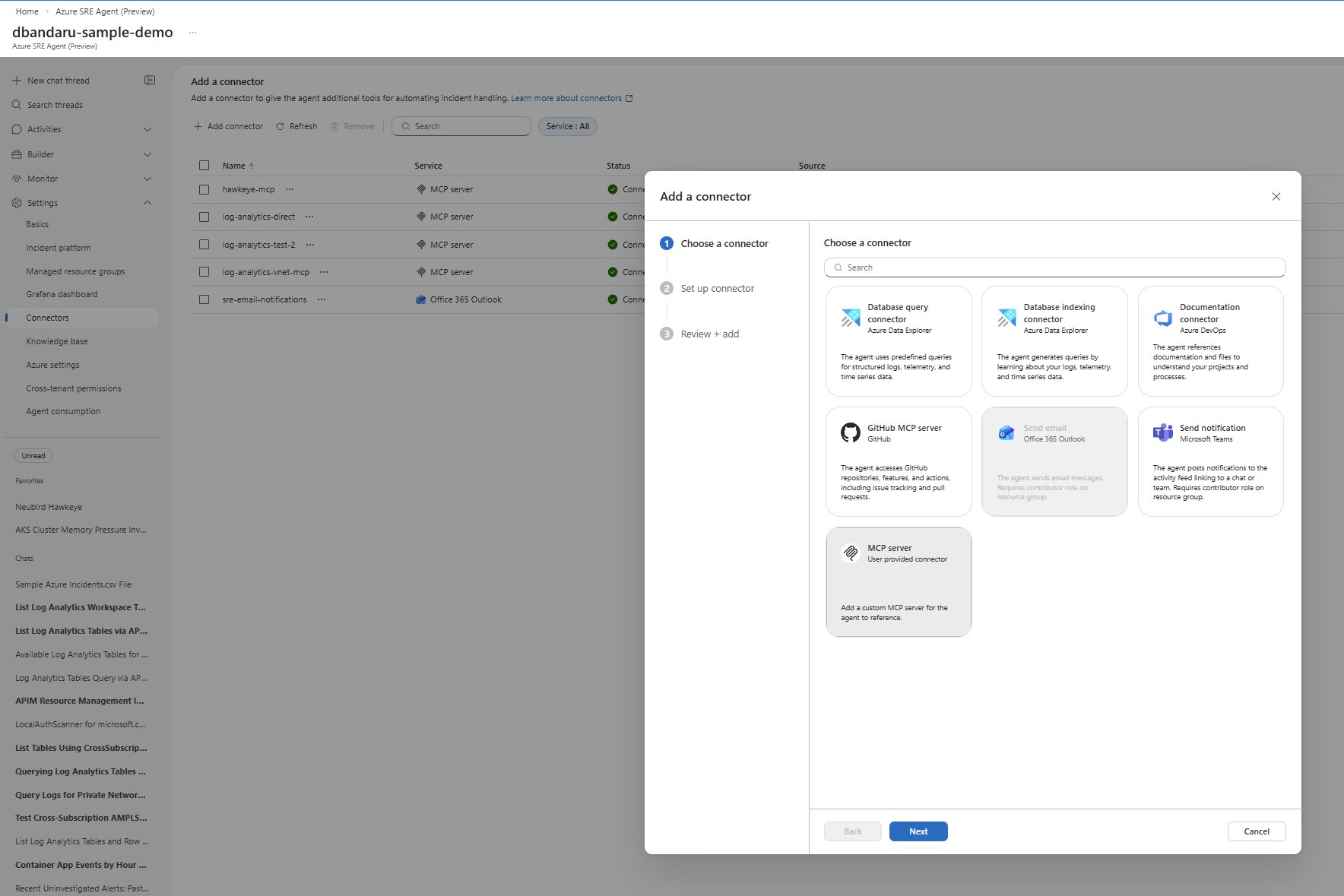
Azure's Model Context Protocol (MCP) represents a significant evolution in how AI agents interact with cloud infrastructure. By connecting Azure SRE Agent to Azure MCP, organizations can extend their AI-driven site reliability engineering capabilities to perform direct Azure operations—listing subscriptions, querying resources, and managing infrastructure—all through a secure, managed identity framework.
This integration isn't merely a technical configuration exercise. It reflects a broader shift toward AI-native cloud operations, where agents become first-class citizens in infrastructure management. For cloud architects and SRE teams, understanding this integration means balancing operational efficiency with security governance.
Understanding the Architecture
Azure MCP serves as a bridge between AI agents and Azure's management APIs. Unlike traditional API connectors that require custom authentication flows, MCP leverages Azure's managed identity system, creating a seamless security model where the agent inherits permissions through its assigned identity.
The SRE Agent acts as the orchestrator, while MCP provides the toolset. This separation of concerns allows Microsoft to update Azure tooling independently of the agent platform, and it enables organizations to customize which Azure capabilities their agents can access.
Configuration Process: A Step-by-Step Analysis
Step 1: MCP Connector Configuration
The connector setup in Azure Portal establishes the communication channel between SRE Agent and MCP server. The critical decision points here involve:
Connection Type: Selecting stdio (standard input/output) creates a direct process-to-process communication channel. This approach offers low latency and simplicity but requires the MCP server to be accessible from the SRE Agent environment.
Tool Exposure Customization: Azure MCP allows granular control over which tool namespaces are exposed:
- Namespace-scoped:
--namespace, subscriptionlimits tools to subscription-level operations, reducing the attack surface - Full access:
--mode, allexposes all available Azure tools, providing maximum functionality but requiring careful permission management
The command arguments npx, -y, @azure/mcp, server, start instruct the agent to execute the Azure MCP server via Node Package Manager. This approach ensures version consistency and simplifies deployment, as the MCP server runs as a containerized process.
Step 2: Managed Identity Configuration
This step represents the core security boundary of the integration. Azure MCP exclusively uses managed identity authentication in this configuration, creating a critical security model:
Identity Binding: The AZURE_CLIENT_ID environment variable explicitly ties the MCP server to a specific managed identity. This identity must match the one selected in the portal dropdown, ensuring no ambiguity in authentication.
Credential Type: Setting AZURE_TOKEN_CREDENTIALS to managedidentitycredential enforces that only managed identity tokens are used. This prevents accidental fallback to other authentication methods and maintains a clear audit trail.
Permission Scoping: The managed identity's RBAC assignments directly determine the agent's capabilities. This creates a direct mapping between security policy and operational functionality:
- Reader role on a subscription enables listing and querying resources
- Contributor role allows resource creation and modification
- Custom roles provide fine-grained control over specific operations
Step 3: Subagent Creation and Tool Integration
The Subagent Builder transforms the MCP connector from a technical configuration into a functional AI assistant. By creating a dedicated subagent for Azure resource management, organizations can:
- Define operational boundaries: Instructions like "Always confirm the subscription context before performing operations" create guardrails
- Tool selection: Only adding the MCP connector to relevant subagents follows the principle of least privilege
- Context specialization: Different subagents can be configured for different Azure domains (compute, storage, networking) with appropriate tool exposure
Step 4: Validation and Testing
The playground environment provides immediate feedback on configuration correctness. Testing with queries like "List my Azure subscriptions" validates:
- Authentication flow: The managed identity successfully acquires tokens
- Tool execution: MCP correctly translates natural language to API calls
- Data return: Azure APIs respond with expected resource information
- Trace visibility: The interaction trace confirms proper tool call sequencing
Security Implications and Risk Management
The managed identity model creates a powerful but potentially risky security dynamic. When users access the SRE Agent, they effectively inherit the permissions of its managed identity. This represents a significant shift from traditional user-based authorization.
Risk Scenarios
Over-Privileged Access: If an SRE Agent's managed identity has broad permissions (e.g., Contributor on multiple subscriptions), any user with agent access can perform those operations. This violates the principle of least privilege if the user shouldn't have those permissions.
Identity Sprawl: Creating multiple agents with different identities can lead to management complexity and inconsistent permission auditing.
Permission Inheritance: Users may not understand that their agent access grants them Azure permissions beyond their individual RBAC assignments.
Mitigation Strategies
Granular RBAC Design: Assign managed identities to specific resource groups rather than entire subscriptions. For example, create an identity with Contributor access only to the production-webapp resource group.
Agent Segmentation: Create separate SRE Agents for different user groups:
- Development team agent: Managed identity with Contributor access to dev/test resource groups
- Production SRE agent: Managed identity with Reader access to production resources, requiring manual approval for changes
- Audit agent: Managed identity with Reader access across all subscriptions for reporting purposes
Regular Auditing: Implement automated checks on managed identity role assignments. Azure Policy can enforce that identities don't have excessive permissions.
User Awareness: Document and communicate the permission model to all SRE Agent users. Consider implementing approval workflows for sensitive operations.
Operational Considerations
Cost Implications
While Azure MCP itself doesn't incur direct costs, the underlying Azure API calls do. Organizations should monitor:
- API call volume: Frequent resource queries can increase management costs
- Data transfer: Large-scale resource listings may generate cross-region data transfer
- Compute costs: The MCP server process consumes compute resources on the SRE Agent infrastructure
Performance Characteristics
The stdio connection type introduces minimal latency, but organizations should consider:
- Concurrent operations: Multiple users accessing the same agent may create contention
- API rate limits: Azure Management APIs have throttling limits that could affect agent responsiveness
- Network latency: For geographically distributed teams, the SRE Agent's location impacts query performance
Integration with Existing Workflows
This integration fits into broader cloud operations strategies:
CI/CD Pipelines: Agents can be incorporated into deployment pipelines to validate resource configurations before releases.
Incident Response: During outages, agents can quickly gather resource status across subscriptions, accelerating root cause analysis.
Cost Optimization: Regular agent-driven resource audits can identify unused or oversized resources.
Strategic Value Proposition
The Azure SRE Agent MCP integration represents more than a technical feature—it's a strategic enabler for cloud-native operations:
- Democratized Cloud Management: Non-expert users can perform complex Azure operations through natural language queries
- Operational Consistency: AI agents execute operations deterministically, reducing human error
- Audit Trail: Every agent interaction is logged, creating comprehensive operational records
- Scalability: Agents can manage thousands of resources simultaneously, far exceeding human capacity
Implementation Roadmap
For organizations considering this integration, a phased approach is recommended:
Phase 1: Pilot - Deploy a single agent with limited permissions for a specific team or project Phase 2: Validation - Test security controls, performance, and user experience Phase 3: Expansion - Create specialized agents for different operational domains Phase 4: Governance - Implement comprehensive auditing and approval workflows
Conclusion
Connecting Azure SRE Agent to Azure MCP unlocks powerful AI-driven cloud operations while introducing new security considerations. Success requires careful attention to managed identity permissions, regular auditing, and clear user communication about the security model.
The integration exemplifies the evolution toward AI-native cloud management, where agents become essential tools in the SRE toolkit. Organizations that implement this integration thoughtfully will gain significant operational advantages while maintaining strong security posture.
Additional Resources
- Azure MCP Documentation - Comprehensive guide to Model Context Protocol
- Azure SRE Agent Documentation - SRE Agent capabilities and configuration
- Managed Identities for Azure Resources - Deep dive into managed identity security model
- Azure RBAC Best Practices - Guidance for permission scoping
Updated January 23, 2026 - Version 1.0
Comments
Please log in or register to join the discussion