As AI systems become more autonomous, designers face the challenge of creating interfaces that balance transparency with usability. This article explores a systematic approach to identifying when and how to reveal AI decision-making processes to users.
Designing Transparent AI: Mapping Decision Nodes for Better User Trust
Designing for autonomous agents presents a unique frustration. We hand a complex task to an AI, it vanishes for 30 seconds (or 30 minutes), and then it returns with a result. We stare at the screen. Did it work? Did it hallucinate? Did it check the compliance database or skip that step? We typically respond to this anxiety with one of two extremes. We either keep the system a Black Box, hiding everything to maintain simplicity, or we panic and provide a Data Dump, streaming every log line and API call to the user.
Neither approach directly addresses the nuance needed to provide users with the ideal level of transparency. The Black Box leaves users feeling powerless. The Data Dump creates notification blindness, destroying the efficiency the agent promised to provide. Users ignore the constant stream of information until something breaks, at which point they lack the context to fix it.
What's New: The Decision Node Audit
The emerging practice that addresses this challenge is the Decision Node Audit, a method that gets designers and engineers in the same room to map backend logic to the user interface. This process helps pinpoint the exact moments a user needs an update on what the AI is doing.
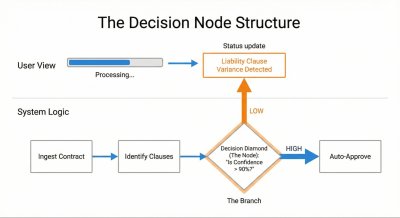
Figure 1: This diagram shows how to connect a hidden system decision based on probability (an Ambiguity Point) to a visible moment of explanation for the user (a Transparency Moment).
In standard computer programs, the process is clear: if A happens, then B will always happen. In AI systems, the process is often based on chance. The AI thinks A is probably the best choice, but it might only be 65% certain. These moments of probabilistic decision-making are where transparency becomes most critical.
Consider a legal AI system that reviews contracts. When checking liability terms against company rules, it might find a 90% match and need to decide if that's good enough. This uncertainty represents a key decision point that should be communicated to the user.
Instead of a generic "Reviewing contracts" message, the interface could update to say: "Liability clause varies from standard template. Analyzing risk level." This specific update gives users confidence, explains the delay, and indicates where to focus attention once the review is complete.
Developer Experience: Mapping the AI's Thought Process
Conducting a Decision Node Audit requires close collaboration between engineers, designers, and product managers. The process involves several key steps:
Assemble the team: Bring together product owners, business analysts, designers, key decision-makers, and the engineers who built the AI.
Map the entire process: Document every step the AI takes, from the user's first action to the final result. This often works best with physical whiteboard sessions.
Identify unclear points: Look for spots where the AI compares options or inputs that don't have one perfect match.
Find 'best guess' steps: Check if the system uses confidence scores (e.g., 85% certainty). These represent decision nodes that should be communicated.
Examine the choices: For each decision point, understand the specific internal logic or comparison being performed.
Create clear explanations: Develop user-facing messages that describe the internal action when the AI makes a choice.
Update the interface: Replace vague messages with specific explanations.
Validate for trust: Ensure the messages provide users with a clear reason for any wait time or result.
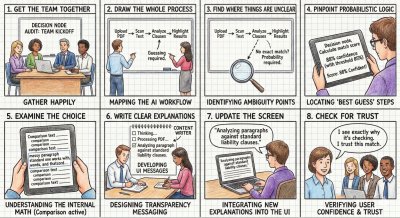
Figure 2: A product team maps the decision nodes of an AI legal tool to design transparent interface messages.
This collaborative approach transforms how teams work together. Rather than handing off polished design files, teams create messy prototypes and shared spreadsheets. The core tool becomes a transparency matrix where engineers and content designers map technical codes to user-facing language.
Teams will experience friction during this process. When a designer asks how the AI decides to decline an expense report transaction, the engineer might respond that the backend only outputs a generic "Error: Missing Data" status. This negotiation pushes the team to create more specific technical hooks that enable meaningful transparency.
User Impact: From Anxiety to Understanding
The most significant benefit of implementing a Decision Node Audit is the transformation of user experience from anxiety to understanding. Consider the case of Meridian, an insurance company that uses an AI to process accident claims.
Initially, Meridian's interface simply showed "Calculating Claim Status" while the AI analyzed uploaded photos and police reports. Users grew frustrated, uncertain whether the AI had even reviewed the police report which contained important mitigating circumstances.
After conducting a Decision Node Audit, the design team identified three distinct steps:
- Image Analysis (comparing damage photos against a database)
- Textual Review (scanning police reports for liability keywords)
- Policy Cross Reference (matching claim details against specific policy terms)
The interface was updated to show:
- "Assessing Damage Photos: Comparing against 500 vehicle impact profiles."
- "Reviewing Police Report: Analyzing liability keywords and legal precedent."
- "Verifying Policy Coverage: Checking for specific exclusions in your plan."
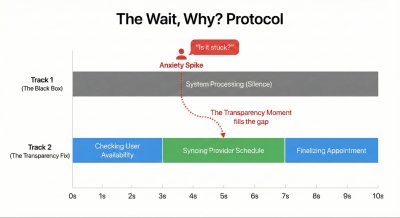
Figure 3: The Wait, Why? Protocol. A timeline illustrating how silence creates anxiety. By mapping the specific moment users ask 'Is it stuck?', designers can insert transparency exactly when it is needed.
The system still took the same amount of time, but the explicit communication restored user confidence. Users understood exactly what the AI was doing and where to focus attention if the assessment seemed inaccurate.
The Impact/Risk Matrix
Not all decision nodes require equal transparency. An AI system might make dozens of small choices for a single complex task. Showing them all creates information overload. The Impact/Risk Matrix helps prioritize which decisions to display:
- Low Stakes/Low Impact: Minimal transparency needed (e.g., organizing file structure)
- High Stakes/Low Impact: Moderate transparency (e.g., archiving email with undo option)
- Low Stakes/High Impact: Moderate transparency (e.g., sending draft to client)
- High Stakes/High Impact: Maximum transparency (e.g., executing stock trade)
The Wait, Why? Test
To validate which moments truly need transparency, use the "Wait, Why?" Test. Ask users to watch an AI complete a task while speaking aloud whenever they feel confused. Questions like "Wait, why did it do that?" or "Is it stuck?" signal missing transparency moments.
In a healthcare scheduling assistant study, users consistently asked "Is it checking my calendar or the doctor's?" during a four-second pause. This revealed the need to split that wait into two distinct steps: "Checking your availability" followed by "Syncing with provider schedule."
Mapping to Design Patterns
Once key decision nodes are identified, they must be mapped to appropriate UI patterns:
- High Stakes & Irreversible: Require Intent Preview (e.g., deleting a database)
- High Stakes & Reversible: Use Action Audit & Undo (e.g., moving a lead to different pipeline)
- Low Impact & Reversible: Auto-execute with passive toast/log (e.g., renaming a file)
- Low Impact & Irreversible: Simple confirmation with undo option (e.g., archiving email)
Operationalizing Transparency
Creating transparency requires cross-functional collaboration:
Logic Review: Meet with system designers to confirm the technical feasibility of displaying specific states.
Content Design: Involve content strategists to translate technical processes into human-friendly explanations.
Testing: Compare different status messages through user testing to identify which wording builds trust.
For example, "Verifying identity" might create different user responses than "Checking government databases." Testing these variations reveals which approach makes users feel safer and more confident in the AI's capabilities.
Trust as a Design Choice
We often view trust as an emotional byproduct of a good user experience. Instead, we should see it as a mechanical result of predictable communication. We build trust by showing the right information at the right time, and destroy it by overwhelming users or hiding the machinery completely.
The Decision Node Audit provides a systematic approach to creating trustworthy AI experiences. By identifying moments where the system makes judgment calls and mapping them to appropriate transparency patterns, designers can transform black boxes into understandable, trustworthy tools.
As AI becomes more prevalent in our daily lives, this approach to transparency will become increasingly important. The next article in this series will explore how to design these transparency moments—how to write the copy, structure the UI, and handle errors when the AI gets it wrong.
For teams implementing these practices, the result should be a more open communication process and users who better understand what their AI-powered tools are doing on their behalf—and why. This integrated approach represents a cornerstone of designing truly trustworthy AI experiences.
Comments
Please log in or register to join the discussion