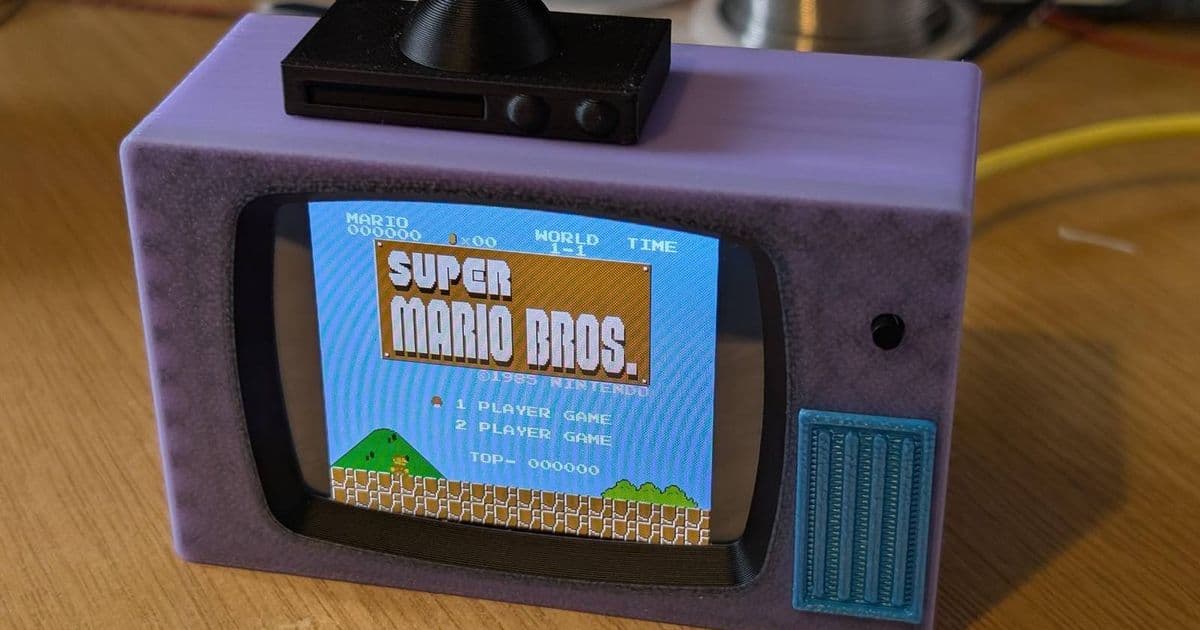
A maker turned a cheap ESP32‑based Cheap Yellow Display into a 90 s‑styled miniature television that can stream 90‑minute movies and run NES ROMs, showing how a single low‑cost board can serve both retro gaming and media playback.
 )
)
Platform update
The Cheap Yellow Display (CYD) is a 1.3‑inch IPS panel paired with an ESP32‑S2 microcontroller. The board ships with the ESP‑IDF 5.2 SDK and supports Arduino‑core 2.2.0. Its built‑in SPI flash (typically 4 MiB) and 320 KB of RAM give just enough headroom for a lightweight NES emulator and a modest video decoder. The project by DynaMightTech uses the CYD’s native TFT driver and the ESP‑IDF ESP‑Audio component to decode H.264 video streams, while the NesDev library provides the NES core.
Developer impact
Cross‑platform considerations
- iOS/Android: The CYD runs a self‑contained firmware, so mobile developers are not directly involved. However, the project exposes a Wi‑Fi‑based OTA update endpoint that follows the same JSON schema used by the ESP‑Matter SDK. This means a companion Android or iOS app could push new ROMs or video playlists without flashing the board again.
- SDK version lock‑in: The current build relies on ESP‑IDF 5.2 because the audio pipeline was introduced in that release. Developers targeting older ESP‑IDF versions will need to back‑port the audio driver or switch to the Arduino‑core, which lacks hardware‑accelerated video decoding.
- Resource constraints: The NES emulator occupies ~150 KB of RAM, leaving ~150 KB for the video decoder’s frame buffer. When playing a 720p H.264 stream, the decoder down‑scales to the display’s native 240 × 240 resolution, which keeps RAM usage within limits but reduces visual fidelity.
Migration path
If you already have a project built on the older ESP‑IDF 4.4 or the Arduino‑ESP32 core, follow these steps to move to the CYD‑based mini TV:
- Upgrade the toolchain – Install the latest ESP‑IDF via the official installer (docs.espressif.com).
- Port the NES core – Clone the NES emulator from the project's GitHub repository (github.com/DynaMightTech/esp32‑nes‑emulator). Replace any
esp32/Arduino.hincludes with the ESP‑IDF equivalents (esp_system.h,driver/spi_master.h). - Integrate ESP‑Audio – Add the
esp_audiocomponent tocomponents/and enable theCONFIG_ESP_AUDIO_SUPPORT_H264_DECODERKconfig option. The component automatically registers an audio pipeline that can be fed a TCP stream from a phone or a local SD card. - Adjust flash layout – Update
partitions.csvto allocate a 2 MiBfactorypartition for the combined emulator and video assets. The CYD’s default partition table is too small for full‑length movies. - Test OTA – Use the OTA example from ESP‑IDF (
examples/system/ota) and point it at the mini TV’s IP address. The OTA server can serve both new ROMs and video playlists as zip files. - Build and flash – Run
idf.py build && idf.py -p /dev/ttyUSB0 flash monitor. The console will show the Wi‑Fi connection, followed by a menu that lets you select "NES" or "Video" mode.
Migration challenges
- Audio latency – The ESP‑Audio H.264 decoder introduces ~80 ms of latency, which is acceptable for movies but noticeable in fast‑paced NES games. Developers can mitigate this by disabling audio for games or using a lower‑bitrate audio track.
- ROM licensing – The firmware does not ship any ROMs. Users must provide their own legally obtained copies. The OTA update schema includes a checksum field to verify ROM integrity before flashing.
- Power consumption – Running the video decoder draws ~350 mA, which exceeds the CYD’s USB‑only power budget for extended sessions. Adding a Li‑Po battery and a simple buck‑boost regulator (e.g., MCP1640) extends runtime to about 2 hours.
Future extensions
- Matter integration – Because the OTA endpoint already follows the Matter schema, the mini TV could appear as a media player in a Home Assistant dashboard, allowing voice‑controlled playback via Alexa or Google Assistant.
- Bluetooth audio – The ESP‑S2 supports Bluetooth Classic A2DP. Pairing a Bluetooth speaker would offload audio rendering from the MCU, reducing latency for games.
- Higher‑resolution displays – The CYD family includes a 2.0‑inch variant with 480 × 480 pixels. Swapping the panel would require only a change in the TFT driver initialization code, but the larger frame buffer would push RAM usage close to the ESP‑S2 limit, so external PSRAM (e.g., 2 MiB) would be advisable.
Resources
- Project Instructables page: tiny‑simpsons‑tv.instructables.com
- ESP‑IDF documentation: docs.espressif.com
- NES emulator source: github.com/DynaMightTech/esp32‑nes‑emulator
- ESP‑Audio component: github.com/espressif/esp‑audio
 )
)
Comments
Please log in or register to join the discussion