
Dolphin’s latest release delivers a suite of latency‑reducing options, brings RetroAchievements to Android, and corrects long‑standing SD‑card and microphone bugs. The update also expands BBA support, improves on‑screen display, and fixes audio glitches in classic titles. These changes make the emulator more responsive, playable, and ready for modern hardware.
Dolphin 2512: Low‑Latency Breakthroughs, Android RetroAchievements, and a Sweeping Patch Sweep

The holiday season has given Dolphin developers a chance to bundle a dozen “treats” into a single release. The headline feature is a pair of frame‑presentation options that cut input latency while keeping frame pacing smooth. The other highlights include RetroAchievements on Android, a new local‑mode Broadband Adapter (BBA) for multi‑instance play, and a long‑awaited SD‑card byte‑order fix.
Latency: From “Slow” to “Near‑Zero”
Dolphin’s performance has always outpaced the GameCube/Wii hardware, but that left a small window for latency to creep in. The new Immediately Present XFB feature bypasses the console’s double‑buffered XFB pipeline, grabbing the rendered frame as soon as it is ready. Combined with Rush Frame Presentation—a smarter throttling mode that aligns frame output with the latest input—the emulator can now deliver a click‑to‑photon delay that rivals the original console.
Technical note: The trick relies on the console’s VBI‑driven frame sync. By pulling the XFB copy out of the normal pipeline, Dolphin can skip the extra buffer that would otherwise add ~10 ms of latency.
The result is a measurable reduction in latency for titles that traditionally struggled with frame pacing. In The Legend of Zelda: Wind Waker and Super Mario Sunshine, the combined approach cut latency by up to 10 ms, a difference that can be felt in fast‑paced shooters and real‑time strategy games.
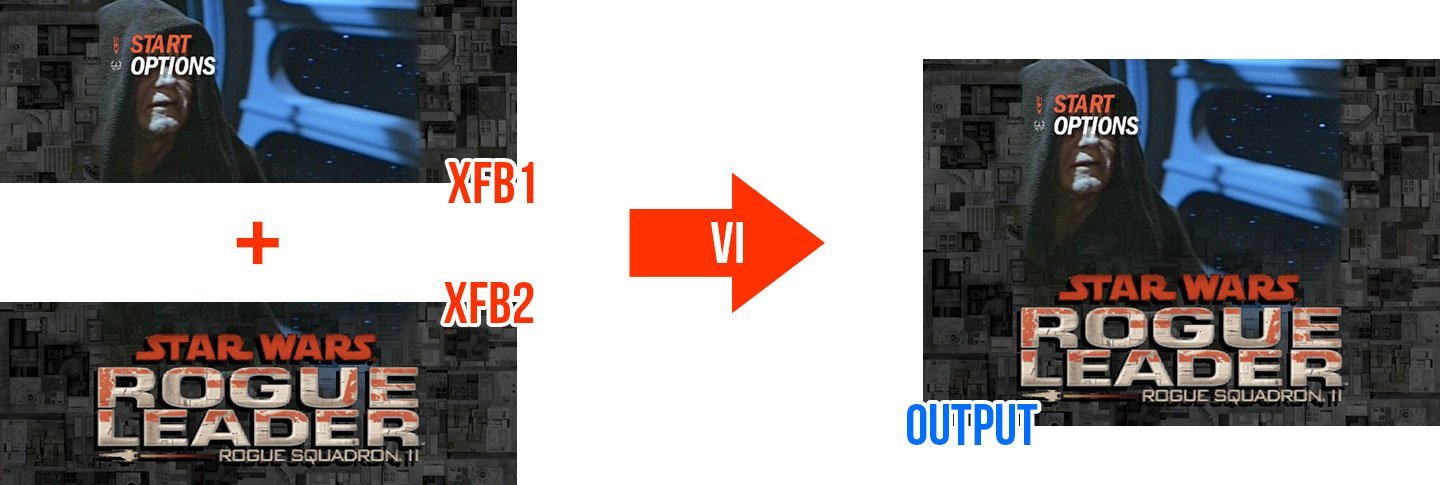
For games that stitch multiple XFB copies—like Rogue Squadron 2—the Immediate hack can produce visual artifacts. To mitigate this, Dolphin now offers Smooth Frame Presentation, which delays output by 1‑2 ms to keep frame pacing consistent. The feature is automatically disabled on games that detect XFB stitching, but can be enabled manually for experiments.
RetroAchievements on Android
Android users have long been left out of the RetroAchievements ecosystem. Release 2512 finally brings the core achievement experience to the mobile emulator.
Implementation detail: The Android build now includes a lightweight webview that pulls achievement data from the RetroAchievements API. Users can log in, unlock achievements in supported GameCube titles, and view progress in the background.
The UI is still a work in progress, but the core functionality is live. Developers and community members are encouraged to report any missing achievement lists or UI glitches.
BBA‑IPC: Local‑Mode Networking
The Broadband Adapter (BBA) has been a staple of Dolphin for years, but running multiple instances on the same machine was cumbersome. The new BBA‑IPC mode uses the cpp‑ipc library to share network state between processes without a TAP server.
- Use case: Play Mario Kart Wii locally with Parsec, or run a private LAN server for a friends’ group.
- Supported OSes: Windows and Linux, with a potential macOS port in the pipeline.
This feature opens the door to new multiplayer experiments and remote play scenarios.

SD‑Card Byte‑Order Fix
A long‑standing bug in Dolphin’s SD‑card emulation caused the virtual card’s CID and CSD registers to return data in the wrong byte order. When the card size exceeded 10 GiB, emulation would crash or hang.
Fix: A small patch in the SDIO subsystem corrected the byte order, restoring support for virtual cards up to 32 GiB.
The change also resolved issues reported by the Super Smash REX community, who needed large SD cards for their 8 GB homebrew builds.
Logitech Microphone Support
The Wii’s iconic Logitech microphone was historically only emulated via USB passthrough. The new release brings native support for the microphone, allowing any standard PC mic to be used in singing games.
How it works: The implementation reuses the Wii Speak codebase, adapting it to accept USB audio streams. Calibration is required to match volume levels.
Android support is slated for a future update, as the GUI integration differs from the desktop build.
On‑Screen Display (OSD) Upgrade
The old pixel font made OSD text hard to read on HiDPI screens. Dolphin now uses Vera Sans Mono as a vector font, ensuring crisp rendering at any resolution.
Customization: Users can drop a custom TTF file named
OSD_Font.ttfinto theLoadfolder to override the default.
All OSD settings are now consolidated under a dedicated configuration section.
Audio Fixes: From Broken to Beautiful
Two audio regressions were addressed:
- NFL Blitz Pro – The game’s low‑pass filter was mis‑initialised, leading to excessive volume. The fix corrects the byte interpretation of the filter coefficients.
- DSP‑HLE – A bug in the low‑pass filter calculation caused a 2.68 coefficient sum instead of the intended 0.68. The patch restores accurate filtering.
These changes bring the audio back in line with the original console’s behaviour.
Community‑Driven Patches
Beyond the core team, contributors such as SuperSamus, Billiard, and extrems played a pivotal role in identifying and patching game‑specific bugs—ranging from idle‑loop optimisations to uncapped frame‑rate fixes. Their work has produced performance boosts and stability improvements across a wide range of titles.
Looking Forward
With latency reduced, Android achievements enabled, and critical bugs fixed, Dolphin 2512 positions itself as a more polished, responsive emulator ready for modern hardware. The development community remains active, and the roadmap continues to include further latency reductions, improved network emulation, and expanded peripheral support.
For a deeper dive into the technical details, developers can review the source changes on GitHub and participate in the Dolphin forums.
Source: Dolphin Emulator Blog – Dolphin Progress Report Release 2512 (Dec 22 2025)
Comments
Please log in or register to join the discussion