A Debian-based distribution focused on accessibility and e-waste reduction, offering exceptional hand-holding for Linux newcomers while supporting humanitarian causes.
The Linux distribution landscape is crowded with options, but Emmabuntüs DE 6 stands apart not for technical novelty, but for its ethical framework. This isn't a distro chasing performance benchmarks or cutting-edge features; it's built around helping people—both those new to Linux and those in need of humanitarian aid.
The Emmabuntüs collective, a group primarily of French Linux enthusiasts, has maintained this distribution for approximately 15 years. Their mission extends beyond software: they support Emmaus International, a humanitarian charity headquartered in France, while simultaneously tackling electronic waste by keeping older computers functional. This dual purpose—helping beginners and reducing e-waste—shapes every design decision.
The project's evolution tells a story of adaptation. Initially based on Ubuntu for its first four releases between 2012 and 2015, the team switched to Debian with Emmabuntüs DE in 2016. The latest release, Emmabuntüs DE 6, arrived last month with a particular focus on accessibility—a area where many distributions pay lip service but rarely implement comprehensively.
Accessibility as a First-Class Citizen
Where most distributions treat accessibility as an afterthought, Emmabuntüs builds it in from the ground up. Screen readers for both graphical and text console environments activate from the first boot. Braille display support extends to Braille embossers—essentially printers for tactile text. Additional sound effects notify users of USB device insertion, and specialized tools simplify media ejection and safe removal. The system even offers options to simplify screen displays for users with visual impairments.
This isn't just compliance checking; it's a fundamental design philosophy. The distribution recognizes that accessibility isn't a checkbox but a continuous commitment to diverse user needs.
Technical Foundation: Debian with Hand-Holding
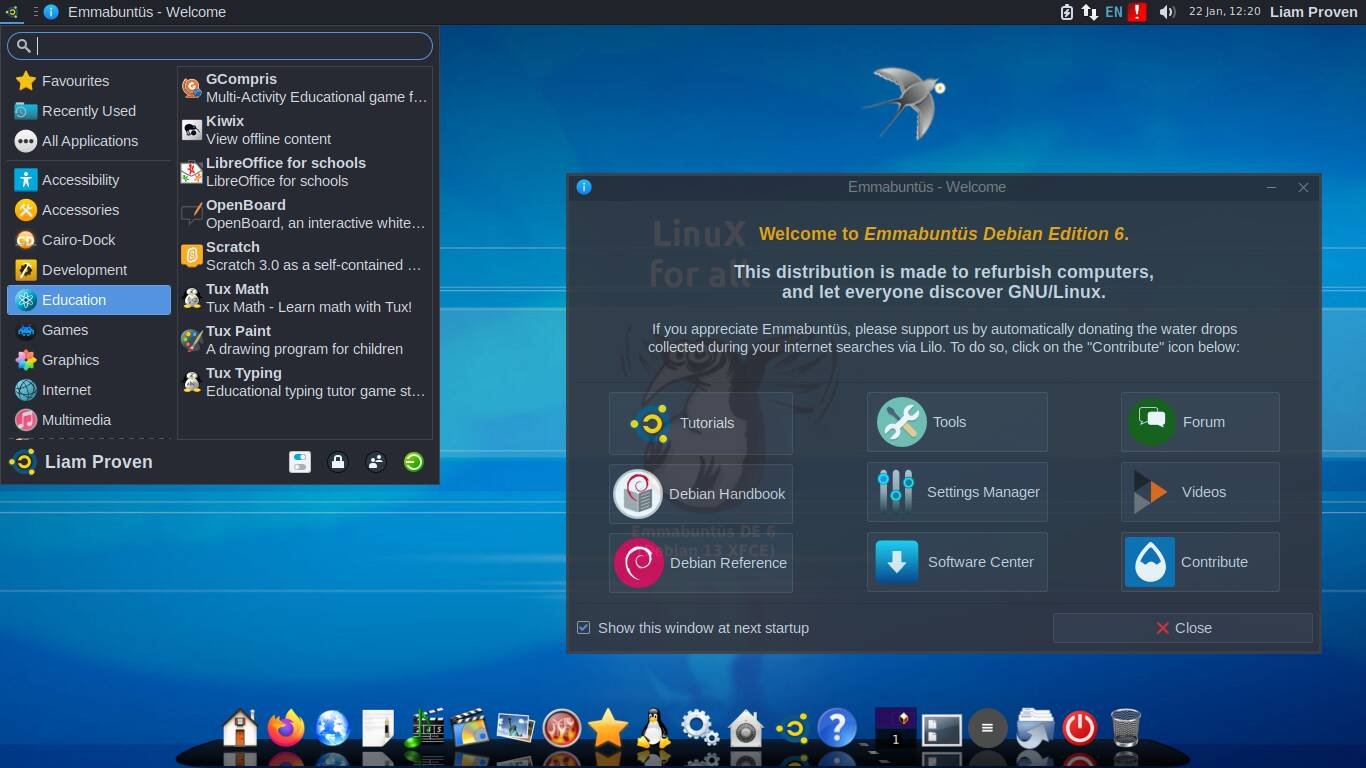
Under the hood, Emmabuntüs DE 6 runs on Debian 13 "Trixie." The live medium doubles as a Debian installer, offering a straightforward path to full installation. The default desktop is Xfce 4.20, configured with a single top panel and the Cairo dock at the bottom. Post-installation, users can opt for LXQt 2.1 if they prefer something lighter.
Installation uses traditional ext4 partitions with separate swap—no immutable filesystems or containerized applications here. Flatpak support is pre-installed but empty by default, keeping the base system lean while allowing users to add applications as needed.
What distinguishes Emmabuntüs from other Debian derivatives is the sheer volume of additional tools and pre-configured applications. Updated ESR versions of Firefox and Thunderbird come pre-installed, with Firefox already configured with uBlock Origin for ad-blocking. Falkon browser provides a backup option for sites that might not render correctly in Firefox.
The application catalog spans multiple categories: Communications (Pidgin, Jitsi for video conferencing), Office, Audio, Video, Photo, Burn, Interests, Education, Utilities, Maintenance, Accessibility, and Help. Each category appears as a group in the dock, creating an organized, discoverable interface.
Documentation and Offline Functionality
A key design principle is offline usability. The distribution includes extensive local documentation, ensuring users can install and configure the system without internet access—a practical consideration for environments with limited connectivity or for users who prefer to work offline.
Additional tools include:
- BleachBit for system cleanup
- DWService for free remote control
- Ventoy for creating bootable media
- Custom tools for desktop customization
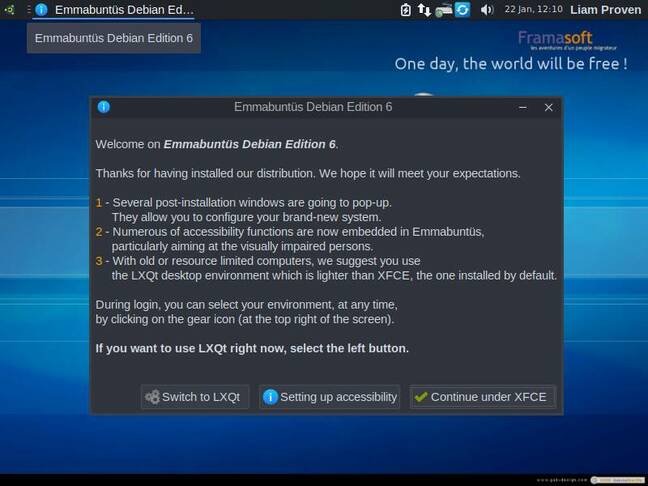
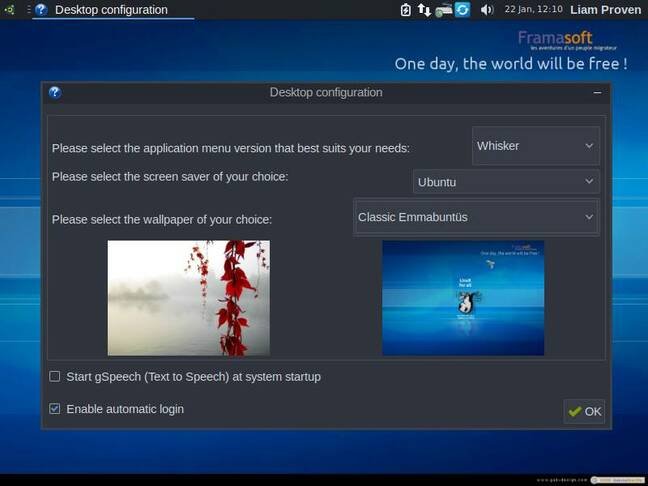
The post-installation experience is particularly thoughtful. A series of welcome screens guide users through customizing their setup: switching desktop environments, adding or removing languages, choosing desktop layouts, wallpapers, screensavers, and Xfce menu styles. Each screen includes a checkbox to disable future runs, allowing users to opt out once they've made their choices.
The final Welcome screen provides links to documentation, tools, settings, user forums, and instructional videos.
Ethical Search and Software Choices
Both web browsers default to the French Lilo search engine, which donates its income to environmental and humanitarian causes. This small detail reflects the project's broader ethical stance—every component choice carries weight.
The distribution includes installers for non-FOSS extras like Microsoft's free fonts and audio/video codecs. App launch menu entries for Steam and WINE don't pre-install these applications but offer to install them when clicked, maintaining a clean base system while providing easy access to popular software.
Trade-offs and Comparisons
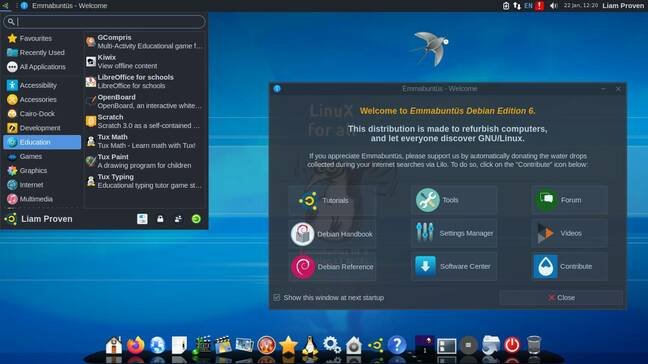
Emmabuntüs isn't without compromises. The interface can feel cluttered, and because it pulls tools from multiple desktop environments, visual consistency suffers—fonts and themes don't always match. Occasionally, French text appears in the interface, a remnant of the project's origins.
The distribution isn't lightweight: it requires about 11 GB of disk space and idles at approximately ¾ GB of RAM. While this is lighter than modern GNOME or KDE Plasma desktops, it's substantial compared to ultra-minimal distributions.
For users prioritizing visual polish, distributions like AnduinOS (a customized Ubuntu variant) offer more cohesive aesthetics. For those wanting extensive pre-installed applications in Flatpak form, Zorin OS Pro provides tens of gigabytes of flagship Linux apps.
The Broader Pattern
Emmabuntüs represents a growing trend of purpose-driven Linux distributions. Like MX Linux with its systemd-optional approach or Garuda Linux with its performance-tuning tools, Emmabuntüs targets specific user needs rather than trying to be everything to everyone. The difference is that Emmabuntüs's target isn't technical sophistication—it's accessibility and humanitarian impact.
This approach raises interesting questions about Linux's future. As distributions become more specialized, the "one-size-fits-all" model fragments. Yet for users who need exceptional hand-holding, or for organizations deploying Linux in resource-constrained environments, specialized distributions like Emmabuntüs fill crucial gaps.
The distribution's success will ultimately be measured not by benchmarks or feature lists, but by how effectively it helps newcomers overcome the Linux learning curve while contributing to broader social good. For a project guided by ethics rather than technology, that's exactly the point.
Comments
Please log in or register to join the discussion