
How moving video processing from synchronous API calls to an asynchronous RabbitMQ pipeline cut response times by 80-90% and enabled seamless handling of 30+ minute videos.
Handling video at scale is never trivial. What starts as a simple upload-and-process flow can quickly turn into a performance bottleneck as video length, user traffic, and processing complexity grow. In our case, we faced a major challenge when increasing video durations began to slow down our APIs and degrade the user experience. This blog walks through the problem we faced with synchronous video processing, why it didn’t scale, and how we redesigned the system into a RabbitMQ-driven asynchronous pipeline that significantly improved performance and reliability.
The Original Problem
Initially, our backend followed a fully synchronous video processing approach:
- The user recorded a video on the client.
- The full video was sent to the backend API.
- The API handled everything:
- Uploading the video to S3
- Processing the video
- Generating subtitles
- Uploading the subtitle .vtt file to S3
- Updating the database with both URLs
- Only after all these steps completed did the API return a success response.
This approach worked fine when video lengths were limited to 5–6 minutes. However, as interview durations gradually increased, this design started showing serious limitations.
Why This Didn’t Scale
As video length grew, so did the problems:
- Long API response times due to heavy video processing
- APIs blocked until FFmpeg and subtitle generation finished
- Poor user experience, as users had to wait until everything completed
- Limited scalability as traffic increased
The API was doing too much. Video processing, cloud uploads, and database updates were tightly coupled with user-facing requests. We needed a better architecture.
The New Scalable Architecture
To overcome these limitations, we redesigned the system with asynchronous processing and background workers.
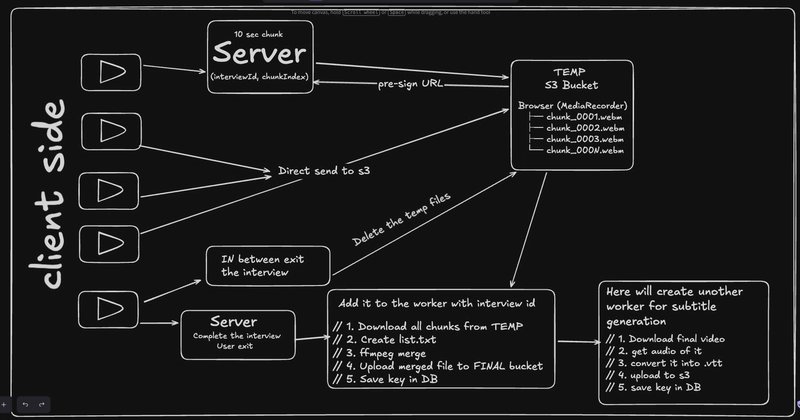
1. Chunked Video Upload with Presigned URLs
Instead of sending the full video to the API:
- The client records the video in small chunks.
- Each chunk is uploaded directly to S3 using presigned URLs.
- This removes the API entirely from the upload path.
- Once the last chunk is uploaded, the client sends a lightweight request to mark the interview as completed.
2. Asynchronous Processing with RabbitMQ
After interview completion:
- The API publishes a message to RabbitMQ.
- The request immediately returns success to the user.
- All heavy processing happens in the background.
We introduced two dedicated RabbitMQ workers:
Video Merge Worker
- Fetches all uploaded chunks from S3
- Uses FFmpeg to merge them into a single video
- Uploads the final video back to S3
- Updates the database with the merged video URL
Subtitle Worker
- Downloads the final merged video from S3
- Extracts audio from the video
- Converts audio into subtitles (.vtt)
- Uploads the .vtt file to S3
- Updates the database with the subtitle URL
Each worker is isolated, scalable, and focused on a single responsibility.
Key Benefits
This redesign brought immediate and measurable improvements:
- 80–90% reduction in API response time
- Heavy CPU tasks moved out of the API layer
- Fully asynchronous, fault-tolerant processing
- Easily scalable by adding more workers
- No waiting time for users after finishing the interview
- Support for more than 30-minute videos with zero downtime
Users can now finish their interview and move on instantly, while processing continues quietly in the background.
Final Thoughts
This shift from a synchronous to an asynchronous architecture was a turning point. By decoupling video uploads and processing from the API layer and leveraging RabbitMQ workers, we built a system that is faster, more scalable, and far more resilient.
Redesigned synchronous video processing into a RabbitMQ-driven asynchronous pipeline, cutting API response time by ~70–80% while enabling scalable background processing for video merging, subtitle generation, and cloud storage.
If you’re dealing with long-running tasks like video processing, this pattern can dramatically improve both performance and user experience. Happy building 🚀
Comments
Please log in or register to join the discussion