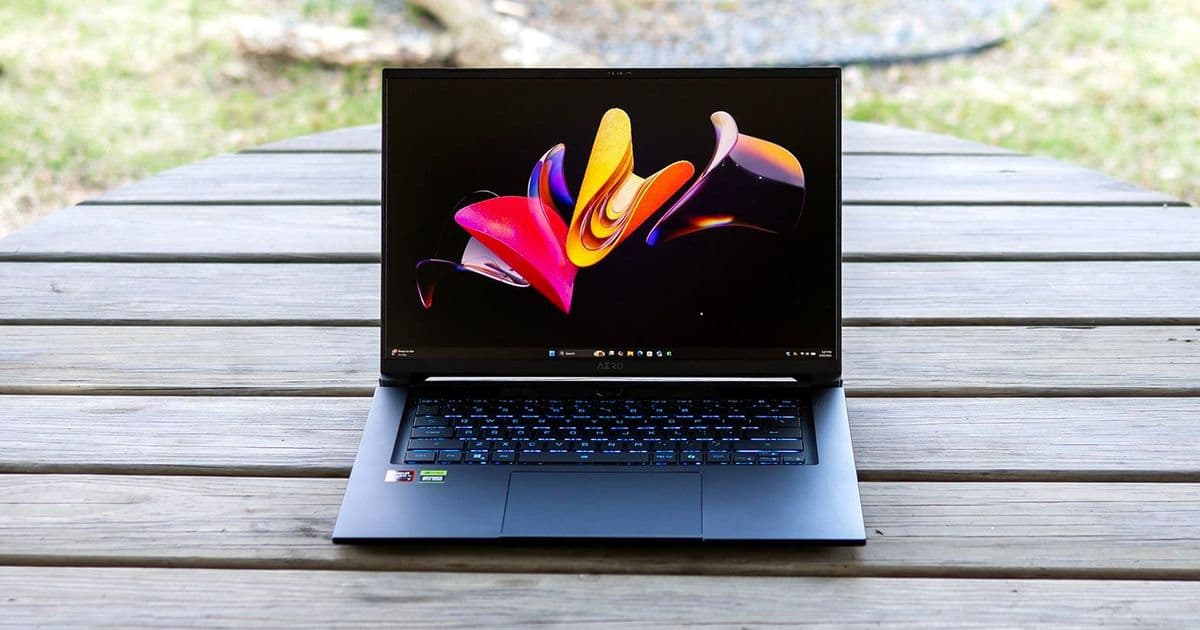

The Gigabyte Aero X16 delivers solid productivity performance and excellent battery life, but its average display, dated connectivity, and high price make it a tough sell against better alternatives.
The Gigabyte Aero X16 aims to be a do-it-all machine for gamers and creators alike, pairing an AMD Ryzen AI 7 350 processor with an Nvidia RTX 5070 graphics card inside a clean, professional-looking chassis. While it delivers solid productivity performance and excellent battery life, several shortcomings prevent it from being a standout choice in its price range.
Design and Build Quality
Available in lunar white or space gray, the Aero X16 presents an understated yet modern aesthetic with slim display bezels and a thin chassis. The aluminum exterior exhibits minimal flexibility and feels sturdy, with excellent build quality featuring minimal and consistent gaps between parts. Luxury touches include a display that opens one-handed, with branding limited to a small highlight on the lid and Aero lettering under the screen.
Measuring 14 x 9.9 x 0.78 inches and weighing 4.2 pounds, the Aero X16 is shallower and significantly lighter than the Framework Laptop 16 (5.29 pounds with graphics module). While more portable than some competitors, the Acer Predator Triton 14 AI uses a smaller 14.5-inch display to achieve its 3.5-pound weight.
Connectivity and Ports
The port selection is adequate but feels dated for a modern laptop in this price range. On the left side, you'll find Ethernet, HDMI, USB-A 3.2 Gen 1, and USB4. The right side offers a 3.5mm audio jack, another USB-A 3.2 Gen 1, and a USB 2.0 port. The barrel-style power connector and legacy USB 2.0 port make the laptop feel less modern than it should.
Internally, the Realtek 8852CE wireless card only supports Wi-Fi 6E and Bluetooth 5.2, lacking the Wi-Fi 7 that would be expected in a contemporary premium laptop.
Gaming Performance
Our review unit features a Ryzen AI 7 350 processor, GeForce RTX 5070 rated for 85W of total graphics power, and 32GB of RAM. In Star Wars Jedi: Fallen Order with Epic settings at 2560 x 1600, gameplay was fluid and stutter-free, with frame rates exceeding 100 FPS outdoors and occasionally reaching 140 FPS.
When compared to other creative-centric gaming laptops, the Aero X16's performance aligns with expectations given its 85W GPU tuning. In Shadow of the Tomb Raider at the highest detail preset, it achieved 109 FPS at 1080p, competitive with the Acer Predator Triton 14 AI but trailing the Framework Laptop 16 and MSI Katana 17 HX.
In Cyberpunk 2077 at Ray Tracing Ultra settings, the Gigabyte posted a just-playable 34 FPS at 1080p, edging out the Acer but trailing the Framework and MSI by a few frames. Native resolution proved too demanding, with only 17 FPS achieved.
Productivity Performance
The Aero X16 excels in productivity tasks. On Geekbench 6, the Ryzen AI 7 350 yielded the highest single-core score (2,916 points) and led in multi-core performance with 14,074 points. In our 25GB file transfer test, it placed mid-pack with an average of 1,480.57 MBps.
In the 4K to 1080p Handbrake video transcoding test, the Gigabyte completed the task in 3 minutes and 54 seconds, leading the Framework (4:18) and MSI (4:30). Overall, with the Ryzen AI 7 350 on tap, the Aero X16 provides ample performance for most productive and creative tasks.
Display Quality
Gigabyte's IPS screen features a 2560 x 1600 resolution, anti-glare surface, and 165Hz refresh rate with adaptive sync support. However, the display quality is merely serviceable rather than exceptional. Colors have adequate saturation but lack the pop you'd get in an OLED or mini-LED panel.
In testing, the display achieved 78.5% of DCI-P3 coverage, falling short of full coverage that would be ideal for creative work. Peak brightness measured 369 nits, slightly exceeding the Acer but still modest compared to premium displays. The Framework system outperformed the Gigabyte with superior DCI-P3 coverage and an impressive 444-nit brightness.
Input and Audio
Typing on the Aero X16 is comfortable, with 1.7mm of key travel and sufficient cushioning at the bottom of each keystroke. Tactile feel is average, without much sensation during the keystroke and not enough spring at the bottom to make it exciting. Nonetheless, typing speed was impressive, with nearly 126 WPM achieved in testing.
The single-zone RGB backlight works well in dark environments, though one zone at this price point isn't particularly impressive. The touchpad is expansive and responsive, with slightly indented edges providing a clear barrier for your fingers.
Audio quality is a weak point for the Aero X16. Listening to music revealed muddy details and a lack of instrument separation, compounded by distant vocals and minimal bass. Volume is barely adequate for immersive experiences, making it difficult to watch movies or play games in anything but a quiet room.
Battery Life and Thermals
In our battery test, which includes web browsing, video streaming over Wi-Fi, and OpenGL workloads at 150 nits, the Aero X16 led the group with 9 hours and 13 minutes of runtime. This significantly outperforms the Acer (8:16), Framework (8:20), and MSI (6:21), making it one of the better gaming laptops for battery life.
During gaming stress testing, the cooling system kept surface temperatures within acceptable ranges, with peaks of 71°F on the touchpad, 95°F between the keyboard G and H keys, and 114°F on the bottom towards the rear edge. Fan noise was barely audible during everyday tasks and only moderately noticeable during gaming.
Upgradeability
The Aero X16 is about as upgradeable as laptops get, with two SODIMM memory slots, two M.2 2280 drive slots, an M.2 2230 wireless card, and a removable battery. All components can be accessed under the bottom panel after removing 10 identical Philips-head screws.
Software and Features
The primary software inclusion is GiMATE, which provides basic system settings including battery charge mode options (full, 80%, or 60% limit) and toggles for battery status and power indicator LEDs. Available power profiles include balanced, gaming, creator, power saving, and online meeting modes.
GiMATE also includes AI features accessible via keyboard shortcut, allowing basic commands like "disable keyboard backlight" to be executed without navigating through menus. The Creator app connects to Hugging Face and enables various image-to-image and text-to-image models to run locally, though only certain models are available.
Configurations and Pricing
Our review sample with Ryzen AI 7 350, RTX 5070, 32GB RAM, and 1TB SSD retails for $1,899 through B&H Photo and Video, though Newegg had the same model for $1,739 at review time. Other configurations start at $1,499 with a GeForce RTX 5050 and 16GB of RAM.
The Verdict
The Gigabyte Aero X16 delivers solid productivity performance, excellent battery life, and a few genuinely useful AI tools, but its average display and dated connectivity hold it back. Creative users and gamers alike can find better value elsewhere, especially at this price point.
The most limiting factor is the display, which is serviceable for everyday use but misses the creative mark with incomplete DCI-P3 coverage and modest brightness. Weak speakers don't help its expressive ambitions, and the reliance on Wi-Fi 6E and USB 2.0 gives the machine a slightly dated feel.
While the RTX 5070 is capable, gaming performance trails far cheaper alternatives like the MSI Katana 17 HX, making the Aero X16 a tough sell for those prioritizing framerates. Creators willing to spend more will find a far better display in the Framework Laptop 16, which also offers superior upgradeability.
Overall, the Aero X16 feels less like a hybrid and more like a compromise—competent in several areas but not exceptional where it counts. At this price, the competition simply plays its cards better.
Comments
Please log in or register to join the discussion