
Google has started deploying its new gradient‑style icons across Workspace web apps, Chrome’s New Tab page, and iOS, changing the visual language that developers must account for in both Android and iOS codebases.
Google Workspace’s Gradient Icon Redesign Begins Rolling Out
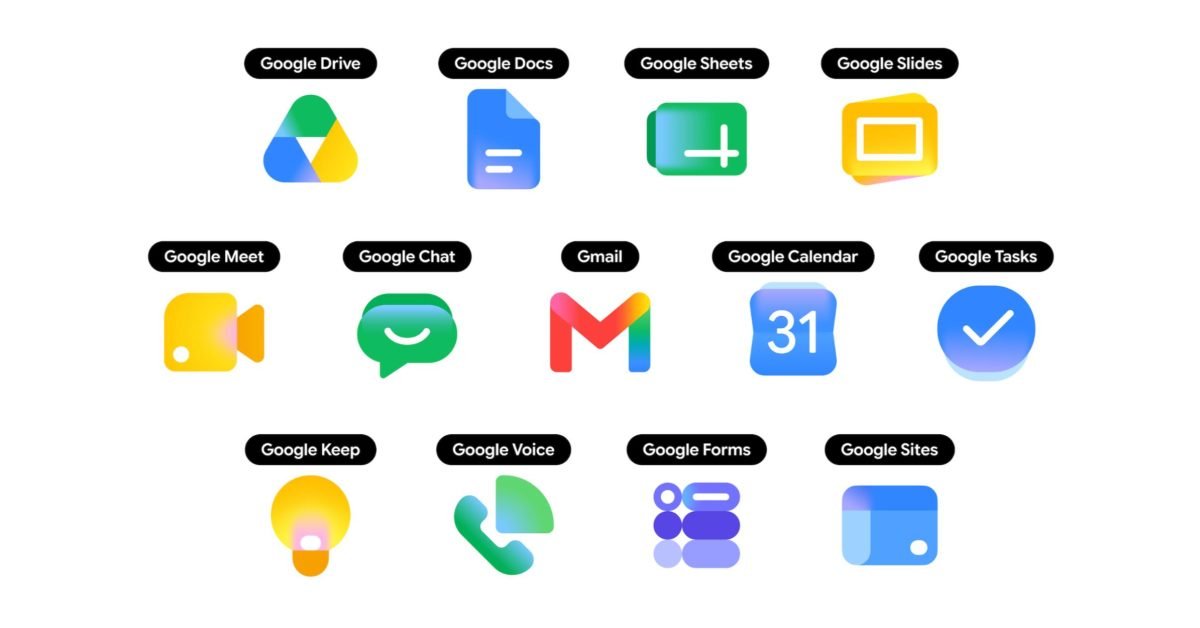
Google announced that the long‑awaited gradient icon set for Workspace apps is now live on the web, Chrome’s New Tab page, and the iOS client. The update replaces the flat, four‑color palette that has been a hallmark of Google’s branding since 2014 with a more saturated, single‑color gradient for each product. Gmail remains the only app that still carries the four‑color motif, while Drive, Docs, Sheets, Slides, Calendar, Chat, Meet, Vids, Forms, Keep, Voice and Tasks all showcase the new look.
What the rollout looks like today
- Web launcher – The new icons appear in the top‑right app launcher on most Google sites and on Chrome’s New Tab page. The launcher now uses a larger square canvas, allowing each icon to occupy more visual space.
- In‑app headers – A handful of products (Keep, Docs, Sheets, Slides, Vids, Forms, Sites) already show the gradient icons in the top‑left corner of the UI, though the favicons in the browser tab are still the old versions.
- iOS – As of this week the gradient set has been pushed to the Google Workspace iOS apps via version 2.53 of the Google Workspace SDK. Android users will see the change in the next minor release (version 2.52) scheduled for early June.
Why mobile developers should care
Consistency across platforms
When you ship a cross‑platform app that integrates with Google services (e.g., using the Google Drive REST API or the Google Sign‑In SDK), the visual assets you bundle for branding need to match Google’s current UI. If your app still ships the legacy flat icons, users will see a mismatch between the native Google app and your own UI, which can look unpolished.
Updated asset pipelines
Both the Android and iOS SDKs now expose the new icons through their respective resource bundles:
- Android – The
com.google.android.gms:play-services-authlibrary (v20.5.0) includes adrawableset namedic_gmail_gradient,ic_drive_gradient, etc. These are vector drawables, so they scale without extra assets. - iOS – The
GoogleWorkspaceCocoaPod (v2.53) adds aGWSGradientIconsasset catalog. You can reference them withUIImage(named: "gws_gradient_drive").
Updating your code to reference these resources eliminates the need to host your own copies of the icons and ensures you receive future tweaks automatically.
Migration checklist for cross‑platform teams
- Audit current icon usage – Search your codebase for any hard‑coded references to Google icons (e.g.,
R.drawable.gmail_iconon Android orUIImage(named: "gmail_icon")on iOS). Document where they appear in UI components, notifications, and deep‑link previews. - Upgrade SDKs –
- Android: bump
play-services-authto 20.5.0 or later. - iOS: update the
GoogleWorkspacepod to 2.53.
- Android: bump
- Replace assets – Swap legacy drawables/asset names with the new gradient equivalents. Because the new assets are vector‑based on Android, you can remove any PNG fallbacks.
- Test on multiple screen densities – Verify that the gradient icons render correctly on low‑dpi Android devices and on iPhone SE‑style screens. The vector format should handle scaling, but some older Android versions (< 5.0) may need a PNG fallback.
- Update branding guidelines – If your product documentation or marketing materials reference Google’s visual style, replace screenshots with the gradient versions.
- Run visual regression tests – Tools like Detox (iOS) and Espresso (Android) can capture UI snapshots. Compare pre‑ and post‑migration screenshots to catch any layout shifts caused by the larger icon canvas.
- Publish – Once the changes pass QA, roll out the update to your beta channel first. Monitor crash logs for any missing resource exceptions.
Cross‑platform considerations
If you are using a framework such as Flutter, React Native, or Xamarin, the migration path differs slightly:
- Flutter – The
google_fontspackage now bundles the gradient icons asIconData. Import them viaIcons.google_drive_gradientand rebuild your asset bundle withflutter pub get. - React Native – The
@react-native-google-signin/google-signinmodule (v9.2.0) includes aGradientIconsfolder. Reference them withrequire('./GradientIcons/drive.png'). - Xamarin – The
Xamarin.GooglePlayServices.AuthNuGet (v118.0.0) adds aResources/drawableset. UseResource.Drawable.ic_drive_gradientin your layouts.
Because each framework pulls the assets from its own package, you do not need to maintain duplicate image files in your repo.
What’s next for Google’s visual language?
Google has hinted that the gradient set will eventually replace the old icons in all native editors (Docs, Sheets, Slides, etc.). The next phase is expected to land in the summer, when the web editors receive an updated favicon and the Chrome OS launcher adopts the new assets. Developers should keep an eye on the Google Workspace Updates blog for the official schedule.
Resources
- Official announcement on the Google Workspace Updates blog
- Android SDK release notes – play‑services‑auth 20.5.0
- iOS SDK release notes – GoogleWorkspace 2.53
- Migration guide for Flutter – Flutter Google Icons package
- React Native asset list – @react-native-google-signin/google-signin
The gradient redesign is more than a cosmetic tweak; it changes the asset pipeline that mobile developers rely on when integrating Google services. Updating SDKs, swapping resources, and running a quick visual regression test will keep your app looking in sync with the rest of the Google ecosystem.
Comments
Please log in or register to join the discussion