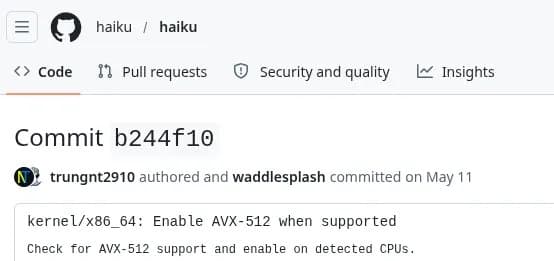
Haiku’s May 2026 work is small in release-note size but meaningful for anyone testing the BeOS-inspired OS on modern desktop and homelab hardware: AVX-512 is now enabled on capable CPUs, while storage, ACPI, WiFi, and Raspberry Pi 5 support continue to inch forward.
Haiku has picked up AVX-512 enablement for capable Intel and AMD processors, thanks to kernel FPU handling changes merged during its May 2026 development cycle. For a desktop hobby OS, that sounds like a niche checkbox. For anyone who treats operating systems as measurable machines, it is more interesting than that: AVX-512 is one of those CPU features where the silicon, compiler, kernel, firmware, thermals, and workload all have to agree before the benchmark chart means anything.
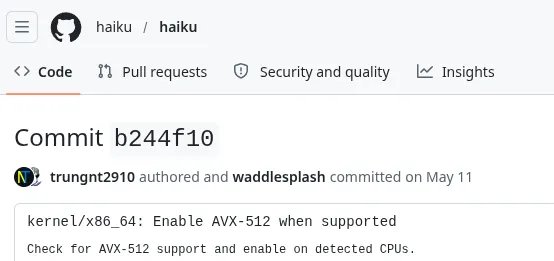
The short version is simple. Haiku can now expose AVX-512 on processors that support it. The longer version is that AVX-512 is not just another CPUID flag. The OS has to correctly manage wider vector state, including ZMM registers and opmask registers, through context switches, interrupts, and thread scheduling. If that state is not saved and restored correctly, the failure mode is not a gentle slowdown. It is corrupted math, broken media code, weird crashes, or a benchmark result that belongs in the trash bin.
Haiku’s kernel FPU changes matter because AVX-512 support crosses the boundary between hardware feature detection and operating system state management. Modern x86 CPUs expose SIMD features through CPUID, but the OS must also enable the right extended processor state through mechanisms such as XSAVE and XCR0. AVX-512 adds more state than AVX2, so the scheduler has more context to preserve when AVX-512 code is active. That is why an application cannot responsibly use AVX-512 just because the CPU marketing page says it exists. The kernel has to participate.
This is especially relevant on modern homelab hardware, where AVX-512 support is fragmented. Intel’s server parts, workstation parts, and some older client CPUs support different AVX-512 subsets. AMD’s Zen 4 and newer server and desktop CPUs support AVX-512 through 256-bit execution paths on many models, which can still produce excellent results without the same frequency behavior as some earlier Intel implementations. A Haiku system running on a Ryzen 7000 workstation, EPYC box, Xeon W system, or older Skylake-SP server now has a more interesting ceiling for vectorized workloads.
| Area | May 2026 Haiku change | Why builders should care |
|---|---|---|
| CPU | AVX-512 enabled through kernel FPU handling work | Opens the door for wider SIMD in compute, media, compression, crypto, and math-heavy ports |
| Storage | MMC driver initialization work | Helps future SD, eMMC, and embedded-style boot targets, though not yet a default win |
| Platform firmware | ACPI driver fixes | Better odds on real PCs, mini PCs, and server boards with imperfect firmware tables |
| I2C | Crash fix in disabled-by-default driver | Useful groundwork for sensors, embedded controllers, and board management style devices |
| Networking | realtekwifi8187 support via FreeBSD-derived urtw driver work |
Gives older Realtek USB WiFi adapters another chance at usefulness |
| ARM | Raspberry Pi 5 boot fixes | Progress, but not yet a usable Haiku target for the Pi 5 |
| Toolchain | Host compiler support for GCC 16 | Keeps the build farm and contributor machines from getting pinned to stale compilers |
The benchmark caveat is the big one: Haiku’s report does not appear to ship public AVX-512 performance numbers with this change. That means nobody should claim a 2x uplift just because the vector width doubled. AVX-512 performance depends on the instruction mix, memory bandwidth, compiler output, CPU frequency policy, and whether the code was actually written to use the relevant AVX-512 subset. A scalar workload does not become faster because the OS can save ZMM registers. A memory-bound workload may barely move. A carefully vectorized kernel can jump hard.
For testing, I would split the first benchmark pass into three buckets: raw vector throughput, real application throughput, and power-normalized throughput. Raw throughput proves the feature is alive. Real application throughput proves it matters. Power-normalized throughput decides whether I would leave it enabled on a machine that runs jobs overnight.
| Test class | What to run | What it proves | What to log |
|---|---|---|---|
| Feature detection | CPUID tool or small AVX-512 test binary | Kernel exposes usable AVX-512 state | CPU model, flags, Haiku build ID |
| Synthetic SIMD | Dot product, memcpy-like vector loops, integer transform kernels | Upper bound for vector execution | Throughput, clocks, thermals |
| Compression | zstd, xz, or similar ports when available | Whether wider vectors help real data paths | MB/s, compression ratio, package version |
| Crypto | OpenSSL-style AES, SHA, Poly1305 tests if ported | Whether crypto paths select SIMD code | ops/s, selected backend |
| Media | Image resize, colorspace conversion, encode helpers | Practical workstation value | frames/s, input size, output settings |
| Power | Wall meter plus platform telemetry when available | Whether the faster run is also efficient | watts, joules per job, fan behavior |
The power side deserves special attention. AVX-512 can increase instantaneous package power, and on some CPUs it can trigger lower all-core clocks. That does not automatically make it inefficient. If a job finishes 40 percent faster while drawing 20 percent more power, the total energy used can still improve. If it draws 35 percent more power for a 5 percent gain, I would keep that workload on AVX2 or scalar code unless latency matters more than watts.
A useful homelab measurement is joules per completed task. Wall power is better than package telemetry if you care about the whole box, especially on older dual-socket servers with hungry VRMs, HBAs, fans, and memory channels. Run each test cold once, discard it, then run three to five measured passes. Log ambient temperature, fan profile, BIOS power mode, and CPU governor behavior where Haiku exposes it. Without those notes, comparing a Xeon workstation to a Ryzen desktop becomes spreadsheet theater.
| CPU family | AVX-512 expectation under Haiku | Builder guidance |
|---|---|---|
| Intel Xeon Scalable Skylake-SP through Ice Lake-SP | Strong AVX-512 support, but watch frequency and thermals | Good candidate for controlled compute tests and recycled server builds |
| Intel Xeon W with AVX-512 | Often a strong workstation target | Check board firmware and cooling before trusting sustained runs |
| Intel hybrid client CPUs | AVX-512 availability varies heavily by generation and firmware | Do not assume support based on core branding |
| AMD Zen 4 and newer | AVX-512 support can be very useful, often via 256-bit data paths | Excellent test target for power-normalized throughput |
| Older AMD Zen, Intel pre-AVX-512 client chips | No AVX-512 | Expect no change from this feature, but driver fixes may still matter |
Compatibility is broader than the CPU. The application stack has to produce AVX-512 code. That can mean hand-written intrinsics, compiler auto-vectorization, assembly paths in libraries, or runtime dispatch. The Intel Intrinsics Guide remains the practical reference for understanding which intrinsic maps to which instruction family, even when the CPU under test is AMD. On the compiler side, Haiku’s new ability to tolerate GCC 16 as a host compiler is the less flashy but still necessary plumbing. Operating systems age badly when their build systems require old toolchains.
The driver work is less glamorous, but it may affect more daily installs. MMC initialization improvements point toward better SD and eMMC handling later, which matters for small boards, thin clients, and embedded-style machines. The I2C crash fix is in a driver that remains disabled by default, but I2C is the bus behind many sensors, management controllers, touchpads, and board-level peripherals. ACPI fixes are always welcome because ACPI is where otherwise solid operating systems go to meet firmware written under deadline pressure.
{{IMAGE:2}}
The new realtekwifi8187 support is also practical. It comes as part of the FreeBSD-derived urtw driver family, useful context for anyone who has watched niche operating systems borrow proven driver work from BSD codebases. The target hardware is older Realtek USB WiFi, not a modern WiFi 6E card, but old USB adapters are exactly the kind of parts that show up in a drawer when a test machine has no supported onboard networking. For Haiku users, a boring working network adapter often beats a theoretically better unsupported one.
The Raspberry Pi 5 status is more restrained. Haiku saw boot fixes for the Raspberry Pi 5, but the board is still not in a usable state. That distinction matters. Booting is a milestone, not a platform recommendation. A usable Pi 5 port needs storage, display, USB, networking, timers, interrupt handling, and enough stability that failures are interesting rather than constant. For now, the Pi 5 remains a development target, not a sensible Haiku build recommendation.
For builders, the most interesting Haiku test machine after this update is not a tiny ARM board. It is a spare AVX-512-capable x86 box with decent cooling, a supported GPU path, wired networking, and storage that Haiku already handles well. A Ryzen 7000 desktop, EPYC workstation, Xeon W tower, or retired Xeon Scalable server gives the AVX-512 work room to show up in measurements. Start with bare metal rather than a VM if the goal is CPU feature testing, since hypervisors can mask or virtualize CPU flags in ways that muddy results.
My recommended build order is conservative: install Haiku on hardware that already boots cleanly, confirm basic devices, then test AVX-512. Do not start with the most exotic board in the rack. Use the Haiku source tree and official Haiku project site to track whether the relevant driver work has landed in a nightly image or requires a local build. If you are chasing R1 Beta 6 readiness, keep a separate stable install or recovery USB nearby, because nightly operating system testing and precious data should not share a disk.
| Build target | Recommendation | Reason |
|---|---|---|
| Daily Haiku desktop | Wait for packaged release or a known-good nightly | AVX-512 is interesting, but daily stability still wins |
| Benchmark box | Use AVX-512-capable x86 bare metal | Best way to verify kernel state handling and real throughput |
| Low-power appliance | Do not chase AVX-512 first | Driver support, idle power, and networking matter more |
| Raspberry Pi 5 | Treat as developer-only | Boot progress is not the same as usable platform support |
| Old WiFi test rig | Try older Realtek USB adapters | New driver support may save a machine with unsupported onboard WiFi |
The larger story is that Haiku is still doing the kind of hardware enablement that separates a nostalgic OS project from a usable one. AVX-512 support will not transform Haiku overnight, and most users will not feel it in the desktop shell. But it raises the ceiling for ports, benchmarks, media tools, math libraries, and future workstation experiments. The ACPI, MMC, I2C, WiFi, and Raspberry Pi 5 work fills in the less visible parts of the same picture: modern hardware support is thousands of small fixes, and each one removes another reason a test install gets wiped after an afternoon.
For a benchmark-obsessed homelab builder, the action item is clear enough. Put Haiku on an AVX-512-capable machine, measure before assuming, log power alongside performance, and compare against the same hardware running Linux or FreeBSD where possible. If Haiku can keep closing the driver gap while exposing more of the CPU correctly, R1 Beta 6 becomes more than a release milestone. It becomes a better excuse to put the OS on real hardware and collect numbers.
Comments
Please log in or register to join the discussion