Halide Mark III introduces three major photography enhancements to iPhone photography: physically accurate alternative photo processing, a new RAW photo editor, and a redesigned professional camera interface with advanced composition tools.
Halide Mark III Revolutionizes iPhone Photography with Advanced Processing Tools and Professional Camera Interface
Halide has released Mark III, a significant upgrade to its professional camera app for iPhone, bringing three transformative photography features that elevate mobile photography to new heights. The 3.0 version, which has been anticipated since late 2024, introduces Halide Looks, a new Photo Lab editor, and a redesigned pro camera interface, fundamentally changing how photographers capture and edit images on iOS devices.
Halide Looks: Physically Accurate Alternative Processing
The most significant addition to Halide Mark III is the introduction of Halide Looks, a collection of five physically accurate alternative photo processes that offer photographers creative tools beyond standard iPhone processing. These looks combine with Halide's film simulation engine and optional HDR capabilities to provide an unprecedented set of creative options for iPhone photographers.
The five included looks have been carefully developed for specific photographic intents:
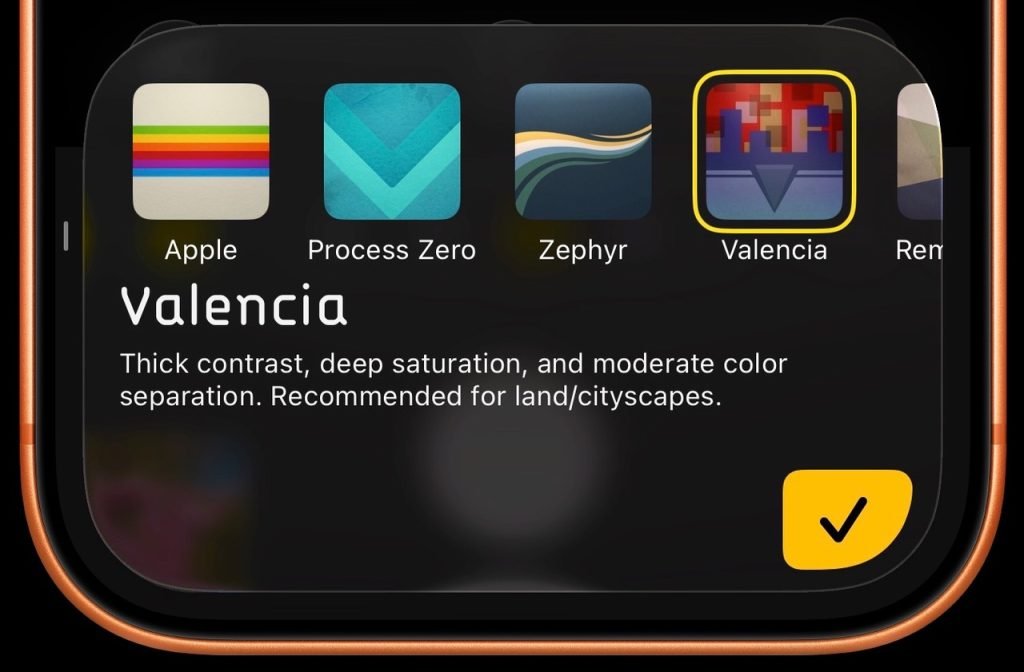
Valencia: Designed for landscapes and cityscapes, this look features thick contrast, deep saturation, and solid color separation. It also produces interesting effects on portraiture and skin tones, making it versatile across different subjects.
Rembrandt: This portrait-focused look emphasizes bone structure and lighting through thick contrast in mid-tones. Its abundant color in the low end converges to white as exposure increases, creating perfect uniformity in skin tones that emphasizes facial contours. According to Halide, the differences compared to default iPhone processing are striking.
Nova: Best suited for landscapes and cityscapes rather than portraiture, this look features exceptional color with tight contrast and smooth peachy highlights that add a distinctive quality to outdoor scenes.
Zephyr: A more subtle and restrained option, Zephyr combines subtle filmic contrast with rich skin tones and foliage. It has the character of a traditional print while maintaining a neutral tone scale and tuned contrast, making it suitable for a wide variety of scenes.
Chrome Noir: Halide's in-house panchromatic black and white look featuring medium contrast that provides a distinctive monochrome option for photographers.
These looks represent a significant advancement in mobile photography processing, offering options that go beyond the standard iPhone filters and provide more sophisticated, film-inspired alternatives. Unlike many mobile photography apps that apply simple filters, Halide Looks use physically accurate models that simulate the chemical processes of traditional film photography, resulting in more authentic and nuanced results.
Photo Lab: New RAW Editor for iPhone and Standalone Cameras
Halide Mark III introduces Photo Lab, a completely new photo editing experience that moves beyond simple adjustments to provide a more sophisticated editing workflow. When shooting with RAW enabled, users can edit their photos later in Halide's new Photo Lab, which the developers describe as "better than an editor."
The Photo Lab interface begins with a Quick Edit section that allows photographers to audition different looks, adjust exposure, and toggle HDR and film simulations within seconds. For more detailed editing, users can adjust framing, color balance, and other parameters with just a few swipes.
Perhaps most significantly, Photo Lab will include beta support for editing RAW files from standalone cameras including Canon, Sony, Nikon, Leica, Fujifilm, and Hasselblad. This marks the first time Halide has expanded beyond iPhone photography to become a photo editor for professional cameras, potentially positioning the app as a cross-platform photography solution.
The technical implementation of RAW editing in Halide Mark III leverages Apple's Core Image framework and Metal for GPU-accelerated processing, ensuring that even complex edits can be performed quickly on iOS devices. This approach allows Halide to maintain high performance while providing professional-grade editing capabilities.
This expansion to support standalone camera RAW files could be particularly valuable for photographers who use multiple devices and want a consistent editing experience across different platforms. The iPad version of Halide Mark III, with its larger screen, may offer an especially conducive environment for detailed editing work.
Redesigned Pro Camera Interface with Advanced Composition Tools
The third major enhancement in Halide Mark III is a completely redesigned pro camera user interface that puts composition tools front and center, recognizing that composition is the fundamental bedrock of photography.
The new interface includes:
- Aspect ratio options matching popular film cameras: 35mm (3:2), medium format (1:1), and pano (65:24)
- A dynamic aspect ratio for Instagram that automatically adjusts between landscape and portrait orientations
- An expanded composition overlay system that goes beyond the standard rule of thirds to include:
- Uniform grid
- Golden ratio
- Rabatment of the rectangle
For photographers who prefer the previous design, Halide has wisely kept the Mark II camera layout as an option, ensuring that long-time users can maintain their preferred workflow while exploring new features.
Platform Requirements and Compatibility
Halide Mark III requires iOS 15.0 or later and is optimized for devices with A12 Bionic chips or newer, including iPhone XS and later models. The app takes advantage of iOS technologies like Core ML for the film simulation engine and HEIF for efficient image storage.
For RAW editing capabilities, Halide Mark III requires devices with sufficient processing power and storage capacity. The app supports both Apple's ProRAW format and RAW files from various camera manufacturers, though performance may vary depending on the specific device and file size.
Comparison to Other Photography Apps
Unlike many camera apps available on the App Store, Halide Mark III distinguishes itself through its focus on professional-grade tools and physically accurate processing. While apps like Adobe Lightroom Mobile offer comprehensive editing capabilities, Halide differentiates itself with its superior camera interface and specialized film simulation technologies.
The introduction of Halide Looks positions Halide as a direct competitor to apps like VSCO and Filmic Pro, but with a more technical approach to processing that appeals to photographers seeking greater control over their images.
Pricing and Availability
Halide Mark III is available today as a free upgrade for customers who purchased Halide Mark II. The new version is also accessible to Halide subscribers starting today. For new users, Halide Mark III can be purchased outright for $59.99, or subscribers can access the app for $19.99 per year.
The pricing structure positions Halide as a premium option in the mobile photography market, with a one-time purchase option available for those who prefer not to subscribe. The subscription model includes access to all current and future features, making it an attractive option for photographers who want to stay up-to-date with the latest developments.
Cross-Platform Considerations
While Halide has traditionally been an iOS-focused application, the introduction of RAW editing support for standalone cameras in Photo Lab suggests a potential expansion beyond Apple's ecosystem. This could indicate Halide's strategy to become a more cross-platform photography tool in the future.
The availability of Halide on both iPhone and iPad already provides a degree of platform flexibility within Apple's ecosystem, with the iPad version potentially offering advantages for more detailed editing work due to its larger screen real estate.
For professional photographers who work across multiple platforms, Halide's expansion to support RAW files from various camera manufacturers could fill a gap in the market for a mobile-first editing solution that maintains quality while offering portability.
Developer Impact and Migration
For existing Halide users, the transition to Mark III should be smooth, especially for those who have used previous versions. The app maintains core functionality while adding significant new features. The inclusion of the previous camera layout as an option ensures that long-time users can maintain their preferred workflow.
For photographers considering switching to Halide Mark III from other camera apps, the learning curve may be steeper due to the professional nature of the features, but the potential benefits in terms of image quality and creative control are substantial.
The introduction of Halide Looks in particular represents a significant advancement in mobile photography processing, offering options that go beyond the standard iPhone filters and provide more sophisticated, film-inspired alternatives that could appeal to both amateur enthusiasts and professional photographers.
Conclusion
Halide Mark III represents a substantial evolution of the professional camera app for iPhone, introducing three major features that significantly enhance mobile photography capabilities. With physically accurate alternative processing, a sophisticated RAW editor, and advanced composition tools, Halide has positioned itself as a must-have application for serious iPhone photographers.
The expansion beyond iPhone photography to support standalone camera RAW files suggests that Halide may be planning a broader cross-platform strategy in the future, potentially making it a more versatile tool for photographers who work across multiple devices and platforms.
For existing Halide users, the upgrade is free and brings significant new functionality. For new users, the $59.99 price point or $19.99/year subscription offers access to professional-grade photography tools that can significantly enhance the iPhone photography experience.
Comments
Please log in or register to join the discussion