A developer shares how he built a custom VSCode extension to automatically export framed elements from Excalidraw files as separate light/dark mode SVG images, streamlining his technical blogging workflow.
I've been using Excalidraw extensively for technical diagrams and explanations, both for breaking down problems for myself and for communicating concepts to coworkers. Recently, I discovered a new use case: expressing my thoughts through graphics in my blog posts.
When I started writing my first article, I quickly ran into a frustrating dependency between graphics and text. Fine-tuning a diagram would often lead to clearer explanations in the text, while changes in the text would reveal that certain information in the graphic was unnecessary. This back-and-forth process revealed a significant workflow problem.
The Manual Export Problem
Every time I needed to export a graphic from Excalidraw, I was facing a 45-second process:
- Select the frame
- Press export
- Choose the right name with dark/light mode postfix
- Export
- Switch between light/dark mode
- Choose the right name with dark/light mode postfix again
- Export again
- Realize that a label crossed the frame boundary
- Start over
The repetitive nature of this process was killing my creative flow and making the writing process much more painful than it needed to be.
First Attempt: GitHub Action Automation
My initial solution involved creating a GitHub action that would:
- Look for changed Excalidraw files in the last push
- Use
jqto find frames inside those files - Export them in dark and light mode as
[framename]-[light/dark] - Commit those new SVG files back to the repo
This approach worked well enough to continue working on my article. The code leveraged JonRC's excalirender library and was available on GitHub.
However, this solution had significant limitations:
- The library had rendering bugs (similar to this issue)
- It required spinning up an x86-based Docker image that wouldn't run on my ARM-based Mac
- I couldn't run the export locally, meaning I had to push to GitHub, wait for the pipeline to finish, and pull the new commit before seeing updated images
This meant I couldn't effectively review my blog post locally with up-to-date images, which was a major workflow breaker.
The Better Solution: Custom VSCode Extension
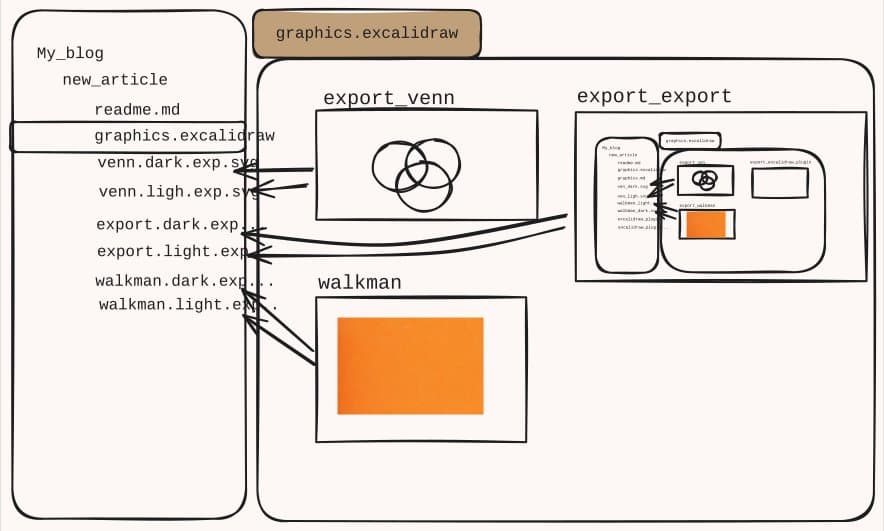
What if Excalidraw's VSCode extension could automatically check open *.excalidraw files for changes and export each frame as two separate SVG files - one in dark mode, one in light mode?
I spent a weekend with Claude building a custom solution. The workflow is now beautifully simple:
- Edit my Excalidraw file in VSCode
- Wrap elements of interest with a frame
- Name the frame with the
export_prefix (e.g.,export_database_diagram) - The extension automatically exports it as SVG in both dark and light modes
- Two SVGs are saved:
${image_name}.light.exp.svgand${image_name}.dark.exp.svgnext to the Excalidraw file
The extension picks up the frame, exports it as SVG in both modes, and saves the files automatically. This means I can now reference these images via auto-complete and preview them in the editor, seeing them rendered in the Preview tab.
Live Preview and Workflow Benefits
With images now available locally and updating whenever I change a frame in my Excalidraw, my workflow has transformed. I can:
- See changes immediately without waiting for CI/CD
- Preview images in the editor with auto-complete support
- Work entirely offline if needed
- Maintain creative flow without export interruptions
The entire solution, including this writeup, took only a couple of hours to implement. The joy of using a tool that solves a real pain point is hard to overstate.
Looking Forward
I'm excited to use this extensively in upcoming articles, particularly for topics like "SQLite on Git." One consideration I'm weighing is whether to contribute this back to the original Excalidraw extension. Since I don't own the original code and don't want to take full ownership, I'm leaning toward opening an issue to describe the problem and solution as inspiration for others.
For now, I've created artifacts for the release section in my GitHub fork that allows others to download and use the extension. If you're facing similar frustrations with Excalidraw exports in your technical blogging workflow, this might be worth checking out.
Comments
Please log in or register to join the discussion