
An in-depth analysis of vim-fuzzbox/fuzzbox.vim, a contemporary fuzzy finder plugin for Vim that leverages vim9script and system tools to provide fast, cross-platform file navigation and search capabilities with minimal dependencies.
fuzzbox.vim: A Modern Fuzzy Finder for Vim with Minimal Dependencies

In the ever-evolving landscape of Vim plugins, fuzzbox.vim emerges as a noteworthy addition to the fuzzy finder category. This plugin distinguishes itself through its modern implementation, minimal dependencies, and comprehensive feature set. Let's explore what makes this tool particularly interesting for Vim users seeking efficient navigation and search capabilities.
The Philosophy Behind fuzzbox.vim
At its core, fuzzbox.vim embodies a minimalist approach to plugin development while still providing extensive functionality. Written entirely in vim9script, it leverages Vim's native features including fuzzing matching, background job processing, and popup windows. This design choice not only ensures compatibility with Vim 9.0+ but also takes advantage of performance improvements available in the latest Vim versions.
The plugin's approach to dependencies is particularly noteworthy. Rather than bundling all functionality within itself, fuzzbox.vim intelligently utilizes tools pre-installed on most systems. For file searching, it defaults to system commands like find or findstr, while offering faster alternatives like ripgrep or fd if they're available. Similarly, for content searching, it defaults to grep or findstr but can use ripgrep or ag when present. This strategy significantly reduces the plugin's footprint while maintaining high performance.
Technical Implementation Details
The architecture of fuzzbox.vim demonstrates thoughtful engineering decisions that balance performance, compatibility, and functionality. The plugin's use of vim9script allows for more concise and efficient code compared to legacy Vim script. This modern scripting language provides better type checking, improved performance, and more consistent syntax, all of which contribute to a smoother user experience.
One particularly interesting aspect is how the plugin handles large datasets. Through its async processing mechanism, fuzzbox.vim processes fuzzy matches in batches rather than all at once. The g:fuzzbox_async_step parameter (defaulting to 10,000) controls the size of these batches, preventing UI freezing when dealing with extensive file lists. Additionally, the g:fuzzbox_async_limit parameter (defaulting to 200) limits the number of results displayed at once, further optimizing performance especially when devicons are enabled.
The plugin also demonstrates sophisticated handling of different environments. For instance, when inside a git repository, it can intelligently use git commands for file listing and searching, respecting .gitignore files when appropriate. This context-aware behavior makes the tool more adaptable to various development workflows.
Feature Analysis
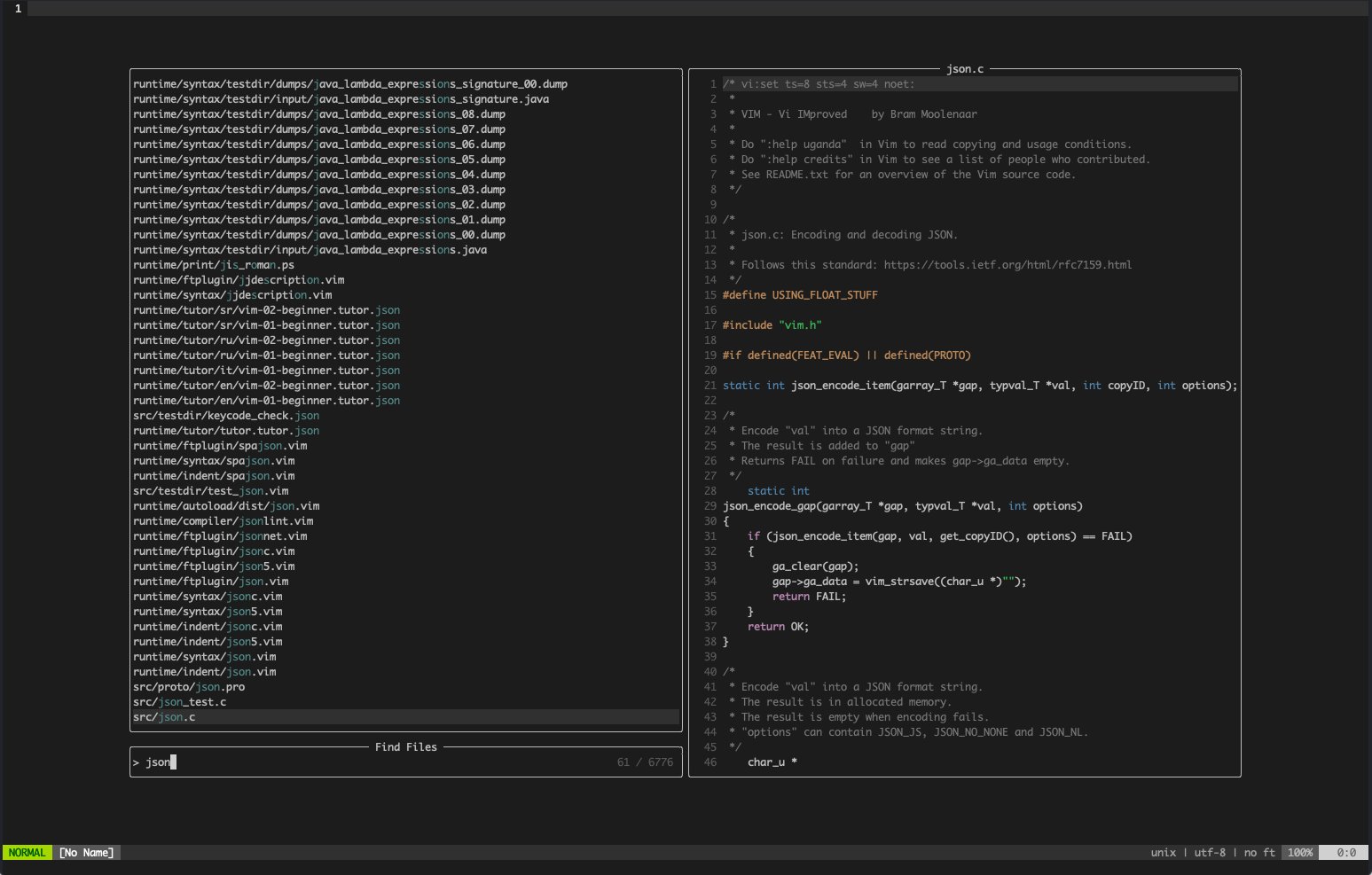
fuzzbox.vim provides an impressive array of fuzzy finding commands that cover most common use cases:
- File Navigation:
FuzzyFilesandFuzzyFilesRootfor finding files in the current directory or project root - Content Search:
FuzzyGrepandFuzzyGrepRootfor searching within file contents - Buffer Management:
FuzzyBuffersfor switching between open buffers - History Access:
FuzzyMru,FuzzyMruCwd, andFuzzyMruRootfor accessing recently used files - Help System:
FuzzyHelpfor searching help documentation - Code Navigation:
FuzzyTagsandFuzzyTagsRootfor jumping between code definitions - Git Integration:
FuzzyGitFilesandFuzzyGitGrepfor git-specific operations
Each of these commands can be customized through numerous configuration options. For example, the plugin can be configured to respect .gitignore files, include or exclude hidden files, follow or ignore symbolic links, and handle submodules appropriately. This level of customization allows users to tailor the tool to their specific workflow and environment.
Configuration and Customization
The plugin's configuration system is both comprehensive and approachable. With over thirty configuration variables, users can fine-tune nearly every aspect of the plugin's behavior. The default settings provide sensible out-of-the-box functionality, while the extensive customization options allow for deep integration into existing workflows.
Key configuration categories include:
- Display Options: Controls for devicons, preview windows, compact layouts, and scrollbar visibility
- Behavior Settings: Options for respecting gitignore, following symlinks, and handling submodules
- Key Mapping Customization: Extensive ability to modify navigation and action keybindings
- Window Management: Precise control over window dimensions, positioning, and appearance
- Exclusion Rules: Flexible file and directory exclusion patterns
The plugin also supports user autocommands through FuzzboxOpening, FuzzboxOpened, and FuzzboxClosed events, enabling further customization and integration with other plugins. This extensibility makes fuzzbox.vim not just a standalone tool but a component that can be woven into larger, personalized Vim environments.
Integration with the Vim Ecosystem
fuzzbox.vim demonstrates excellent compatibility with other popular Vim plugins. It has built-in support for vim-devicons and vim-nerdfont to display file type icons, and can integrate with vim-glyph-palette for enhanced icon coloring. For users of the Language Server Protocol (LSP), the plugin can work with yegappan/lsp through the fuzzbox-lsp.vim extension.
The plugin's approach to window management is particularly thoughtful. By default, it avoids opening files in windows containing special buffers (like file explorers or help buffers), but this behavior can be customized through the g:fuzzbox_reuse_windows option. This consideration for existing workflows reduces friction when integrating the plugin into established Vim setups.
Performance Considerations
Performance is a clear priority in fuzzbox.vim's design. The plugin's use of system tools like ripgrep or fd when available provides significant speed improvements over Vim-native implementations. The async processing of large lists prevents UI freezing, while the batched approach to fuzzy matching ensures responsiveness even with extensive codebases.
The plugin also includes several performance-related configuration options. Users can adjust the async step size and limit based on their system capabilities, disable preview windows on smaller displays, or enable compact layouts to reduce resource usage. These options allow users to balance visual richness with performance based on their specific hardware and workflow requirements.
Limitations and Trade-offs
Despite its many strengths, fuzzbox.vim has some limitations worth considering. The most significant is its requirement for Vim 9.0+, which excludes users of earlier Vim versions and Neovim users. This decision, while allowing for modern implementation, does limit the plugin's potential audience.
Another consideration is the plugin's complexity. With numerous configuration options and extensive capabilities, new users might find the learning curve steeper than with simpler alternatives. However, the sensible defaults mitigate this concern to some extent, allowing users to gradually explore more advanced features as needed.
Comparison with Alternatives
In the fuzzy finder space, fuzzbox.vim competes with established tools like fzf, ctrlp, and denite. Where these alternatives might offer broader compatibility or more extensive feature sets, fuzzbox.vim differentiates itself through its minimal dependencies and modern implementation.
Compared to fzf, which requires an external Rust binary, fuzzbox.vim has a significantly smaller footprint. Compared to ctrlp, which hasn't seen significant updates in years, fuzzbox.vim benefits from ongoing development and modern Vim features. Compared to denite, which supports more sources and backends, fuzzbox.vim offers a more focused and streamlined experience.
Practical Applications
The versatility of fuzzbox.vim makes it suitable for a wide range of development scenarios. For web developers, the integration with git and respect for .gitignore files streamlines navigation in large codebases. For system administrators, the cross-platform compatibility ensures consistent behavior across different environments. For language-specific developers, the tag searching capabilities and LSP integration facilitate code navigation.
The plugin's MRU (Most Recently Used) file tracking is particularly valuable for developers who work across multiple projects, as it provides quick access to files regardless of their location in the filesystem. Similarly, the buffer switching capabilities enhance workflow continuity when working with multiple files simultaneously.
Conclusion
fuzzbox.vim represents a thoughtful approach to fuzzy finding in Vim, balancing modern implementation with practical functionality. Its minimal dependencies, comprehensive feature set, and extensive customization options make it a compelling choice for Vim users seeking efficient navigation and search capabilities.
While the Vim 9.0 requirement limits its audience, the plugin's performance benefits and code quality improvements justify this constraint for users of recent Vim versions. For those willing to embrace modern Vim development, fuzzbox.vim offers a powerful, efficient, and enjoyable way to navigate code and files.
The plugin's GitHub repository (vim-fuzzbox/fuzzbox.vim) provides detailed documentation and installation instructions, making it accessible to Vim users looking to enhance their workflow with a contemporary fuzzy finder solution.
Comments
Please log in or register to join the discussion