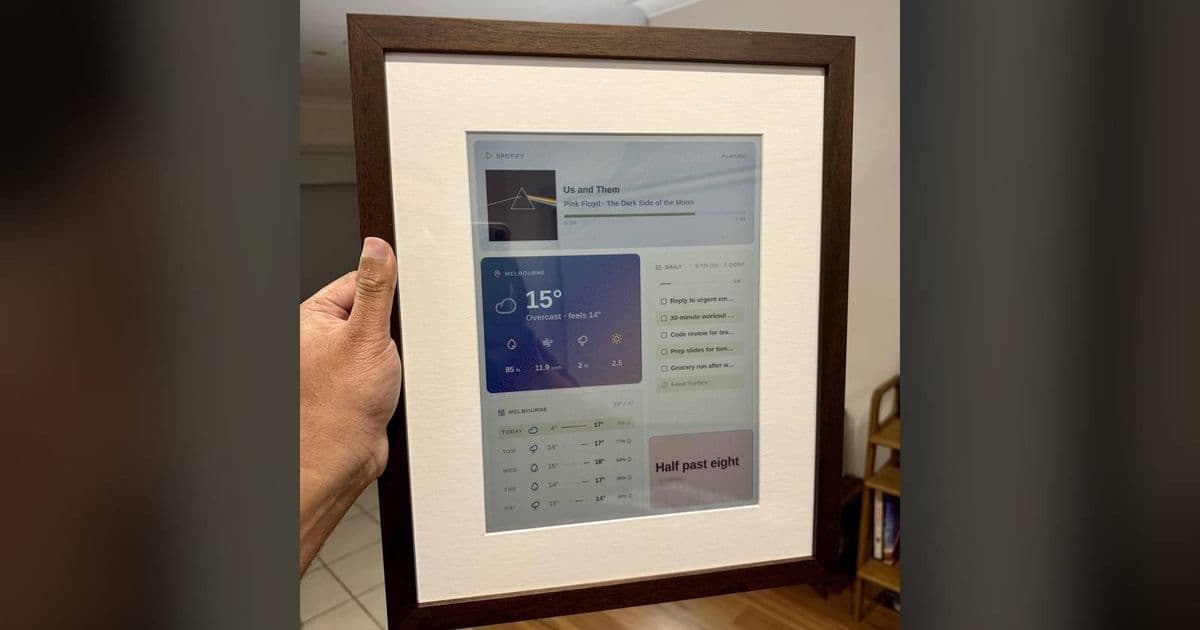
A maker paired Raspberry Pi hardware with an e-ink panel to build a framed display for art and status screens. Developers can use the code as a low-power canvas for dashboards and build monitors.
Simon Batt wrote for XDA on June 15 about a Raspberry Pi e-ink frame that hangs like wall art and runs open source software.
Platform update
The build puts a Raspberry Pi behind an e-ink panel and hides the electronics inside a picture frame. The result reads like decor until the owner changes the image feed, schedule or renderer.
A Raspberry Pi gives the project a full Linux userspace, network stack and package manager. A builder can fetch images over Wi-Fi, render text with system fonts, cache assets on disk and run a local endpoint for updates.
Raspberry Pi's official docs cover the core platform pieces. Raspberry Pi Imager flashes Raspberry Pi OS, and the getting started guide covers setup, networking and configuration. Builders who use SPI panels should read the SPI documentation, since many e-ink HATs use SPI plus GPIO pins for reset and data control.
The current Raspberry Pi OS downloads page lists a 64-bit image dated April 21, 2026, with Debian 13 Trixie, kernel 6.12 and 3,080 MB of storage for Lite. That gives new builders a clean baseline. Legacy images use Debian 12 Bookworm for older deployments.
Open source software matters here because developers can inspect the refresh path, replace the image source and change the schedule. A Python 3 stack can use Pillow for image composition, a vendor driver for the panel and a service manager for boot-time refreshes. Builders should pin dependencies inside a Python virtual environment, then run the job through systemd or cron.
E-ink changes the product shape. LCD frames burn power to keep pixels lit. E-ink panels hold an image after refresh, so the Pi can update the screen at intervals and spend the rest of the time idle. Builders can use that trade for art, calendar snapshots or build status. Animation and fast charts need another display type.
Developer impact
Developers get a hackable display target that behaves more like an embedded publishing surface than a monitor. You render a final bitmap, push it to the panel and accept the refresh cost. Developers benefit from clean layout code, stable data feeds and careful font choices.
The first design decision involves refresh cadence. A weather panel may update twice an hour. A CI monitor may update after each build. A framed art rotation may update at sunrise and evening. Each cadence changes the battery plan and cache rules. If the frame plugs into a wall, the developer can keep the Pi online. If the frame runs from a battery pack, the developer needs wake, fetch, render, refresh and shutdown steps.
The second decision involves color. E-ink panels support black and white, grayscale or limited accent colors. A dashboard that looks clean on a phone can collapse on a 1-bit panel. Developers should generate display-specific assets during the build step, then test them on the panel. Dithering can rescue photos. Text needs contrast, spacing and a font size that survives the panel's pixel density.
Cross-platform teams can treat the frame as a neutral output device. An iOS app, Android app, web backend or GitHub Actions workflow can publish the same JSON payload. The Raspberry Pi can render that payload into the frame's bitmap. Teams can keep Swift and Kotlin code out of the display driver, while the frame keeps working after mobile teams redesign app screens.
A good open source frame project should keep input handling apart from hardware writes. The input layer might read Home Assistant or a CI endpoint. The renderer should convert structured data into an image with fixed dimensions. The driver should own panel commands. Developers who keep those boundaries clean can swap a Waveshare-style panel for another e-ink module with less rewrite work. Waveshare's e-Paper wiki shows the range of panel sizes and driver boards that builders may encounter.
Maintainers can audit API keys, strip unused integrations and pin package versions. They can add a health endpoint that reports the last refresh time. They can log panel errors before the frame goes back on the wall. Those small choices save maintenance time after the first weekend build.
Migration
Builders who want to reproduce the idea should start with the platform, then choose the panel. A Raspberry Pi Zero 2 W can handle simple image fetch and render work with low power draw. A Raspberry Pi 4 or 5 gives more CPU headroom for image processing and local admin screens. The board needs Wi-Fi or Ethernet, enough storage for cached images and a power setup that fits inside the frame.
Install Raspberry Pi OS with Raspberry Pi Imager, enable SPI and SSH during setup, then boot the board on the bench before mounting hardware. Create a project directory, set up a Python virtual environment and install the panel vendor's library plus Pillow. Keep one script for rendering and one script for refresh. That split lets you generate a test image on macOS, Windows or Linux before you touch the e-ink panel.
A migration from an LCD dashboard starts with data format before UI porting. Export the dashboard's state as JSON: title, timestamp, status and one or two values. Render that data into a fixed canvas that matches the panel resolution. Test black-and-white output first. Add grayscale or color after the layout works.
Service setup comes next. Use a systemd service for one-shot refreshes and a timer for scheduled runs, or trigger the script from a webhook if your network allows it. Write logs to disk with size limits. Store the last good image so the frame can repaint after a reboot without reaching the network.
Developers should give security the same care as the picture frame. Put secrets in environment files with restricted permissions. Avoid a public update endpoint from a device on your home network. If you need remote updates, push content from a server the Pi trusts, or use a private VPN.
The XDA post points to a useful direction for DIY displays: make the hardware disappear and keep the software open enough for developers to adapt. A framed e-ink panel can show art today and a release dashboard tomorrow, as long as the project keeps the rendering layer and panel driver apart.
Comments
Please log in or register to join the discussion