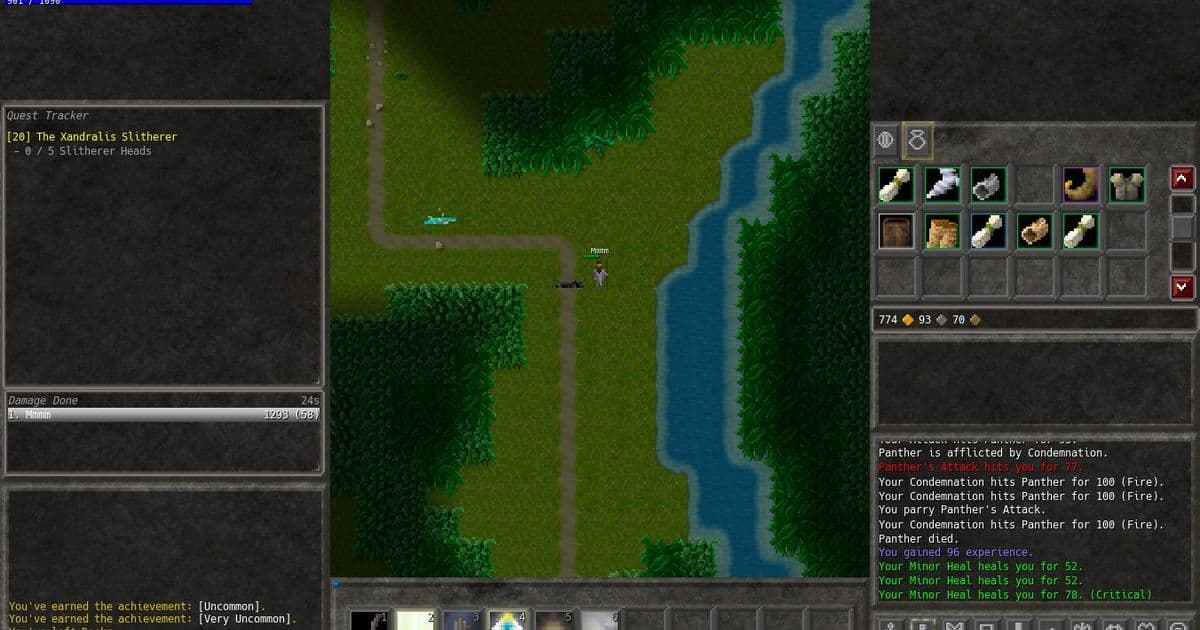
A deep dive into the technical journey of adding true offline mode and custom‑server support to the Trolddom MMORPG, covering architecture, microservice refactoring, fake sockets, SQLite migration, authentication challenges, and lessons for future game designs.
Making an Always‑Online MMORPG Kill‑Proof: Offline Play and Player‑Hosted Servers
Published 2025‑08‑20 by Rasmus
Why Bother?
The modern business model for multiplayer games leans heavily on live‑service revenue streams, which forces most titles to stay permanently connected to proprietary back‑ends. That approach alienates a growing segment of players who value ownership, longevity, and the ability to run a game without a third‑party service that might disappear tomorrow. For a solo‑developer‑driven MMORPG like Trolddom, the question was not whether the effort was justified from a profit perspective, but whether the technical challenge was interesting enough to merit a summer‑long experiment.
Existing Architecture – A Quick Tour
Trolddom was built as a collection of microservices that communicate over TCP. The startup sequence looks roughly like this:
- Steam ticket – the client obtains an encrypted ticket that proves ownership.
- Gateway – validates the ticket, creates an auth token, and queries a PostgreSQL database for the player account.
- Realm service – loads persistent world data from a Blob store, applies a lock, and presents a list of realms.
- Game server – spawns the player into a map instance, locks character data, and periodically writes updates back to the Blob.
- Messaging switchboard – enables asynchronous chat, invites, and party coordination.
All services rely on two shared infrastructure components:
- Blob – a key/value store (Jelly) for large binary blobs such as map state.
- Lock – a distributed lock service that prevents concurrent writes.
The diagram below (taken from the original blog) shows the single‑process developer mode that runs every microservice inside one executable:
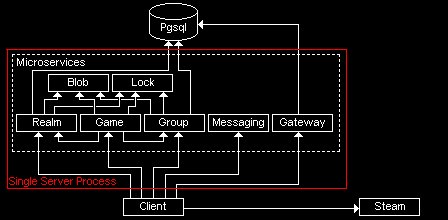
In that mode the client, gateway, realm, and game server all live in the same address space, which makes debugging trivial: press F5 in Visual Studio and the whole world comes up.
From Online‑Only to Offline‑Ready
1. Removing the Network Layer
The most intrusive part of the system is the socket plumbing. Each microservice has a thin client wrapper (e.g., GatewayClient) that owns a TCPConnection. Re‑architecting the whole stack to use a message‑bus abstraction would have been overkill, so the solution was to replace the low‑level socket calls with a fake‑socket library that mimics the Unix socket API but only works inside the same process. The library implements the subset needed for non‑blocking IPv4 TCP streams, allowing the existing client code to compile unchanged while all traffic stays in‑memory.
2. Swapping PostgreSQL for SQLite
Steam authentication and many gameplay features depend on a relational store. Deploying a full PostgreSQL instance on every player's machine was unrealistic, so the codebase was refactored to expose a IDatabase interface with two concrete implementations:
PostgresDatabase– the production backend.SQLiteDatabase– an embedded, file‑based fallback used for offline and custom‑server modes.
Because the original schema contained 14 tables with mixed data types, a pragmatic simplification was adopted: all columns are stored as TEXT, and the primary key (account_id) remains an auto‑increment integer. During initialization the SQLite backend adds any missing columns, which means schema migrations become a matter of appending new column names to a list.
Note: The shared‑ID generation used by the
GroupandRealmservices conflicted when both tried to write to the same SQLite file concurrently. Since the services now run in the same process, a quick mutex around the ID generator solved the problem, albeit with a bit of spaghetti code.
3. Authentication Without Steam
Offline mode cannot rely on Steam's encrypted tickets, because the secret key required to validate them cannot be shipped with the client. The gateway therefore gained a guest login path that creates a temporary Steam‑ID‑like identifier without any external verification. For custom servers the same path is used by default, with an optional lightweight username/password scheme that skips email verification and two‑factor checks. This keeps the barrier low for hobbyist hosts while still providing a unique identifier for each player.
4. User‑Facing Switches
A command‑line flag (-offline_mode) would have been functional but unfriendly. Instead, a minimal UI was added to the launcher, presenting three options:
- Online (official) – connects to the public gateway.
- Offline – spins up the entire server stack locally using fake sockets and SQLite.
- Custom Server – prompts for an IP address and launches the same stack against a remote executable.
When the player selects Offline, the launcher starts the embedded server modules, the client connects via the fake‑socket layer, and the game proceeds as if it were online, minus any features that depend on external services (e.g., auction house, guild chat).
Custom Server Deployment
Running a personal Trolddom server is essentially the same binary that powers the official Linux backend, compiled for Windows. The steps are:
- Download the
trolddom_server.exerelease. - Place the executable next to the game client.
- Launch the server; it will automatically create an SQLite database in the working directory.
- In the client launcher, choose Custom Server and enter the host's IP address.
Because the server still expects the same port layout as the official services, users must forward a handful of TCP ports on their router. No NAT traversal or relay is provided, which keeps the implementation simple and mirrors the original architecture.
Lessons Learned
| Area | What Worked | What Fell Short |
|---|---|---|
| Planning | Keeping client and server code in the same language (C++) made in‑process embedding trivial. | Adding offline support after the fact required many invasive changes; a network abstraction layer would have reduced friction. |
| Authentication | Steam tickets provide a frictionless login for the official service. | Relying exclusively on Steam makes it hard to support self‑hosted environments without exposing secret keys. |
| Data Storage | SQLite is perfect for a single‑player or small‑hosted scenario; the text‑column schema avoided complex migrations. | Sharing a single SQLite file across multiple microservices introduced concurrency bugs that needed manual locking. |
| Microservice Design | The module manager allowed all services to run in one process, simplifying debugging. | If one service crashes, the whole process goes down – isolation would be preferable for a production server. |
| User Experience | Adding a simple UI selector prevented the game from failing immediately when the official servers are unavailable. | The UI is functional but far from polished; a dedicated settings screen would improve discoverability. |
Takeaway for Future Projects
- Design for flexibility early. Even if you intend a live‑service model, expose configuration hooks for alternative authentication and storage back‑ends.
- Abstract network I/O. A thin message‑passing layer (e.g., using a
ITransportinterface) lets you swap real sockets for in‑process channels without touching business logic. - Prefer embedded databases for local play. SQLite works well when you can tolerate slower queries and lack of concurrent writers.
- Separate concerns. Keep microservices isolated when possible; a crash in one should not bring down the entire server.
- Document the launch process. Clear, step‑by‑step instructions for custom servers lower the barrier for community‑run worlds.
Looking Ahead
The offline mode is now stable enough for daily use, and a handful of community members have already set up private servers. The next milestone is to provide a lightweight web UI for managing accounts on custom servers, which would give hobbyists a more polished experience without re‑introducing the complexity of full‑scale email‑based authentication.
If you are interested in trying the offline build or hosting your own server, the binaries and source code are available on the project’s GitHub repository:
Read other posts:
← Modding Trolddom: Getting Started
→ State of the Game
Comments
Please log in or register to join the discussion