Windows Autopatch is enabling hotpatch security updates by default for eligible devices starting with the May 2026 Windows security update, allowing organizations to achieve 90% compliance in half the time without requiring restarts.
Microsoft is making a significant change to how Windows devices receive security updates by enabling hotpatch updates by default starting with the May 2026 Windows security update. This shift aims to help organizations secure their devices faster by applying critical security fixes without requiring system restarts.
The Hotpatch Advantage
When Windows publishes monthly security updates to address common vulnerabilities and exposures (CVEs), IT administrators traditionally had to wait for devices to restart before updates took effect. This waiting period typically lasted 3-5 days after installation before forcing restarts to apply the patches.
Hotpatch updates fundamentally change this process. Security updates take effect immediately upon installation, eliminating the restart requirement. This approach has already proven successful, with over 10 million production devices currently enrolled in hotpatch updates.
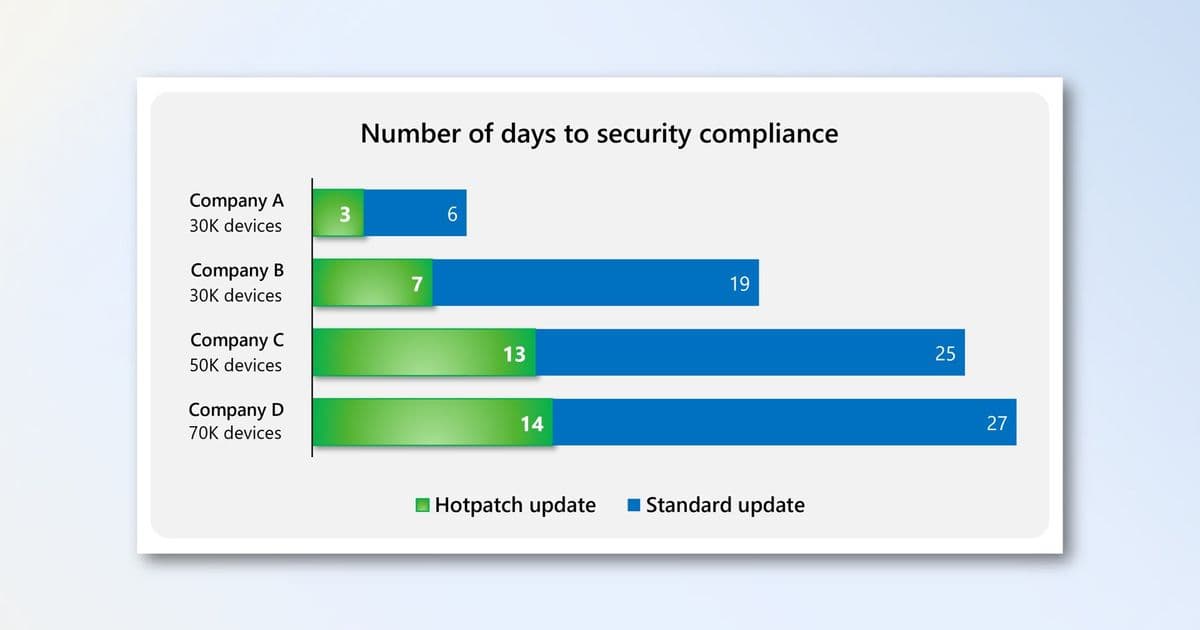
Real-world data demonstrates the impact: four companies with 30,000 to 70,000 devices reported achieving 90% patch compliance in half their previous time without changing any policies. The efficiency gains come from removing the restart bottleneck that previously delayed security compliance.
How Hotpatch by Default Works
Starting with the May 2026 Windows security update, Windows Autopatch will enable hotpatch updates automatically for eligible devices through both Microsoft Intune and the Windows updates API in Microsoft Graph.
Here's what this means in practice:
- All update policies in Microsoft Intune depend on Windows Autopatch
- The default tenant setting applies only to devices not assigned to quality update policies
- Windows Autopatch respects existing quality update policy configurations
- Update deferrals and update ring settings remain honored
- Hotpatch updates apply only to devices meeting specific prerequisites
Devices that don't meet hotpatch prerequisites will continue patching as they do today.
Timeline and Implementation
For devices meeting prerequisites that have already taken the April 2026 security update (a baseline update), hotpatch updates will begin with the May 2026 security update. Organizations can use new Windows Autopatch update readiness tools to verify hotpatch enrollment status.
Hotpatch updates are applied from the latest baseline release. If a device is enrolled in hotpatch updates but hasn't yet received the latest baseline, Windows Autopatch first installs the baseline update, which requires a restart. Once on the latest baseline, devices receive subsequent hotpatch updates without restarts.
Monitoring Hotpatch Readiness
Before the May 2026 rollout, organizations can review the Hotpatch quality updates report in Intune to see which devices have hotpatch updates enabled and meet prerequisites. The report shows devices ready for hotpatch in the "Hotpatch ready" column and successfully patched devices in the "Hotpatched" column.
The Quality update status report also provides visibility, with a new "Hotpatch enabled" column showing each device's status.
Opting Out If Needed
Microsoft recommends keeping hotpatch updates enabled, as they represent the fastest path to device security. However, organizations not ready for this change have options.
Starting April 1, 2026, new controls become available:
Tenant-level opt-out: Configure the default hotpatch behavior in Microsoft Intune under Tenant administration > Windows Autopatch > Tenant management > Tenant settings. Toggle the "When available, apply updates without restarting the device (hotpatch)" setting to Block.
Group-level opt-out: Assign devices to quality update policies to override the tenant default. Create a Windows quality update policy in Intune under Devices > Manage updates > Windows updates, then set the hotpatch toggle to Block.
Organizations have until May 11, 2026 to make these changes, as April is a hotpatch baseline month.
Prerequisites and Next Steps
Hotpatch updates only apply to devices meeting specific requirements. Organizations should verify device eligibility before the May 2026 rollout. The Windows Autopatch frequently asked questions (FAQ) provides detailed information about prerequisites and implementation.
This change represents Microsoft's commitment to accelerating security compliance across enterprise environments, potentially cutting the time to secure devices by 50% while maintaining administrative control over update policies.
Comments
Please log in or register to join the discussion