Microsoft introduces a revamped Defender deployment tool for Windows that embeds onboarding packages in a single .exe, adds configurable expiry dates, and provides detailed telemetry to improve security posture and reduce misconfiguration risks.
Microsoft has unveiled a significant update to its Defender deployment tool for Windows, aiming to simplify and secure the onboarding process for both modern and legacy devices. The new experience embeds all necessary onboarding information within a single, downloadable .exe file, eliminating the need for separate onboarding files and reducing the risk of misconfiguration or accidental duplication of devices. This update is particularly timely, as Microsoft Threat Intelligence research indicates that in the majority of ransomware attacks, the spreader machine was a device that was not yet onboarded to Defender.
What’s New in the Defender Deployment Tool
The updated Defender deployment tool introduces several key features designed to improve transparency, control, and security:
- Single, Runnable .exe: The onboarding package and all related information are embedded within a downloadable .exe, removing the need for separate onboarding files.
- Silent and Non-Interactive Options: Supports large-scale deployments using tools like Group Policy or Configuration Manager.
- Custom Package Identifiers: Helps track and manage onboarding packages across your organization.
- Configurable Expiry: Onboarding packages can now expire after 1 day, 7 days, or a custom amount up to one year, reducing the risk of unauthorized usage.
- Customizable Name Identifiers and Keys: Increases control and visibility over the onboarding process.
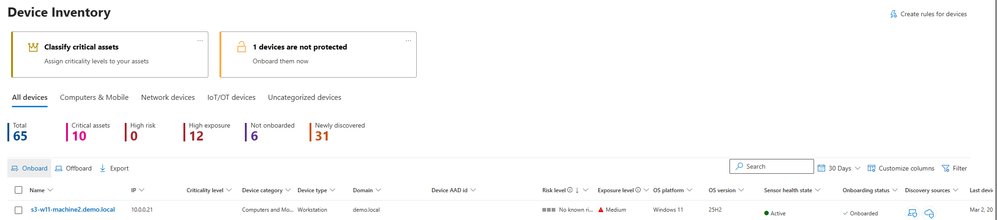
- New Portal Entry Points: Makes it easier to find the right onboarding and offboarding method for Windows, including directly from the device inventory page.
Enhanced Security and Transparency
The new experience moves away from using scripts and loose blobs, making it more difficult for unauthorized users to onboard devices. For the first time, administrators can set custom expiry dates on onboarding packages, protecting against unwanted onboarding and compliance issues. Expiry reduces the likelihood of unauthorized package usage, especially when combined with the new portal-provided key required to complete the onboarding process.
Deployment tool events are now available in the device timeline and advanced hunting tabs, providing increased transparency into onboarding progress and errors. The new deployment packages page allows administrators to see their organization's onboarding packages at a glance, with the ability to filter by active or expired packages and hide packages no longer needed.
How to Get Started
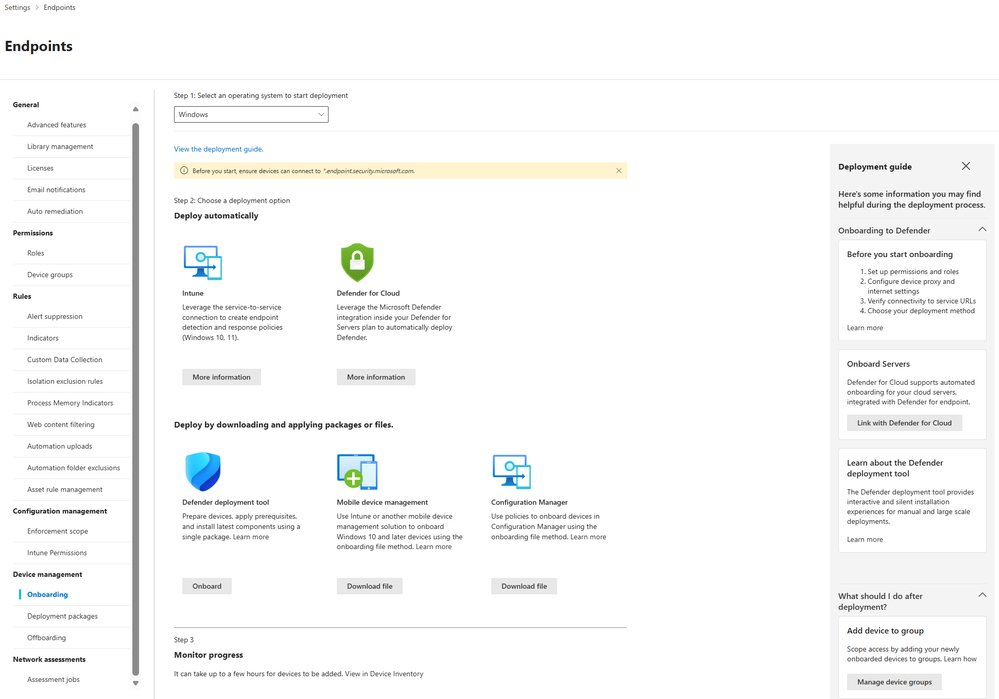
To experience the next iteration of the Defender deployment tool for Windows, navigate to Settings > Endpoints > Onboarding > Windows, or jump there directly from the device inventory page. There, you'll find the newly designed onboarding page in the Defender portal, complete with on/offboarding guides. Select the Defender deployment tool from the options shown.
For Linux devices, the Defender deployment tool is also available. Microsoft is committed to continuing to make it easier to onboard devices to Defender across platforms.
Business Impact
This update addresses common challenges faced by IT administrators, such as complex onboarding steps that differ by OS, accidental device duplication, and incorrect initial configuration settings. By providing a more predictable and transparent onboarding experience, Microsoft aims to help organizations strengthen their security posture and reduce the risk of ransomware attacks.
The ability to set expiry dates on onboarding packages and the requirement for a portal-provided key add an extra layer of security, ensuring that only authorized devices can be onboarded. The detailed telemetry and new deployment packages page also make it easier to track and manage the onboarding process, improving overall visibility and control.
Learn More
For detailed guidance on deploying Microsoft Defender endpoint security to Windows and Linux devices using the Defender deployment tool, visit the Microsoft Learn documentation. To stay updated on Microsoft Security solutions, bookmark the Microsoft Security Blog and follow Microsoft Security on LinkedIn and X.
This update represents a significant step forward in making endpoint security more accessible and manageable for organizations of all sizes, helping to ensure that all devices are properly protected against evolving threats.
Comments
Please log in or register to join the discussion