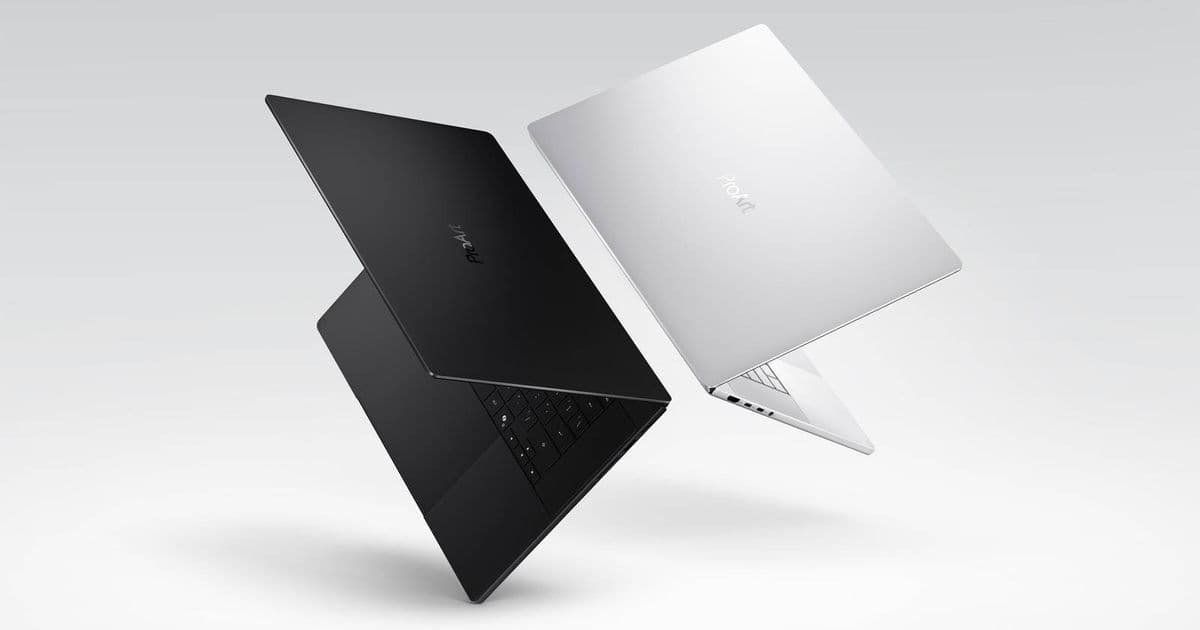
Asus unveiled the ProArt P16 and P14 laptops, the first Windows 11 creator machines powered by Nvidia’s Arm‑based RTX Spark chip. With up to 6,144 Blackwell RTX cores, 128 GB of unified LPDDR5X memory and 1 PFLOP of AI throughput, the devices promise a new tier of on‑device machine‑learning performance for creators, while also raising questions about SDK compatibility, driver support and cross‑platform development.
 )
)
New hardware, new platform
Asus announced three RTX Spark‑powered devices on June 1: the ProArt P16, the ProArt P14, and a compact ProArt Mini PC. Both laptops run Windows 11 on Arm and are built around Nvidia’s freshly released RTX Spark SoC, a custom Arm‑v9 CPU paired with a Blackwell‑based RTX GPU. The P16 packs up to 6,144 RTX cores, 128 GB of unified LPDDR5X RAM and a 16‑inch 4K Tandem OLED panel that can hit 1,600 nits. The P14 scales the design down to a 14‑inch 3K HDR display at 120 Hz, but retains the same core architecture.
“We designed the ProArt line as a premium AI‑first platform for creators who need real‑time inference on the go,” said an Asus spokesperson.
While pricing and availability remain undisclosed, the hardware specs alone make these the most powerful Windows Arm laptops announced to date.
Why the SDK version matters
Nvidia’s RTX Spark is the first Arm‑based GPU that supports the full CUDA 13 toolchain. The official CUDA release notes list CUDA 13.2 as the minimum version that includes Arm64 binaries for the new Blackwell cores. Developers targeting the ProArt machines will need to:
- Install the CUDA 13.2 (or later) toolkit from the Nvidia developer site.
- Use the Nvidia Nsight Systems and Nsight Compute versions that explicitly list RTX Spark support (Nsight 2024.2+).
- Update any third‑party libraries (cuDNN, TensorRT, NCCL) to the Arm‑compatible builds, which are now hosted under the Arm64 download tab.
Older CUDA versions (e.g., 12.x) will compile for x86_64 but will fail at runtime on the Arm‑based SoC, leading to cryptic “unsupported device” errors.
Platform requirements on Windows 11 Arm
The ProArt laptops ship with Windows 11 version 24H2 pre‑installed. This build includes the Windows Subsystem for Linux (WSL) 2 kernel version 6.9, which now supports direct GPU pass‑through for Arm devices. To take advantage of the full AI stack:
- Enable WSL 2 and install the Ubuntu 24.04 distribution from the Microsoft Store.
- Inside WSL, install the CUDA 13.2 Linux package for aarch64.
- Verify GPU visibility with
nvidia-smi– it should report a RTX Spark device with a compute capability of 9.0.
Developers can also run native Windows 11 apps compiled for ARM64. Visual Studio 2022 v17.12 adds a “Windows ARM64” target platform and includes the Microsoft C++ ARM64 compiler. When combined with the CUDA Toolkit, you can produce mixed‑language binaries that call into CUDA kernels from a Win32 UI.
Cross‑platform considerations for creators
1. Library compatibility
Most deep‑learning frameworks (PyTorch 2.3, TensorFlow 2.16) have released Arm64 wheels that leverage CUDA 13. However, some niche libraries—especially those built on older CUDA APIs—still lack Arm support. In those cases, developers may need to:
- Re‑compile the library from source with the
-DCUDA_ARCHITECTURES=90flag. - Use ONNX Runtime as an intermediate format; it supports hardware‑accelerated inference on RTX Spark via the DirectML backend.
2. Memory model differences
The unified LPDDR5X pool means the CPU and GPU share the same address space, similar to Apple’s M‑series. This eliminates explicit data copies but requires careful memory‑pinning to avoid page‑fault stalls. Nvidia’s Unified Memory APIs now expose a cudaMemAdvise call that can hint at read‑only or read‑most‑often regions—useful for large texture assets in video‑editing pipelines.
3. Power and thermal constraints
Even though the P16 is only 12.9 mm thick, the RTX Spark can sustain ~90 W of GPU power for short bursts. Developers should design workloads to respect the Dynamic Power Management (DPM) thresholds exposed through the Windows Power API. Throttling can be monitored via the PowerReadACValueIndex call, and workloads can be scaled back using CUDA’s stream priority features.
4. Testing on other Arm devices
Because Nvidia is also shipping RTX Spark to the Microsoft Surface Laptop Ultra, you can use that device as a secondary test platform. For broader coverage, consider testing on Qualcomm Snapdragon X Elite tablets (which run the same Windows 11 Arm build) to verify fallback paths when certain Blackwell features are unavailable.
Migration path for existing Windows x86_64 creators
If you already have a Windows x86_64 codebase that relies on CUDA, the migration steps are:
- Add an ARM64 build configuration in your CI pipeline (GitHub Actions now offers
windows-latest-arm64). - Update your CMake toolchain to point to the ARM64 compiler (
cl.exe /arch:ARM64). - Switch to the new CUDA toolkit and adjust any hard‑coded compute capability flags.
- Run unit tests in WSL to catch any ABI mismatches early.
- Profile with Nsight on the ProArt hardware to identify any performance regressions.
Because the RTX Spark’s architecture is largely compatible with existing Blackwell GPUs, most kernel code will run unchanged after recompilation. The biggest surprises usually come from pointer‑size differences and the need to align data structures to 128‑bit boundaries for optimal DMA.
What this means for the creator ecosystem
The ProArt P16/P14 demonstrate that high‑end AI workloads can now live on thin, portable Windows laptops without resorting to external eGPUs. For developers building video‑effects plugins, real‑time upscaling tools, or AR/VR pipelines, the ability to ship a single binary that runs on both x86_64 and Arm64 Windows machines simplifies distribution.
At the same time, the shift pushes the entire Windows developer community to adopt the newer CUDA 13 stack and to familiarize themselves with Arm‑specific debugging tools like WinDbg ARM64 and LLDB inside WSL.
Looking ahead
Nvidia has hinted at a second‑generation RTX Spark with 12,288 cores slated for 2027, and Asus is already teasing a ProArt Studio X workstation that will combine the chip with a detachable GPU dock. For now, the P16 and P14 give early adopters a glimpse of what “premium AI” looks like on a truly portable Windows platform.
Sources: Asus Press Release, Nvidia CUDA Toolkit 13.2 Release Notes, Microsoft Surface Laptop Ultra announcement.
Comments
Please log in or register to join the discussion