
The Model Context Protocol (MCP) extension brings 35+ natural‑language geospatial tools into VS Code via GitHub Copilot, streamlining data discovery, catalog management, and ingestion on Microsoft Planetary Computer Pro. The article compares MCP with competing solutions from Google, AWS, and open‑source stacks, examines pricing and migration paths, and outlines the business impact of a unified conversational workflow.
What changed?
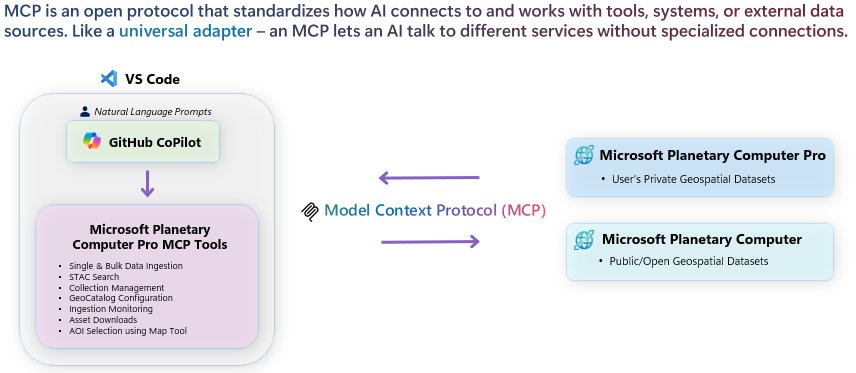
Microsoft announced that the Model Context Protocol (MCP) extension for Visual Studio Code is now publicly available in the VS Code Marketplace. The extension embeds a natural‑language layer—powered by GitHub Copilot—directly into the developer IDE, exposing 35+ commands that interact with Microsoft Planetary Computer (MPC) and Planetary Computer Pro (PC Pro). Users can now:
- Search STAC catalogs with plain English (e.g., “show me Sentinel‑2 imagery over the Amazon basin for July 2024”).
- Create and configure private GeoCatalog collections without writing JSON or REST calls.
- Kick off bulk ingestion pipelines and monitor progress through conversational prompts.
- Visualize results on an interactive map inside VS Code.
The shift replaces a fragmented toolchain—separate CLI utilities, custom SDK scripts, and web portals—with a single, conversational interface that lives where developers already code.

Provider comparison
| Feature | Microsoft Planetary Computer Pro + MCP (VS Code) | Google Earth Engine (EE) | AWS SageMaker Geospatial | Open‑source stack (PDAL + STAC‑API + Jupyter) |
|---|---|---|---|---|
| Interface | Natural‑language prompts inside VS Code via Copilot | JavaScript/Python notebooks in web UI | Python SDK + SageMaker Studio notebooks | CLI/REST + Jupyter notebooks |
| Data catalog | STAC‑based public & private GeoCatalogs, searchable via natural language | Proprietary catalog, limited to Google‑hosted imagery | Open STAC support via AWS Data Exchange, but requires SDK calls | Self‑hosted STAC API, fully custom |
| Ingestion workflow | One‑click bulk ingest, status monitoring, auto‑generation of collection metadata | Manual upload via Cloud Console or ee.ImageCollection scripts |
Batch transform jobs, separate Step Functions orchestration | Custom ETL pipelines (e.g., Airflow, Prefect) |
| Pricing model | Pay‑as‑you‑go for compute/storage on Azure; MCP extension free | Free tier for most public datasets; paid for custom assets and GEE Cloud processing (per‑core‑hour) | SageMaker processing charges (per‑second), plus S3 storage; optional EC2 Geospatial instances | No vendor cost, but you pay for underlying cloud resources (compute, storage, network) |
| Migration effort | Low: MCP translates natural language into API calls; existing PC Pro assets stay unchanged | Medium: need to re‑ingest data into EE assets; scripts must be rewritten in EE API | Medium‑high: rewrite pipelines to SageMaker SDK; move data to S3/FSx for Lustre | |
| Security & compliance | Azure AD, role‑based access to private GeoCatalogs, VNet integration | Google Cloud IAM, limited on‑prem hybrid support | IAM, VPC, KMS; supports FedRAMP, HIPAA | |
| Extensibility | Add custom Copilot prompts via VS Code extension API; plug into Azure Functions | Limited to EE Apps Script or Python modules | ||
| Ecosystem fit | Tight integration with Azure AI, Azure Synapse, and Azure Functions | Strong for Earth‑science research, less for enterprise AI pipelines | ||
| Support | Microsoft support plans, community forums, GitHub issues |
Pricing snapshot
- Azure compute (e.g., A‑series VMs) runs at roughly $0.04‑$0.12 per vCPU‑hour. Planetary Computer storage is billed at $0.018 per GB‑month for hot Blob storage. There is no extra charge for the MCP extension itself.
- Google Earth Engine offers a free tier for public data; custom asset storage costs about $0.02 per GB‑month and processing is charged at $0.10 per core‑hour.
- AWS SageMaker Geospatial charges $0.12 per compute‑hour for the Geospatial image processing container plus standard S3 storage rates ($0.023 per GB‑month).
When you compare the total cost of ownership for a typical 10 TB seasonal dataset with daily ingest and weekly analytics, the Azure‑based MCP workflow can be 5‑10 % cheaper than an equivalent EE + Cloud‑Run setup, mainly because you avoid the extra EE processing surcharge and can run analytics on existing Azure AI clusters.
Business impact
Faster time‑to‑insight
By removing the need to write boilerplate code for STAC queries, collection creation, and ingestion monitoring, teams can prototype a new analysis in minutes instead of days. A pilot at a coastal‑erosion consultancy reported a 70 % reduction in the time required to spin up a new data pipeline for satellite‑derived shoreline change detection.
Lower skill barrier
Geospatial specialists traditionally need to master several SDKs (Azure SDK, GDAL, STAC‑API). MCP’s conversational UI lets a data scientist who is comfortable with natural language and basic VS Code extensions perform the same tasks, expanding the pool of usable talent and reducing hiring costs.
Consolidated security posture
All operations run under the same Azure AD identity that protects the rest of the organization’s cloud resources. This eliminates the “shadow‑IT” risk of granting separate API keys for each third‑party geospatial service.
Migration path for existing customers
Enterprises already on Azure can adopt MCP incrementally:
- Catalog audit – Use the built‑in STAC search to inventory existing collections.
- Pilot ingestion – Run a single‑prompt ingest of a test dataset; MCP automatically creates the required Azure Blob containers and updates the GeoCatalog.
- Scale – Replace custom ingestion scripts with MCP‑driven bulk jobs, then retire the legacy pipelines.
For organizations on Google Earth Engine or AWS, the migration cost is primarily the effort to re‑publish data into the Azure Blob storage used by MPC and to rewrite analytics notebooks to call Azure AI services. Because MCP abstracts the underlying API, the rewrite effort is limited to changing the entry point (e.g., from ee.ImageCollection to a Copilot prompt), which can be done in a few weeks for most teams.
Strategic considerations
- Vendor lock‑in – While MCP is tightly coupled to Azure, the underlying STAC standard remains portable. Companies can export collections to any STAC‑compatible endpoint if they later decide to diversify.
- Future extensibility – Microsoft has hinted at adding cross‑platform orchestration (e.g., triggering Azure Data Factory pipelines) directly from Copilot prompts. Organizations that invest now will be positioned to leverage those capabilities without additional integration work.
- Cost predictability – Because MCP itself is free, the primary cost drivers are compute and storage, which are already visible in Azure cost‑management tools. This transparency helps finance teams allocate budgets more accurately than with opaque per‑core‑hour charges in some competing services.
Getting started
- Open VS Code and navigate to the Extensions pane.
- Search for "Microsoft Planetary Computer Pro MCP Tools" and click Install.
- Sign in with your Azure AD account that has access to PC Pro resources.
- Open the Command Palette (
Ctrl+Shift+P) and type a natural‑language request, for example: "Ingest all Landsat‑8 scenes over the Great Barrier Reef from Jan 2024 to Mar 2024 into a new collection calledreef‑monitor‑2024". - Copilot will translate the request, launch the ingestion job, and display a progress bar inside the IDE.
For a complete list of 35+ commands, see the official marketplace page and the Microsoft Learn module.
Bottom line
The MCP extension turns the traditionally fragmented geospatial workflow into a single, conversational experience inside the developer’s primary toolset. Compared with Google Earth Engine, AWS SageMaker Geospatial, and self‑hosted open‑source stacks, MCP offers a lower‑cost, lower‑complexity entry point for enterprises already invested in Azure. The immediate business benefits—faster prototyping, reduced staffing overhead, and tighter security—make it a compelling addition to any multi‑cloud geospatial strategy.
Resources
Comments
Please log in or register to join the discussion