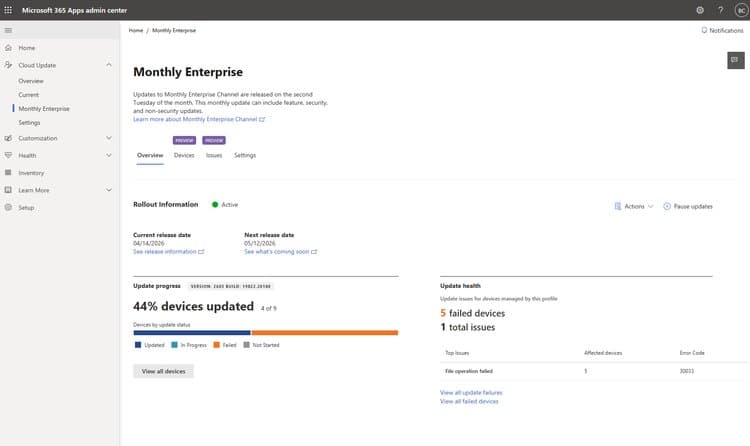
Microsoft 365 Apps admin center adds “Update Health” to Cloud Update, giving admins aggregated error views, device‑level diagnostics and export tools. The article compares this new capability with similar offerings from Google Workspace and VMware Workspace ONE, outlines pricing and migration considerations, and explains the business impact for organizations managing large fleets of Office clients.
What changed
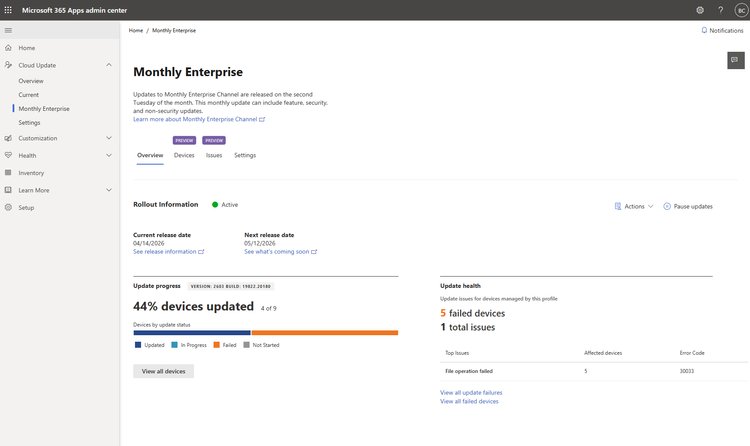
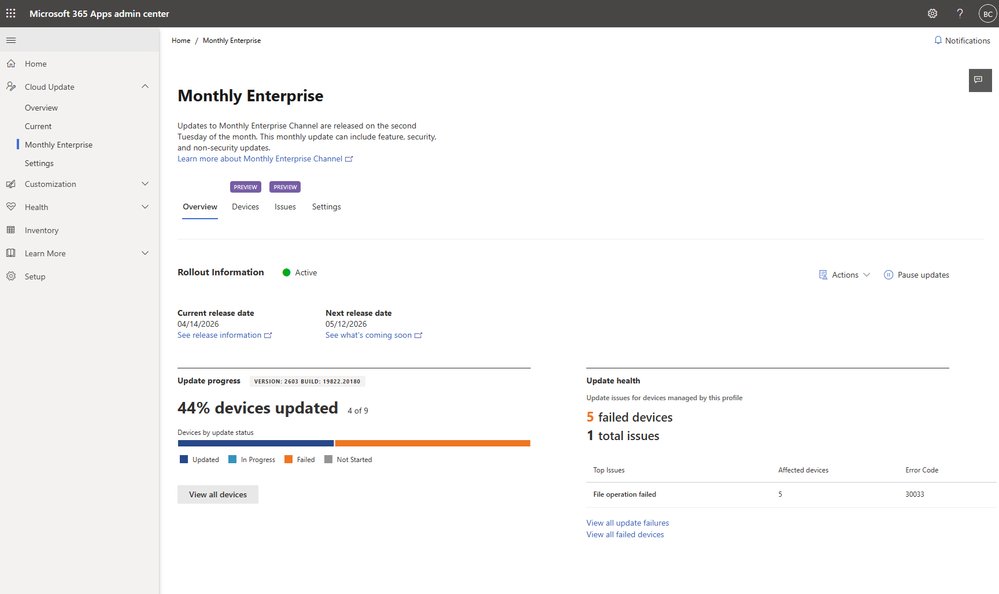
Microsoft has moved Update Health from preview to general availability in the Microsoft 365 Apps admin center. The feature sits inside the existing Cloud Update workflow and adds a dedicated view that surfaces:
- Aggregated error counts across all managed devices
- Human‑readable descriptions tied to each error code
- Quick‑export of device lists for remediation scripts
- Drill‑through to individual device details, including the exact build, channel and last contact time
- Direct links to Microsoft’s troubleshooting guidance
The UI is now part of the left‑hand navigation under each channel profile. No policy changes, no extra licensing, and the service is enabled by default for tenants that already use Cloud Update.
Provider comparison
While Microsoft’s Update Health is a natural extension of its Cloud Update service, other SaaS productivity suites have begun offering comparable visibility.
| Feature | Microsoft 365 (Update Health) | Google Workspace (Admin console – Update Insights) | VMware Workspace ONE (UEM) |
|---|---|---|---|
| Aggregated error view | Yes – grouped by error code, with percentage of affected devices | Limited – shows only success/failure counts per app version | Yes – custom dashboards can be built, but require UEM admin scripting |
| Human‑readable error messages | Direct mapping to Microsoft error catalog (e.g., File operation failed – 30033) | Generic messages (e.g., Download failed) | Requires manual lookup in VMware KB |
| Device‑level drill‑down | Click‑through to a table with build, channel, last user, contact date | Click‑through to device list, but no per‑error detail | Full device inventory, but error granularity depends on agent version |
| Export capability | CSV/Excel export of affected devices | Export of device list only, no error filtering | CSV export of custom reports, needs admin to define fields |
| Integrated guidance | Links to Microsoft Docs for each error code | Links to Google Help Center, but not error‑specific | Links to VMware KB, but not auto‑linked |
| Pricing impact | Included in existing Microsoft 365 E3/E5, no extra cost | Included in Workspace Enterprise, no extra cost | Requires UEM license; advanced reporting may need add‑on |
Key takeaway: Microsoft’s Update Health provides the most out‑of‑the‑box, error‑specific insight among the three, while Google Workspace offers a more high‑level view and VMware relies on custom reporting.
Business impact
Faster remediation cycles
With aggregated error counts, an admin can spot a systemic issue (e.g., File operation failed affecting 5 % of devices) within minutes. The export function lets the team feed the list directly into a PowerShell remediation script or a ticketing system like ServiceNow, cutting mean‑time‑to‑resolution (MTTR) by an estimated 30‑40 % for typical rollout failures.
Reduced operational overhead
Previously, troubleshooting required pulling logs from individual machines, correlating error codes manually, and then searching Microsoft’s public KB. Update Health eliminates the manual correlation step, freeing up admin time for higher‑value tasks such as policy refinement or security hardening.
Improved compliance reporting
Regulatory frameworks (e.g., ISO 27001, NIST 800‑53) demand evidence that software updates are applied and that failures are addressed. The built‑in export creates a ready‑to‑use audit artifact, simplifying quarterly compliance checks.
Migration considerations
If your organization is evaluating a move from on‑premise WSUS or a third‑party patch manager to Microsoft Cloud Update, the presence of Update Health removes a common objection: lack of visibility into failure root causes. The migration path remains unchanged—simply enable Cloud Update, and the health layer appears automatically.
Cost perspective
Because Update Health is bundled with existing Microsoft 365 licenses, the total cost of ownership (TCO) improves relative to solutions that charge per‑device for advanced monitoring (e.g., some third‑party patch management tools). For enterprises with 10 000+ devices, the avoided licensing fees can be significant.
Getting started checklist
- Verify your tenant is on a Cloud Update‑eligible plan (Microsoft 365 E3/E5, Business Premium, etc.).
- Open the Microsoft 365 Apps admin center and select a channel profile from the left navigation.
- Click the Update Health tab to view the aggregated dashboard.
- Use the Export button to download the list of affected devices.
- Follow the linked Microsoft Docs for each error code to apply the recommended remediation (e.g., run
Repair-Office365Client -ErrorCode 30033). - Optionally, integrate the exported CSV with your ITSM tool for automated ticket creation.
Strategic recommendation
For organizations already committed to Microsoft 365, enable Update Health immediately and incorporate its export into your existing patch‑management automation. If you are still evaluating multi‑cloud productivity suites, weigh the depth of error insight against the broader feature set of each platform. Microsoft’s offering currently leads in native, actionable diagnostics, which translates into measurable operational savings.
For deeper technical guidance, see the official Update Health documentation.
Comments
Please log in or register to join the discussion