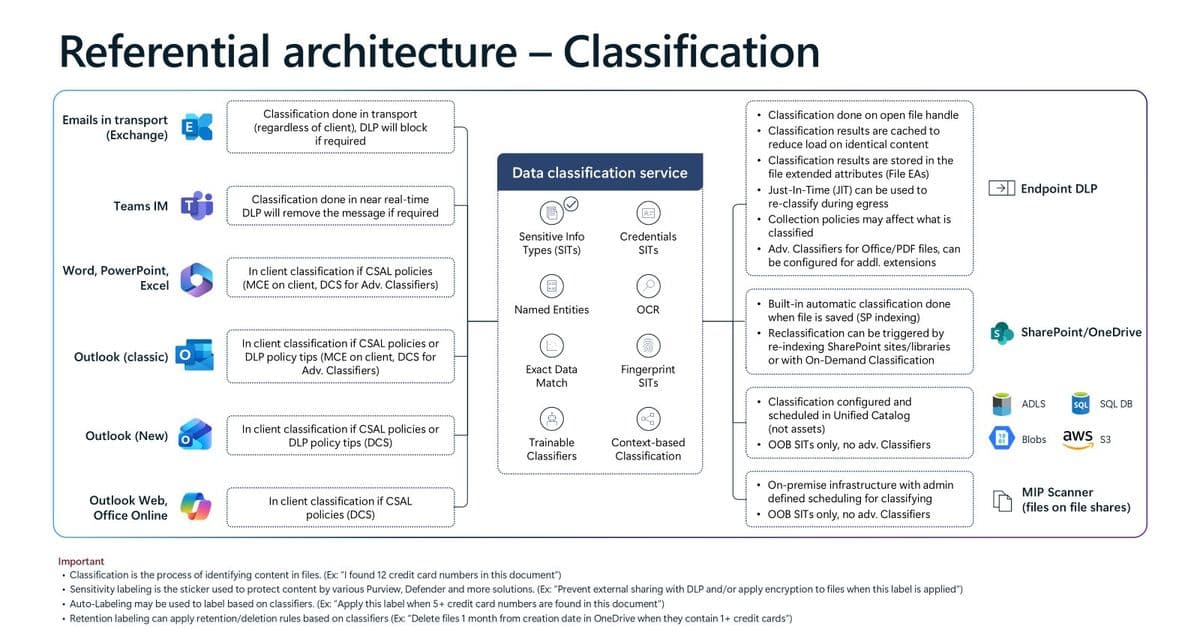
Microsoft has released detailed architecture diagrams showing how Purview's data protection controls work across Microsoft 365 workloads, providing organizations with a unified view of classification, labeling, DLP, and insider risk management.
Microsoft has published comprehensive architecture diagrams that provide a detailed view of how data protection controls operate across Microsoft 365 workloads. These diagrams, created by the Microsoft Purview Customer Excellence Engineering team, offer organizations a unified understanding of how classification, sensitivity labeling, Data Loss Prevention (DLP), and Insider Risk Management work together to protect sensitive data.
Understanding the Purview Architecture
The architecture diagrams serve as a referential guide rather than a prescriptive deployment model. They illustrate common architectural patterns used to protect sensitive data across endpoints, email, and collaboration services. The diagrams help organizations understand where policy evaluation occurs, how signals flow between services, and how enforcement is applied consistently.
Classification: The Foundation of Data Protection
The first diagram focuses on how content sensitivity is determined across Microsoft 365 workloads and connected locations. Content classification can occur in three places: the client, in transport, or in the service, depending on the workload and policy requirements.
Microsoft Purview supports multiple classifier types:
- Sensitive Information Types (SITs): Deterministic patterns and keywords
- Exact Data Match: Custom-defined data patterns
- Document Fingerprinting: Template-based classification
- Trainable Classifiers: Machine learning models for complex content
Classification happens in real-time or near real-time as content is created, modified, or transmitted. This classification acts as the core signal for Purview data protection, with all downstream enforcement decisions relying on these classification outcomes.
Sensitivity Labeling: The Unified Control Plane
The labeling diagram illustrates how sensitivity labels provide a consistent approach to data security across the Microsoft 365 ecosystem. Labels serve as organizational signals that are end-user facing and help train users on data security hygiene.
Key features of the labeling system include:
- Labels can be applied manually, with layered defaults, or automatically
- Labels travel with content across SharePoint, OneDrive, Teams, Outlook, and Office apps
- Label configuration can enforce protections such as encryption, watermarking, and external access controls
- User actions like changing labels to lower priority signal intent to share
- Label priority rules ensure predictable behavior when multiple labeling methods apply
Sensitivity labels provide a single mechanism to express organizational intent for data protection, reducing the need for workload-specific configuration.
Endpoint DLP: Device-Level Protection
The Endpoint DLP diagram shows how DLP policies are evaluated and enforced directly on user devices, including Windows and macOS. Devices are onboarded to Microsoft 365 and Purview through standard management methods without requiring additional agents.
Local content classification and real-time policy evaluation protect against data exfiltration through actions like copying to removable media, uploading to cloud services, printing, or pasting into browsers. Just-In-Time (JIT) reclassification ensures files are protected even when created offline or recently downloaded.
Exchange DLP: Email Pipeline Protection
The Exchange DLP diagram demonstrates how classification and DLP are integrated into the email pipeline. Email content can be classified in the Outlook client and in Exchange transport, with DLP evaluation occurring before delivery.
Enforcement actions include policy tips, warnings, blocking, or encryption, with all actions logged for auditing and investigation. This architecture ensures sensitive information is evaluated and protected before email leaves the organization.
SharePoint DLP: File Protection
The SharePoint DLP diagram illustrates how DLP policies are enforced as files are uploaded, shared, and accessed in SharePoint and OneDrive. Both new and existing files are evaluated when content becomes sensitive, regardless of previous sharing status or external access.
DLP enforcement is triggered when files are shared internally or externally, with guest access scenarios explicitly evaluated. This approach allows organizations to enforce policy at the moment of risk, even if a file was uploaded or shared before it became sensitive.
Browser DLP: Modern Access Scenarios
Two browser DLP diagrams address different access patterns:
Unmanaged Device / Managed App: This scenario focuses on protecting data when users access managed applications from unmanaged devices or personal browsers. Conditional Access, session controls, and browser enforcement ensure DLP policies evaluate uploads, downloads, copy, paste, and print actions in real time.
Managed Device / Unmanaged App: This scenario addresses users on managed corporate devices interacting with consumer AI tools or unmanaged web applications. Web traffic is evaluated inline using browser-based DLP enforcement, protecting sensitive text typed into AI prompts or files uploaded to unmanaged apps.
Insider Risk Management: Behavioral Detection
The Insider Risk Management diagram shows how Microsoft Purview correlates signals across Microsoft 365 and non-Microsoft sources to detect risky user behavior. Signals are ingested from user activities, DLP, audit logs, communication compliance, Defender, and third-party sources.
Risk indicators are evaluated against policies and thresholds to generate alerts, with investigations managed through cases that include escalation, confirmation, or dismissal workflows. Adaptive protection can automatically adjust DLP controls based on user risk level.
Copilot Data Protection
Several diagrams address data protection for Microsoft 365 Copilot:
Data Protection for Copilot: Shows how Copilot respects sensitivity labels, encryption, and tenant boundaries when generating responses. Copilot only accesses data within the Microsoft 365 service boundary, with sensitivity labels and encryption inherited by Copilot-generated content.
Oversharing Controls for Copilot: Demonstrates how SharePoint, Purview, and Copilot controls work together to reduce accidental oversharing. Restricted SharePoint Search limits what Copilot can discover without changing permissions, while sensitivity labels and DLP restrict Copilot access to sensitive content.
Auditing and Retention of Copilot Usage: Explains how Copilot prompts, responses, and accessed content are stored and governed. Prompts and responses are stored in user mailboxes, OneDrive, or SharePoint Embedded containers, with Microsoft Purview tools providing audit, retention, and eDiscovery coverage.
Data Loss Prevention for Copilot: Brings together classification, labeling, and DLP to show how Copilot-related actions are evaluated. Copilot responses are evaluated using existing Purview DLP policies, with sensitive content blocked, audited, or warned before exposure.
Using the Architecture Diagrams
Each diagram should be read as a reference flow rather than a step-by-step implementation guide. Together, they illustrate how:
- Classification generates sensitivity signals
- Sensitivity labels express protection intent and provide consistent user experience
- DLP enforces that intent consistently across endpoints, email, and collaboration services
- Protection extends beyond traditional files and email to AI, browser, and insider risk scenarios
- Consistent controls apply across people, devices, apps, and services
These patterns help organizations design data protection strategies that scale with modern work and AI-assisted collaboration.
Access and Implementation
The architecture diagrams are downloadable in PowerPoint format and can be used as reference and training materials when designing Purview solutions deployment. For further deployment guidance, Microsoft provides Purview Deployment blueprints.
The diagrams represent a significant resource for organizations implementing comprehensive data protection strategies, providing clear visualization of how Microsoft's security controls work together to protect sensitive information across the modern workplace.
Comments
Please log in or register to join the discussion