Microsoft is overhauling its Windows Insider Program to address reliability concerns and user frustration, simplifying the channel structure from multiple options to just two: Experimental and Beta. The changes promise more transparency, immediate feature access, and better control for testers.
Microsoft has announced a significant overhaul of its Windows Insider Program, simplifying the channel structure to address long-standing reliability concerns and user frustrations with Windows 11 testing. The program, which allows users to test early Windows releases and provide feedback to Microsoft, has been criticized for its confusing structure and unpredictable feature access.
"The experience, where features are announced but only some of you receive them due to how we gradually roll things out, is the single biggest frustration we hear," writes Alec Oot, who is responsible for the Windows Update experience at Microsoft, in a recent blog post.
Until now, the Windows Insider Program has evolved from simple rings to a complex channel structure similar to Chromium's Beta, Dev, and Canary channels. Over time, this structure became increasingly confusing, with testers often unable to access experimental features they read about online, even after updating their systems.
"Most testers never get access to experimental features, thanks to Microsoft's Controlled Feature Rollout (CFR)," explains security analyst Sarah Chen. "This creates a frustrating experience where users update their PCs hoping to test new features, only to find they're not available."
To address these issues, Microsoft is consolidating the program into just two channels:
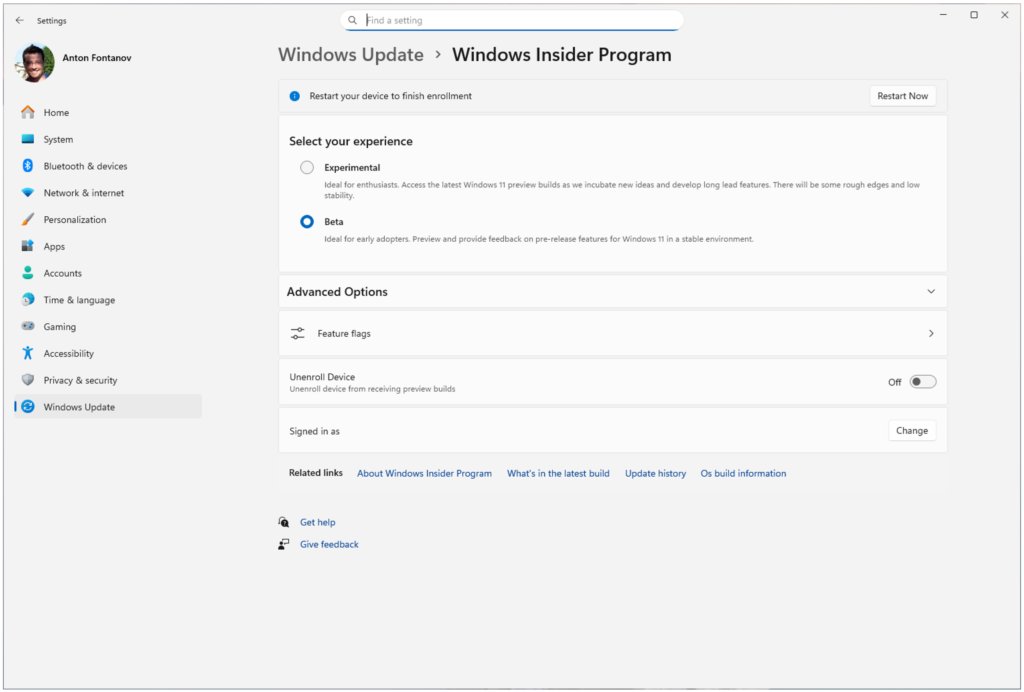
Experimental Channel: Replaces the previous Dev and Canary channels, designed specifically for users who want to test experimental features that may never ship in production builds.
Beta Channel: An updated version of the original Beta Channel where Microsoft is ending gradual feature rollouts. This means all new features mentioned in release notes will be immediately available to all testers in this channel.
The new structure introduces several improvements for testers:
- Immediate Feature Access: The Beta Channel will no longer use gradual feature rollouts, ensuring all announced features are available immediately.
- Manual Feature Toggling: Users can now manually enable experimental features through Windows Settings, even if they're still in gradual rollout. This is done via Settings > Windows Update > Windows Insider Program > Feature flags.
- Clearer Purpose: The "Experimental" channel name clearly indicates its purpose, helping testers understand they're accessing unfinished features that may never ship.
Microsoft is rolling out these changes in phases:
- Dev Channel users are being moved to Experimental first
- Canary users will transition to specific versions of Experimental (26H1 for 28000 series, Future Platforms for 29500 series)
- Beta Channel users will move to the new Beta experience, though Microsoft notes some minor feature changes may occur during transition
For those wanting to maintain access to all existing experimental features, Microsoft recommends moving from Beta to Dev before the transition completes, as Dev is being moved to Experimental.
The update also introduces a new Windows Update experience that allows users to pause updates and avoid forced reboots, giving testers more control over their testing environment.
"Microsoft's move to simplify the Insider Program structure is a significant step toward improving the Windows development process," says software engineer David Kim. "By making feature access more predictable and transparent, Microsoft can collect more meaningful feedback and potentially identify issues earlier in the development cycle."
For those interested in joining the revamped program, Microsoft is gradually rolling out the new experience. Dev Channel users can manually enable the new Experimental channel UI through Settings > Windows Update > Windows Insider Program > Feature flags.
The changes come as Microsoft continues to address reliability concerns in Windows 11, with the company emphasizing the importance of tester feedback in improving the operating system's stability and feature quality.
This restructuring represents Microsoft's acknowledgment that the previous approach to feature rollouts and testing channels created unnecessary complexity and frustration for its most engaged users. By simplifying the structure and providing more transparency, Microsoft aims to create a more effective testing program that ultimately benefits all Windows users.
Comments
Please log in or register to join the discussion