
Microsoft is embedding Microsoft Defender directly into Teams collaboration workflows, introducing near-real-time URL scanning, post-delivery threat detection, and new SOC hunting capabilities. The update automates protection against tech support impersonation attacks while giving security teams granular control to remove users from malicious conversations and block domains without leaving the Defender portal.
Microsoft has fundamentally changed how security operates within Microsoft Teams, moving from reactive monitoring to automated, integrated protection powered by Microsoft Defender. With over 300 million monthly active users, the platform has become a prime target for sophisticated attacks, particularly tech support impersonation schemes that combine mail bombing with malicious URLs disguised as internal IT tools.
The Attack Vector: Why Teams Security Needed Evolution
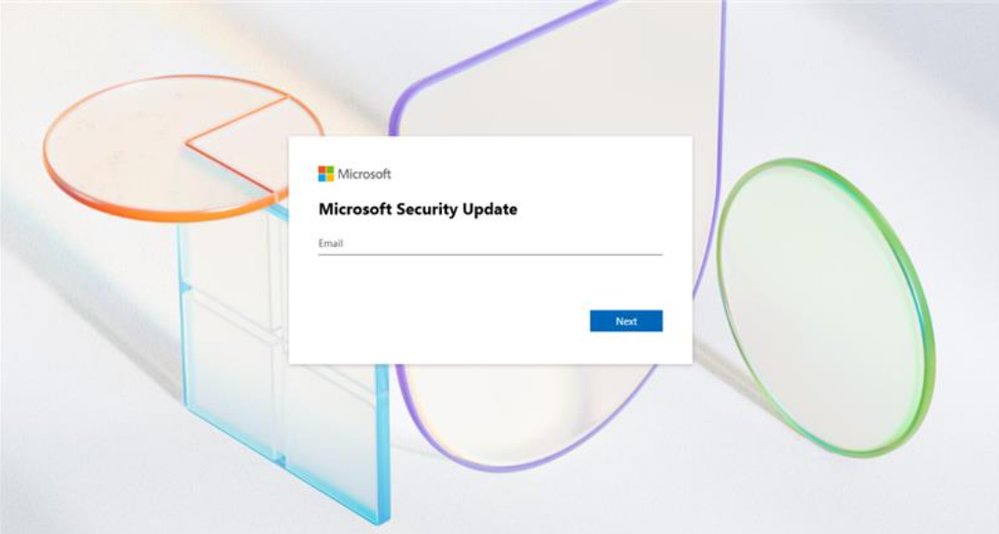
Threat actors have shifted their tactics to exploit the trust inherent in workplace collaboration tools. The emerging pattern involves a multi-stage attack:
- Initial contact: Mail bombing overwhelms the target's inbox
- Teams infiltration: Attackers message or call, impersonating IT support offering help
- Credential harvesting: Victims are directed to malicious URLs mimicking internal security tools
- System compromise: Attackers gain access via remote management tools like Quick Assist or AnyDesk
These malicious URLs often feature falsified corporate branding, making them particularly convincing. Traditional email security couldn't address this gap because Teams communications operate outside standard email gateways.
Near Real-Time Protection: How It Works
For worldwide customers with Teams enterprise licenses, Microsoft has implemented a dual-layer defense system:
Pre-Delivery Scanning
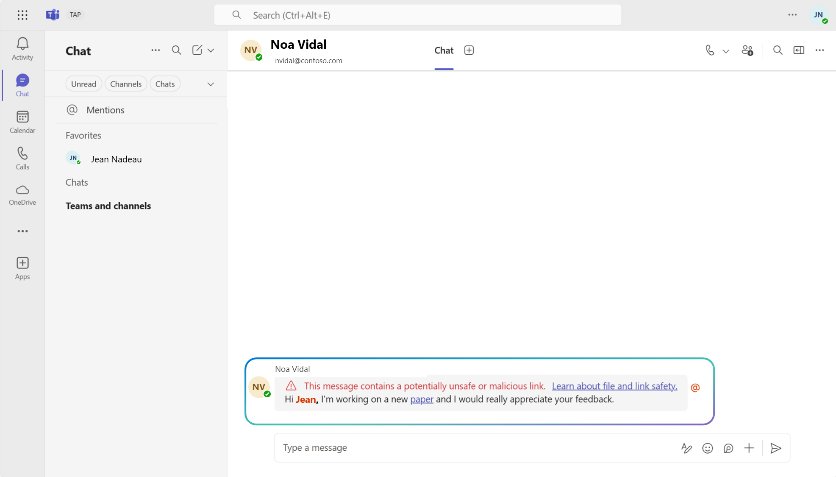
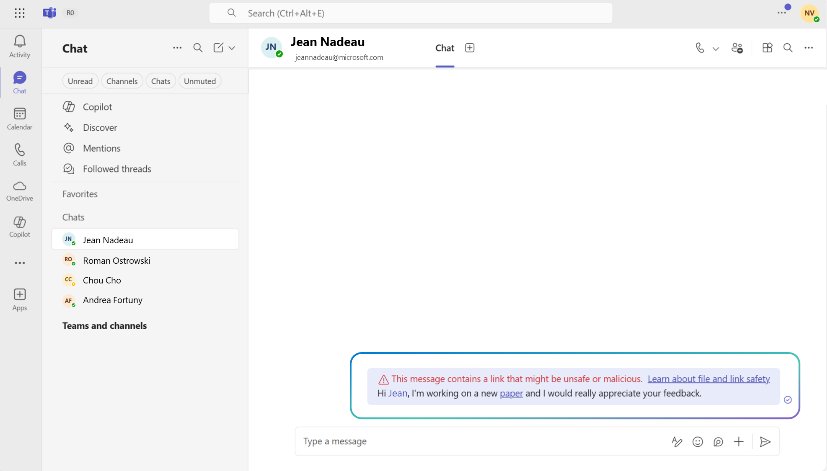
Every message containing URLs is scanned before reaching the recipient. If a malicious URL is detected, the message displays a warning tip immediately:
- Known threats: Messages with identified malicious URLs are flagged instantly
- External communications: Protection extends to federated messages from other tenants
- Coverage: Works across chats, channels, and meetings
Post-Delivery Monitoring
The system continues monitoring for up to 48 hours after delivery. If a previously safe URL becomes weaponized:
- The message is automatically updated with a warning tip
- Users receive updated notifications without manual intervention
- Protection adapts to evolving threats in real-time
This approach is enabled by default for all Teams enterprise users, requiring no additional configuration. The system uses Microsoft Defender's detection engines and threat intelligence to identify malicious URLs.
User-Driven Feedback Loop
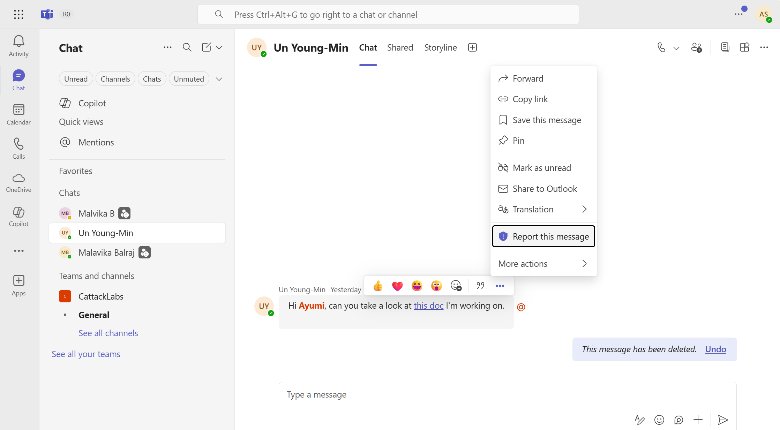
For organizations with Microsoft Defender for Office 365 Plan 2 or E5 licenses, a new feedback mechanism empowers users to improve detection accuracy:
Reporting options:
- "Report as security risk": For suspicious messages that weren't flagged
- "Report as not security risk": For false positives where safe messages were incorrectly flagged
These reports feed directly into Microsoft Defender investigation workflows, creating a continuous improvement cycle. Users can report from any Teams client (web, desktop, mobile) for both internal and external communications.
Reports appear as incidents in the Microsoft Defender portal, where security teams can triage and investigate. This reduces support overhead while improving detection precision over time.
Advanced Hunting: New Visibility for SOC Teams
Security Operations teams gain three new Advanced Hunting tables specifically designed for Teams message metadata:
MessageEvents
Captures metadata for all Teams messages containing URLs at delivery time, including:
- Sender/recipient information
- Timestamps
- Tenant origin
- URL presence
MessagePostDeliveryEvents
Surfaces messages flagged as malicious after delivery, including:
- Zero-hour auto purge (ZAP) actions
- Post-delivery URL weaponization
- Warning tip updates
MessageURLInfo
Provides granular URL details extracted from Teams messages:
- Full URL strings
- Domain information
- Query parameters
- Associated threat intelligence
Enhanced Visibility Features
Cross-tenant hunting: SOC teams can now hunt across all external federated messages, not just those containing URLs. This is critical for hybrid collaboration environments where threats may originate from partner organizations.
SafetyTip column: Added to MessageEvents and MessagePostDeliveryEvents tables, this flags whether users actually saw warning tips in their Teams client. This helps SOC teams distinguish between:
- Warnings shown to users
- Blocks that prevented delivery
- Messages that were quarantined
SIEM Integration
These tables are accessible via Advanced Hunting APIs and Streaming APIs, enabling integration with existing automation pipelines. For third-party SIEM solutions like Splunk:
- Use the latest Microsoft Defender Splunk connector
- Select the new Teams protection tables during configuration
- Configure continuous data flow for extended retention
This allows organizations to maintain their existing SOC workflows while incorporating Teams-specific telemetry.
Response Capabilities: Taking Action from Defender
Remove Users from Conversations
Security admins can now remove internal users from unsafe chats directly from the Defender portal:
- Investigate suspicious conversations in Advanced Hunting
- Use the Action Wizard from the Teams entity flyout
- Remove users and clear chat history
- All actions are traceable in Action Center and audit logs
This prevents further exposure and contains risks in real-time without requiring Teams Admin Center access.
Block Domains at the Source
SOC teams can block malicious domains directly within the Defender portal:
- Adds entries to Teams Admin Center (TAC) blocked domains list automatically
- Blocks new external chat messages, invites, and channel communications from those domains
- Deletes existing communications from blocked domains
- Works without switching between portals
This enables near real-time protection when suspicious external organizations are identified.
Expanding Protection to MDO Plan 1
Microsoft is extending Zero-hour auto-purge (ZAP) and Teams admin quarantine to Microsoft Defender for Office 365 Plan 1 customers:
What this means:
- Post-delivery protection for all Teams customers, not just Plan 2
- Malicious messages automatically moved to admin quarantine
- No additional configuration required
- Full control via Microsoft Defender portal
ZAP works by continuously monitoring Teams messages and quarantining those that contain phishing or malware URLs, even if they initially evaded detection. Security admins can review, manage, and release quarantined messages as needed.
Strategic Implications for Cloud Security
Multi-Cloud Considerations
For organizations operating across multiple cloud platforms, these capabilities create a unified security layer within Teams. However, security teams must consider:
- Coverage gaps: How does this integrate with non-Microsoft collaboration tools (Slack, Zoom, Google Workspace)?
- Data residency: Where is Teams message metadata processed and stored?
- Compliance: How do these features align with regulatory requirements for message retention and audit trails?
Cost-Benefit Analysis
Licensing requirements:
- Basic protection: Teams Enterprise license (included)
- Advanced features (user reporting, hunting, response): MDO P2 or E5
- ZAP expansion: MDO P1
For organizations already invested in Microsoft 365 E5, these features provide significant additional value without incremental cost. For those on lower tiers, the decision involves weighing:
- Cost of MDO P2 vs. potential breach impact
- Operational efficiency gains from integrated workflows
- Reduced need for third-party Teams security tools
Migration and Implementation
For existing Teams deployments:
- Verify licensing (Teams Enterprise minimum)
- Enable default protections (already on by default)
- Configure user reporting policies
- Integrate Advanced Hunting tables into SOC workflows
- Train users on reporting mechanisms
For new deployments:
- Protections are enabled by default
- No migration steps required
- SOC teams should immediately begin exploring Advanced Hunting tables
Trade-offs and Limitations
What This Doesn't Address
External threat sources: While URL scanning is comprehensive, this doesn't address:
- Malicious file attachments
- Social engineering without URLs
- Compromised internal accounts
- Data exfiltration via legitimate channels
Platform scope: These protections are Teams-specific. Organizations using multiple collaboration platforms still need:
- Cross-platform security orchestration
- Consistent policies across tools
- Unified incident response
Performance considerations: Real-time scanning and 48-hour monitoring add processing overhead. While Microsoft handles this infrastructureally, organizations should monitor:
- Message delivery latency
- API rate limits for hunting queries
- SIEM data ingestion volumes
Comparison with Alternative Approaches
Third-Party CASB Solutions
Cloud Access Security Brokers (CASBs) offer Teams monitoring but typically:
- Require additional licensing
- May have API rate limitations
- Need separate incident response workflows
- Provide cross-platform visibility
Microsoft's native approach offers:
- Tighter integration with Teams infrastructure
- Lower latency detection
- Unified licensing with M365
- Single pane of glass for SOC teams
Native Teams Admin Controls
Teams Admin Center provides basic:
- Threat policies
- User reporting
- Domain blocking
The new Defender integration enhances this by:
- Adding automated scanning
- Providing hunting capabilities
- Enabling programmatic response
- Integrating with existing SOC tools
Implementation Best Practices
For Security Administrators
- Baseline verification: Confirm protections are enabled via Teams Admin Center
- User communication: Educate users on new warning tips and reporting mechanisms
- SOC integration: Add Teams tables to existing hunting queries
- Alert tuning: Configure alerts for high-confidence threats
- Audit review: Regularly review Action Center logs
For SOC Analysts
- Query development: Build hunting queries using new tables
- SIEM integration: Configure streaming APIs for existing workflows
- Incident response: Update runbooks to include Teams-specific actions
- False positive management: Use user reports to refine detection
For Cloud Architects
- Licensing audit: Verify current MDO and Teams license levels
- API planning: Estimate hunting query volume and SIEM ingestion rates
- Compliance mapping: Document how features meet regulatory requirements
- Multi-cloud strategy: Plan for gaps in non-Microsoft platforms
Looking Ahead: The Future of Integrated Security
These capabilities represent Microsoft's broader strategy of embedding security directly into productivity tools rather than treating them as separate layers. This approach:
- Reduces complexity: Fewer tools to manage
- Improves response time: Actions happen where threats are detected
- Lowers cost: Consolidates licensing
- Increases coverage: Protects workflows that traditional security misses
However, it also creates deeper vendor lock-in. Organizations must balance the benefits of integrated security against the risks of single-provider dependence.
Conclusion
Microsoft's enhanced Teams protection transforms the platform from a collaboration tool into a security-aware environment. By combining automated URL scanning, user feedback loops, and SOC-integrated response capabilities, organizations gain comprehensive protection against emerging threats like tech support impersonation.
The key differentiator is operational efficiency: security teams can investigate, hunt, and respond without leaving the Defender portal, while users contribute to detection accuracy through simple reporting mechanisms.
For organizations already invested in Microsoft 365, these features provide substantial security improvements at minimal additional cost. For those evaluating collaboration platforms, Teams now offers a compelling security advantage that native competitors struggle to match.
The expansion to MDO Plan 1 ensures these protections are accessible across all enterprise tiers, making secure collaboration the default rather than the exception.
Learn more:
Comments
Please log in or register to join the discussion