
The GNOME AI virtual assistant Newelle has reached version 1.0 with Model Context Protocol server support, enabling real-time integration with external tools and data sources across the Linux desktop ecosystem.
The Newelle AI assistant for GNOME has matured significantly since its 1.0 release last summer, and its latest update introduces Model Context Protocol (MCP) server support - a move that fundamentally expands what this desktop AI companion can actually do.
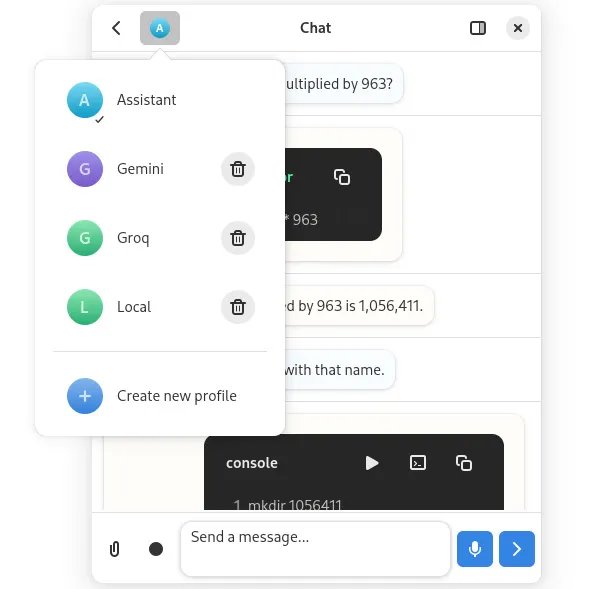
What is MCP and Why It Matters for Desktop AI
The Model Context Protocol represents an emerging open standard that allows AI applications to securely connect with external data sources, tools, and systems. Think of it as a universal adapter for AI assistants - instead of writing custom integrations for every application, MCP provides a standardized way for LLMs to discover and interact with available resources.
For Newelle, this means the assistant can now tap into "thousands" of applications that support MCP servers. Rather than being limited to basic text generation or pre-programmed commands, Newelle can query live system data, manipulate files through compatible applications, pull information from databases, or trigger workflows in other software - all through a standardized protocol.
The Technical Implementation
Newelle's MCP integration works by acting as an MCP client that can discover and communicate with MCP servers running either locally or remotely. When you ask Newelle to perform a task, the assistant can:
- Discover available tools: Query the MCP registry to find what servers are accessible
- Request capabilities: Understand what actions each server exposes
- Execute with context: Perform operations using real-time data from those sources
- Maintain security: Operate within permission boundaries defined by each server
This architecture separates the AI model from the tools it uses, creating a modular system where new integrations don't require updating Newelle itself - you just need an MCP server for the target application.
Beyond MCP: Other New Features
The latest Newelle release includes several complementary improvements:
Built-in Tools Framework: Newelle now has a "Tools" system that allows extensions to add new capabilities without modifying the core application. This is different from MCP integration - these are native tools that extend Newelle's own functionality rather than connecting to external applications.
LLM Favorites: Users can mark specific language models as favorites, making it easier to switch between preferred models for different tasks. This is particularly useful when running multiple local models or accessing different cloud providers.
Enhanced Shortcuts: New keyboard shortcuts improve workflow integration for power users who want to invoke the assistant quickly without breaking their typing flow.
Real-World Use Cases
With MCP support, Newelle becomes significantly more practical for daily desktop use:
- File operations: "Organize my Downloads folder by file type" - Newelle could use an MCP-enabled file manager
- System monitoring: "What's using so much CPU right now?" - Query an MCP server exposing system metrics
- Development workflows: "Create a new project based on my template" - Interface with an MCP-enabled IDE or project manager
- Cross-application search: "Find all documents mentioning 'Q4 budget'" - Search across MCP-connected document repositories
Availability and Installation
Newelle is available as a Flatpak on Flathub, making installation straightforward across most Linux distributions. The application requires GNOME 43 or newer and works best with a GPU for local model inference, though it can also connect to cloud-based LLM APIs.
For users interested in the technical details or wanting to contribute, the project is hosted on GitHub where you can find documentation on building custom MCP servers or extending Newelle's native tools framework.
The Broader Context
Newelle's MCP adoption reflects a larger trend toward standardized AI integration on Linux desktops. Rather than each AI assistant creating its own proprietary integration layer, protocols like MCP enable a composable ecosystem where applications, tools, and AI models can interoperate regardless of which specific implementations are used.
This approach mirrors how Linux desktop development has solved other fragmentation problems - through open standards that allow competition on implementation while maintaining compatibility. For homelab builders and power users who measure and optimize everything, this standardization means less time writing custom scripts and more time actually using AI-enhanced workflows.
The question now is whether other GNOME AI projects will adopt MCP, potentially creating a rich ecosystem where your choice of AI assistant doesn't lock you out of application integrations. For users who've been waiting for AI on Linux to become more than just a chat interface, Newelle's MCP support represents a meaningful step toward that future.
Learn more about Newelle on GitHub and install it from Flathub. The MCP specification provides details for developers interested in building compatible servers.
Comments
Please log in or register to join the discussion