A deep‑dive into how a prototype for natural‑language‑driven imaging cohort discovery was transformed into a production‑grade Azure Machine Learning pipeline, covering component design, compute trade‑offs, cost analysis, and future roadmap.
What changed
In the first installment of this series we proved that a natural‑language interface could retrieve relevant DICOM studies in seconds instead of months. The proof‑of‑concept showed the idea’s promise but relied on ad‑hoc notebooks, manual script execution, and a single‑run workflow. The new release replaces that fragile stack with a fully versioned Azure Machine Learning (Azure ML) pipeline that can be triggered repeatedly, audited, and scaled to hospital‑size image collections.
Provider comparison – Azure ML vs. traditional orchestration
| Feature | Azure ML Pipelines | Custom Kubernetes / Airflow |
|---|---|---|
| Component model | Python‑based components with explicit input/output contracts. | Docker tasks or operators; contracts must be enforced manually. |
| Parallel execution | Built‑in DAG engine can run independent branches concurrently without extra code. | Requires explicit parallelism configuration, often via separate workers. |
| Reproducibility | Every run is automatically versioned, logs environment specs, and stores lineage in the workspace. | Versioning must be added (e.g., Git tags, custom metadata stores). |
| Compute flexibility | Mix CPU and GPU compute targets per component; Azure ML handles provisioning and scaling. | Must manage node pools, GPU drivers, and scheduling yourself. |
| Cost transparency | Per‑component usage is logged; Azure cost analysis tools can attribute spend to each step. | Cost attribution is possible but usually requires custom metering. |
| Security & data access | Integrated with Azure RBAC, managed identities, and private endpoints for DICOM stores. | Needs manual configuration of IAM, networking, and secret management. |
The Azure ML approach wins on operational simplicity and auditability, while a self‑hosted solution can be cheaper for very large, constantly running workloads if you already have a Kubernetes estate.
Business impact – turning a demo into a production service
Pipeline architecture
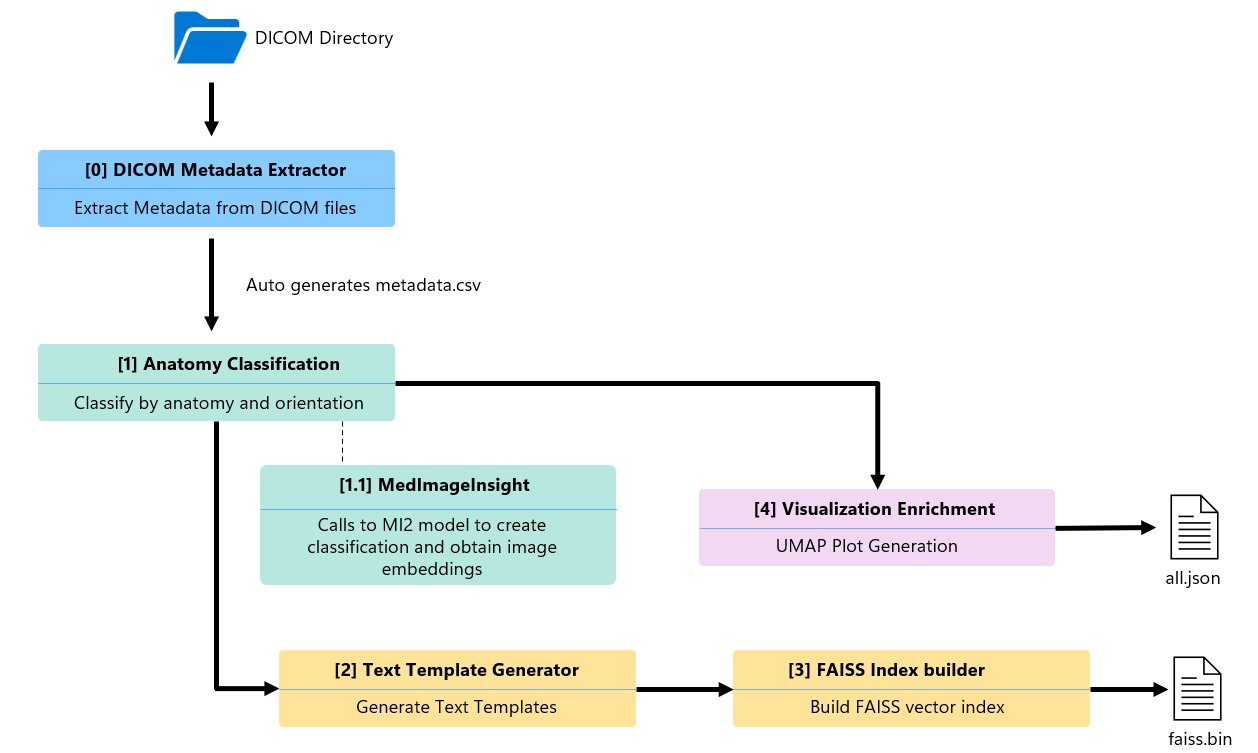
The production pipeline consists of five Python components arranged in a directed acyclic graph (DAG). Two branches run in parallel after the metadata extraction step, shaving roughly 12 % off total runtime.
- Metadata extractor – Scans a DICOM folder, pulls study/series UIDs, modality, body part, slice count.
- Anatomy classification – Calls MedImageInsight (MI2), Microsoft’s foundation model for medical image embeddings, to perform zero‑shot classification of body part and orientation.
- Text template generator – Merges metadata and classification results into five natural‑language templates per series.
- FAISS index builder – Encodes the templates with BiomedCLIP (
microsoft/BiomedCLIP-PubMedBERT_256-vit_base_patch16_224) and stores them in a flat inner‑product index for fast similarity search. - Visualization enrichment – Reduces the 1024‑dim image embeddings to 2‑D using UMAP, producing coordinates for the interactive scatter plot in the cohort explorer UI.
Compute choices and cost analysis
| Dataset | CPU runtime | GPU runtime | CPU cost* | GPU cost* |
|---|---|---|---|---|
| 4,500 series | ~200 min | ~30 min | $12 | $18 |
| 120,000 series | 108 h | 15 h | $27 (pipeline) + $151 (MI2 endpoint) = $178 | $45 (pipeline) + $21 (MI2 endpoint) = $66 |
*Costs assume $0.25 / hr for Standard_D2s_v3 (CPU) and $3.00 / hr for Standard_NC4as_T4_v3 (GPU). MedImageInsight endpoint runs on a Standard_NC4as_T4_v3 VM at $1.40 / hr.
Key takeaways:
- GPU acceleration cuts BiomedCLIP encoding time by ~7× and reduces total wall‑clock time dramatically.
- When endpoint latency dominates (large batch jobs), loading MedImageInsight directly on the pipeline’s GPU nodes eliminates per‑request network overhead and lowers overall spend.
- Azure ML provisioning overhead (environment setup, data mounting) adds 5‑10 min per run; caching the conda environment or using a pre‑built Docker image can mitigate this.
Migration considerations
| Consideration | Azure ML recommendation |
|---|---|
| Data residency | Store DICOM files in Azure Blob Storage with private endpoints; use Managed Identity for pipeline access. |
| Version control | Register each component as an Azure ML Component version; tag pipeline runs with Git commit SHA. |
| Security | Enable Azure Policy to enforce that only approved compute SKUs (e.g., Standard_NC4as_T4_v3) can be used for the MedImageInsight step. |
| Scaling | For > 1 M series, switch the FAISS index to IndexIVFFlat or IndexHNSW and shard the dataset across multiple GPU nodes. |
| Monitoring | Hook Azure ML run metrics into Azure Monitor dashboards; set alerts on run duration spikes. |
Future enhancements
- Multi‑modality support – Extend the pipeline to CT, X‑ray, and ultrasound by adding modality‑specific preprocessing components.
- Hybrid embeddings – Fuse MedImageInsight image vectors with text vectors from a clinical language model to enable condition‑aware search (e.g., “ground‑glass opacities”).
- Dynamic template generation – Replace static agents with a small LLM that tailors descriptions based on study context, improving recall in the FAISS search.
- Incremental indexing – Implement a delta‑index update step so new studies can be added without rebuilding the entire FAISS index.
Closing thoughts
Moving from a hackathon notebook to an Azure ML pipeline required disciplined componentization, careful compute budgeting, and a clear strategy for model serving. The resulting system delivers repeatable, auditable cohort discovery while keeping costs under control, especially when GPU resources are applied judiciously. Teams building large‑scale medical imaging AI can adopt the same pattern: start with a minimal component, validate on CPU, then migrate the bottleneck (often embedding generation) to GPU or an on‑node model load. By doing so, they gain both speed and cost efficiency without sacrificing the governance that healthcare workloads demand.
The healthcare AI models in Microsoft Foundry are intended for research and development only. They are not certified for clinical use, and any deployment in a medical setting must comply with applicable regulations and obtain the necessary approvals.
Comments
Please log in or register to join the discussion