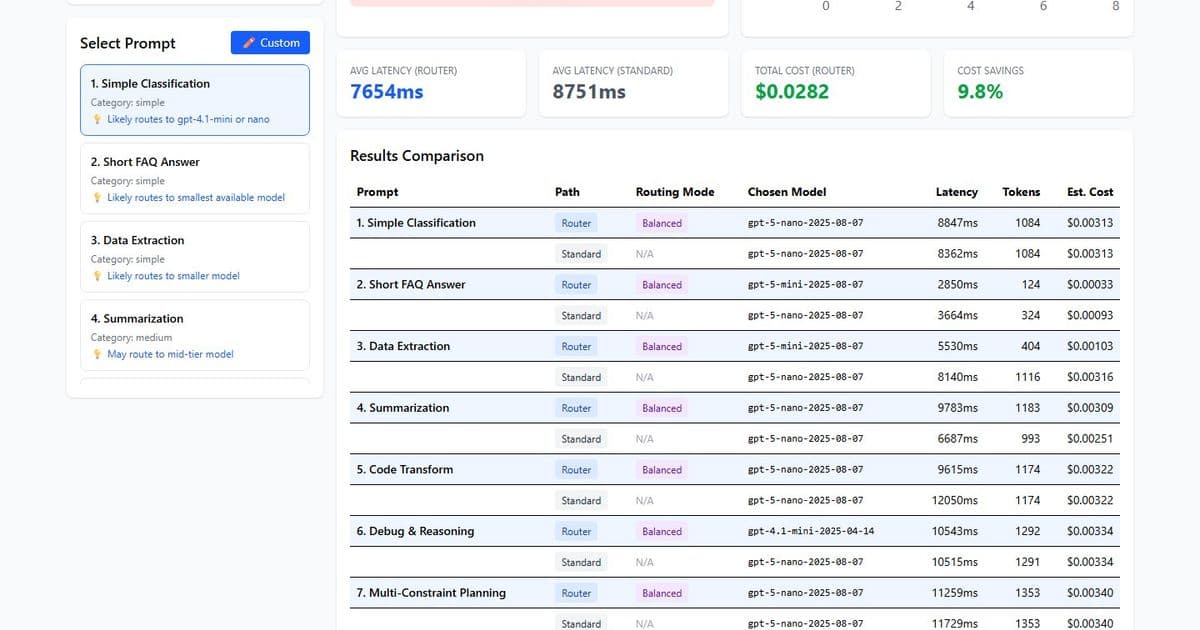
Microsoft Foundry Model Router automatically selects the most suitable language model for each request, delivering measurable cost reductions and operational simplicity for mixed‑complexity workloads. A hands‑on demo illustrates latency, token usage, and pricing differences across routing modes, while the Azure portal enables mode changes without redeploying applications.
Microsoft announced the general availability of Model Router in Azure AI Foundry. The service sits as a managed routing layer between an application and a pool of underlying language models. For every incoming prompt it evaluates complexity, task type, and context length, then forwards the request to the most appropriate model. The routing decision is exposed through the response.model field, allowing downstream cost tracking and distribution analysis without any custom logic in the client code.
What Changed
Until now many Azure OpenAI deployments relied on a single model endpoint. This approach works for homogeneous workloads but becomes inefficient when a workload mixes simple classification tasks with complex multi‑constraint planning. Model Router addresses that inefficiency by introducing a dynamic selection mechanism that aligns model capability with prompt difficulty.
Provider Comparison
Azure’s Model Router competes with similar capabilities in other major cloud platforms. AWS Bedrock offers a model selection API that lets developers choose a model at runtime, but it requires explicit calls to the Bedrock service and does not provide a single deployment name that hides the selection logic. Google Vertex AI includes a model routing feature in its AI Platform, yet the routing configuration is tied to specific model families and often needs custom code to interpret latency and cost trade‑offs. Anthropic’s Claude provides a model selection endpoint, but the pricing model is fixed per request and does not expose a unified deployment name for downstream applications. Microsoft’s approach differs by exposing a single Azure OpenAI endpoint, eliminating the need for conditional routing in the application layer and allowing mode changes through the Foundry portal without redeployment.
Business Impact
The benchmark conducted by Lee Stott demonstrates cost savings ranging from 4.5% in Balanced mode to 14.2% in Quality‑Optimised mode, with latency differences staying within a few hundred milliseconds. These figures translate directly into monthly spend reductions for high‑traffic services. For example, a customer processing 10 million prompts per month could see a reduction of $30 000 to $140 000 depending on the routing mode and prompt mix. Operational simplicity improves because the routing logic lives in Azure’s infrastructure, not in the application code. Teams can switch between Balanced, Cost‑Optimised, and Quality‑Optimised modes via the portal, supporting rapid cost adjustments during peak traffic periods or compliance runs that demand higher accuracy.
Technical Deep Dive
Model Router is a language model trained on three objectives: prompt classification, model capability mapping, and cost optimisation. The model receives the incoming prompt and outputs a routing decision that includes the selected underlying model and an optional confidence score. The routing pool currently contains four models: gpt‑5‑nano, gpt‑5‑mini, gpt‑oss‑120b, and gpt‑4.1‑mini. Each model has distinct pricing per token and latency characteristics. The router balances these dimensions based on the selected mode.
The service integrates with the standard Azure OpenAI chat completion API. The only change required in the client is to replace the deployment name with "model-router". The request payload remains the same, and the response includes the selected model in the model field. This design lets developers keep existing SDKs and workflows while gaining intelligent routing.
The routing decision is deterministic for a given prompt and mode, but the underlying model pool can evolve as new models become available. When Microsoft adds a new model to the pool, the router automatically incorporates it into its decision matrix without code changes. This future‑proofing reduces the operational burden of model selection and enables continuous cost optimisation as pricing and performance improve.
Building the Demo
Lee Stott released an interactive React + TypeScript application that visualises routing decisions. The demo sends the same prompt to both Model Router and a fixed deployment such as gpt‑5‑nano, then displays latency, token usage, and estimated cost side‑by‑side. The application supports three routing modes and a custom prompt entry field, allowing users to test production‑representative prompts before committing to the router in production.
The demo uses Vite as a dev server, Tailwind CSS for styling, and Recharts for distribution charts. Azure OpenAI API version 2024‑10‑21 is employed for both the router and the standard deployment. Security measures include an ErrorBoundary for crash resilience, sanitised error messages, AbortController timeouts, input length validation, and restrictive security headers. API keys are stored in environment variables and git‑ignored.
Source code is available on GitHub at https://github.com/leestott/router-demo-app. The repository includes a setup script for local development and clear instructions for production deployment using Managed Identity.
Results
The benchmark ran ten prompts ranging from simple classification to complex multi‑constraint planning. In Balanced mode the router used four models, with gpt‑5‑nano handling 50% of the requests, gpt‑5‑mini 20%, gpt‑oss‑120b 20%, and gpt‑4.1‑mini 10%. The average latency was 7,800 ms compared with 7,700 ms for the standard deployment, and the total cost for ten prompts was $0.029 versus $0.030. The cost‑optimised mode achieved a 4.7% saving, while the quality‑optimised mode delivered a 14.2% saving and was faster than the standard deployment in that mode.
Figure 1 shows the latency comparison across the three modes. The router’s latency advantage in Quality‑Optimised mode stems from its preference for smaller models for simple prompts, which reduces overall processing time. Figure 2 visualises the cost distribution across the four underlying models, highlighting the router’s ability to shift traffic toward cheaper options without sacrificing quality.
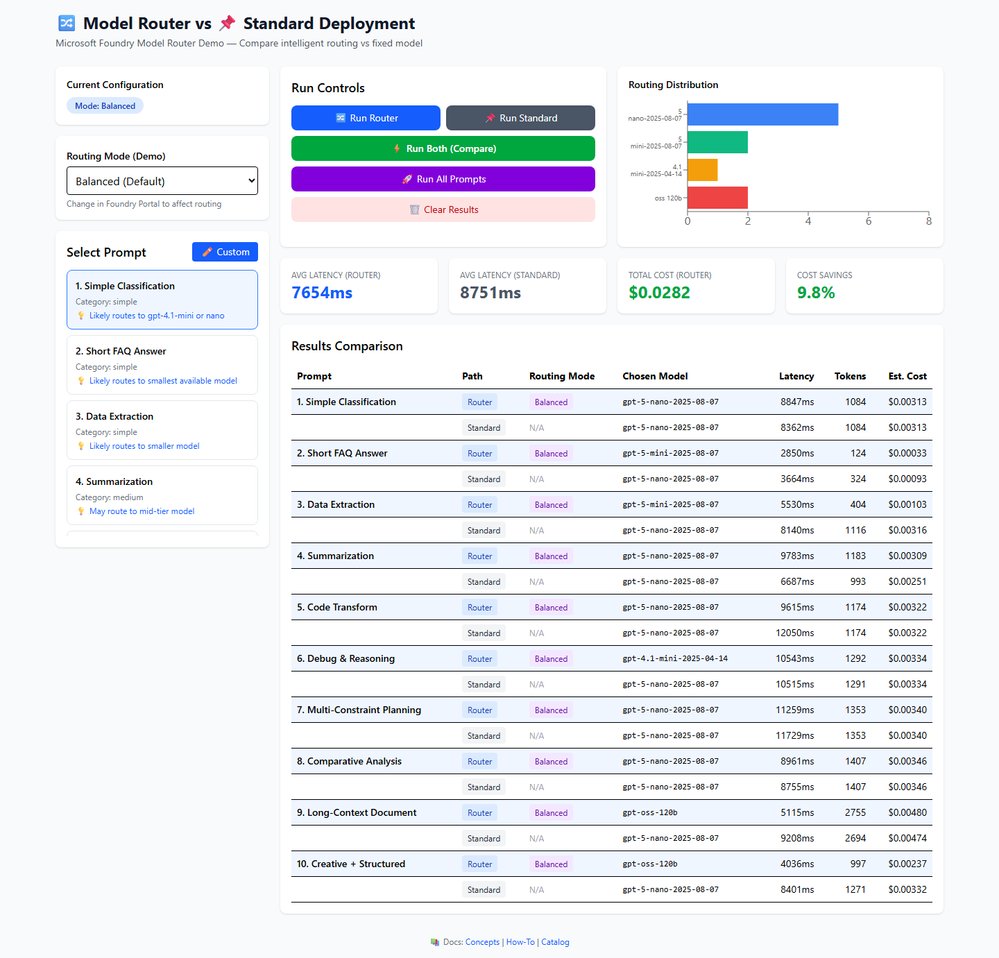 ![Latency comparison chart]() Caption: Latency comparison across Balanced, Cost‑Optimised, and Quality‑Optimised routing modes.
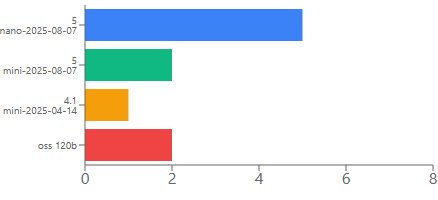 ![Cost distribution chart]() Caption: Cost distribution across the four underlying models used by Model Router.
Recommendations
- Mixed‑complexity workloads benefit most because the router can allocate simple tasks to cheaper models while preserving premium capabilities for demanding queries.
- Cost‑sensitive deployments should start with the Cost‑Optimised mode and monitor model distribution to ensure quality thresholds are met.
- Compliance‑driven scenarios where accuracy is paramount can use the Quality‑Optimised mode, which still routes simple prompts to efficient models, delivering faster responses.
- Ultra‑low‑latency requirements may need to evaluate the router’s overhead; in Quality‑Optimised mode the router can be faster, but in Balanced mode latency differences are marginal.
- Single‑task workloads where one model consistently outperforms others should avoid the router to prevent unnecessary complexity.
A practical workflow involves cloning the demo repository, configuring environment variables with Azure credentials, and running the application locally. Users can select a prompt from the pre‑built list, choose a routing mode, and click "Run Both" to compare results. The custom prompt feature lets teams test actual production inputs, providing a data‑driven basis for deployment decisions.
Technical Stack
- React 19 + TypeScript 5.9: UI and type safety
- Vite 7: Dev server and build tool
- Tailwind CSS 4: Styling
- Recharts 3: Distribution and comparison charts
- Azure OpenAI API (2024‑10‑21): Model Router and standard completions
Future Outlook
Microsoft plans to expand the routing pool with additional models, including newer versions of gpt‑5 and specialised domain models. As new models join the pool, the router automatically re‑optimises its decision matrix, keeping cost savings aligned with the latest pricing and performance data. Teams can expect minimal operational effort to benefit from these additions.
Conclusion
Model Router solves a common inefficiency in AI deployments by aligning model selection with prompt complexity. The service delivers measurable cost reductions, comparable latency, and operational simplicity. By exposing a single endpoint and allowing mode changes through the Foundry portal, Microsoft provides a flexible solution that scales with workload diversity. The hands‑on demo demonstrates how to validate routing behaviour with real prompts, making it easier for organisations to adopt the technology without extensive engineering overhead.
Resources
- Official documentation: https://learn.microsoft.com/en-us/azure/ai-foundry/model-router
- Sample app repository: https://github.com/leestott/router-demo-app
- Azure OpenAI API reference: https://learn.microsoft.com/en-us/azure/ai-services/openai/reference?api-version=2024-10-21
- Foundry portal guide: https://learn.microsoft.com/en-us/azure/ai-foundry/overview
- Managed Identity production auth: https://learn.microsoft.com/en-us/azure/active-directory/managed-identities-azure-resources/overview
Comments
Please log in or register to join the discussion