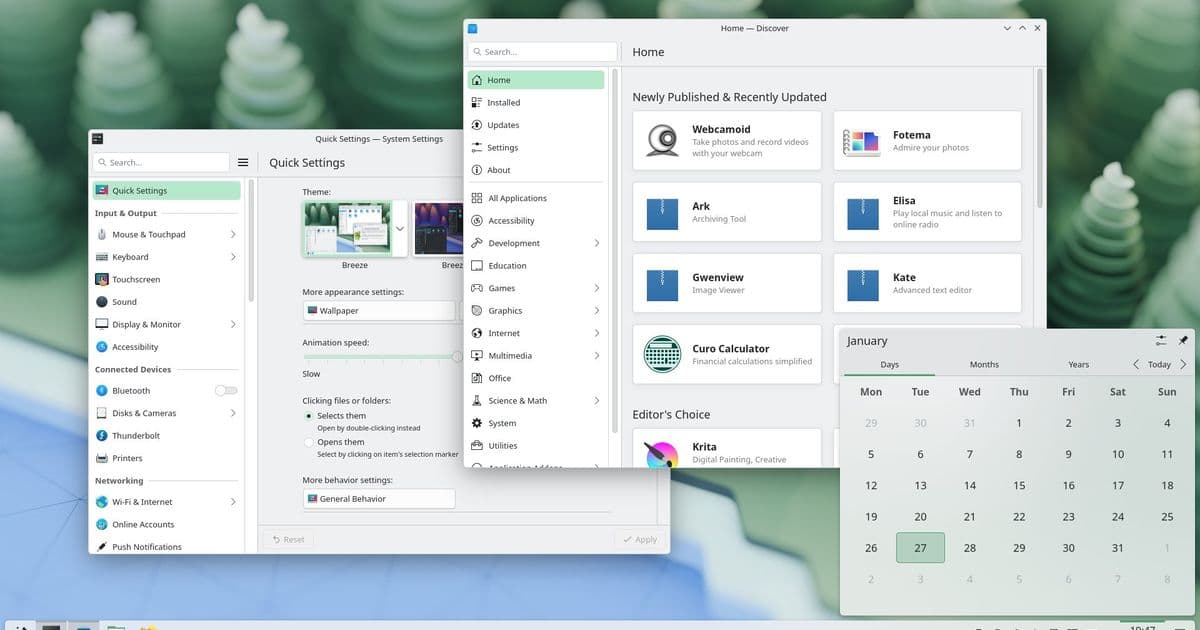
KDE's Plasma 6.6 release brings major accessibility improvements, new features like text recognition in screenshots, and a dedicated setup wizard, all while maintaining the desktop's legendary flexibility.
KDE has unveiled Plasma 6.6, a release that balances enhanced usability with the flexibility that has made it the "most versatile desktop in the known universe" according to the KDE community. Released on Tuesday, February 17, 2026, this update focuses on streamlining workflows, improving accessibility, and adding practical new features that make everyday computing more intuitive.
Enhanced Accessibility Features
Accessibility has received significant attention in Plasma 6.6. For users with color vision deficiencies, the System Settings Accessibility page now includes four colorblindness correction filters, including a new grayscale option. The Zoom and Magnifier feature has expanded to four tracking modes, with a new option that keeps the pointer centered on screen at all times.
The release also introduces support for "Slow Keys" on Wayland and standardized "Reduced Motion" accessibility settings, ensuring that users with various needs can customize their experience effectively.
Text Recognition and Screenshot Improvements
One of the most practical additions is Spectacle's new text recognition capability. Users can now extract text directly from screenshots, making it significantly easier to create alt text for visually impaired users or quickly capture information from images. This feature represents KDE's commitment to inclusive design while providing utility for all users.
Additionally, users can now filter specific windows out of screencasts by right-clicking a window's title bar and selecting the appropriate option, giving content creators more control over their recordings.
The New On-Screen Keyboard
Plasma 6.6 introduces a completely redesigned on-screen keyboard. The new Plasma Keyboard offers improved functionality and a more modern interface, making it easier for users who rely on touch input or have accessibility needs to interact with their desktop environment.
Plasma Setup: A New User Experience
Perhaps the most significant structural change is the introduction of Plasma Setup, a dedicated first-run wizard that separates user account creation from the operating system installation process. This modular approach allows for greater flexibility in deployment scenarios:
- Companies shipping pre-installed Plasma devices
- Organizations refurbishing computers for redistribution
- Users selling or giving away computers without transferring personal data
The separation of technical installation steps from user-facing configuration creates a cleaner, more focused setup experience that can be tailored to different use cases.
Workflow Enhancements
KDE has focused heavily on speeding up common workflows throughout the desktop. Users can now connect to new Wi-Fi networks by simply scanning QR codes if their system has a camera. Volume control has been streamlined by allowing users to hover over app icons in the task manager and scroll to adjust volume levels.
The Windows List widget now supports "Open on hover" functionality and can filter out windows not on the current desktop or activity. Additionally, holding Alt and double-clicking files or folders on the desktop instantly opens their properties dialog, eliminating unnecessary clicks.
Customization Refinements
For users who enjoy personalizing their environment, Plasma 6.6 offers new customization options. Users can now convert their current setup into a global theme for use with day and night theme switching. A more subtle customization option allows changing the color intensity of application frames.
The emoji picker (activated with Meta+.) now includes an easier skin tone selector, making it more inclusive and user-friendly.
Additional Features and Improvements
The release includes numerous other enhancements:
- Virtual desktops can now be limited to the primary screen only
- An optional new login manager is available
- Automatic screen brightness adjustment for devices with ambient light sensors
- Game controller support as regular input devices
- Font installation directly in the Discover software center
- Process priority selection in System Monitor
- Standalone Web Browser and Audio Volume widgets can be pinned open
- USB access prompts and refreshed permission prompts
- Smoother animations on high-refresh-rate screens
A Tribute to Björn Balazs
The release is dedicated to Björn Balazs, a passionate KDE contributor who passed away from cancer in September 2025. Despite his illness, Balazs continued working on his privacy project and participating in community meetings during Akademy 2025. KDE describes him as "the stuff FLOSS legends are made of" and notes that his dedication to helping people achieve privacy and control over technology will be sorely missed.
Getting Started with Plasma 6.6
Users can try Plasma 6.6 through several methods:
- Live images bootable from USB for testing
- Docker images for quick deployment
- Distribution-specific packages (availability varies by OS)
- Direct source compilation for advanced users
Community and Support
KDE emphasizes that it is a free software community that relies on volunteer contributions. The organization welcomes help in various forms, from coding and documentation to translations and financial support. Users can provide feedback through KDE Forums, the #Plasma Matrix channel, the Plasma-devel mailing list, or Bugzilla.
Plasma 6.6 represents KDE's continued evolution toward a more accessible, user-friendly desktop while maintaining the customization and flexibility that has defined the platform. By addressing both practical workflow improvements and fundamental accessibility needs, KDE has created a release that serves both power users and those who need additional assistance navigating their digital environment.
Comments
Please log in or register to join the discussion