
Most enterprise AI initiatives don't fail because of weak models—they fail because the surrounding architecture wasn't engineered for production reality. This article explores how to build AI systems that can survive real-world conditions through proper control planes, governance enforcement, and operational discipline.
The Production Reality Gap
Most AI systems don't fail in the lab. They fail the moment production touches them. Real users arrive, data drifts, security constraints tighten, and incidents force your architecture to prove it can survive.
The hard truth: AI initiatives rarely fail because the model is weak. They fail because the surrounding architecture was never engineered for production reality.
Teams often bolt AI onto existing platforms. In Azure-based environments, the foundation can be solid—identity, networking, governance, logging, policy enforcement, and scale primitives. But that doesn't make the AI layer production-grade by default. It becomes production-grade only when the AI runtime is engineered like a first-class subsystem with explicit boundaries, control points, and designed failure behavior.

Production Failure Taxonomy
When AI fails in production, the postmortem rarely says the model was bad. It almost always points to missing boundaries, over-privileged execution, or decisions nobody can trace.
If your AI can take actions, you are no longer shipping a chat feature. You are operating a runtime that can change state across real systems. Reliability is not just uptime—it's the ability to limit blast radius, reproduce decisions, and stop or degrade safely when uncertainty or risk spikes.
Here are the most common failure modes:
1. Healthy systems that are confidently wrong Uptime looks perfect. Latency is fine. The output is wrong. Nothing alerts until real damage shows up.
2. The agent ends up with more authority than the user The user asks a question. The agent has tools and credentials. Now it can do things the user never should have been able to do.
3. Each action is allowed, but the chain is not Read data, create ticket, send message. All approved individually. Put together, it becomes a capability nobody reviewed.
4. Retrieval becomes the attack path Most teams worry about prompt injection. But a poisoned or stale retrieval layer can be worse, because it feeds the model the wrong truth.
5. Tool calls turn mistakes into incidents The moment AI can change state—config, permissions, emails, payments, or data—a mistake is no longer a bad answer. It is an incident.
6. Retries duplicate side effects Timeouts happen. Retries happen. If your tool calls are not safe to repeat, you will create duplicate tickets, refunds, emails, or deletes.
Deterministic Platforms, Probabilistic Behavior
Most production platforms are built for deterministic behavior: defined contracts, predictable services, stable outputs. AI changes the physics. You introduce probabilistic behavior into deterministic pipelines and failure modes multiply.
An AI system can be confidently wrong while still looking "healthy" through basic uptime dashboards. That's why reliability in production AI is rarely about "better prompts" or "higher model accuracy." It's about engineering the right control points: identity boundaries, governance enforcement, behavioral observability, and safe degradation.
The model is only one component. The system is the product.
Production AI Control Plane
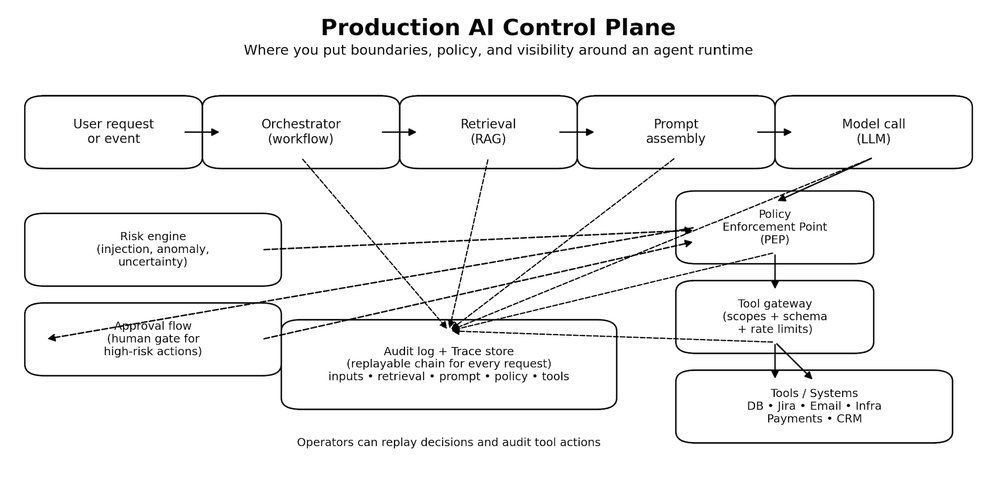
Once you inject probabilistic behavior into a deterministic platform, you need more than prompts and endpoints. You need a control plane. Not a fancy framework—just a clear place in the runtime where decisions get bounded, actions get authorized, and behavior becomes explainable when something goes wrong.
The model proposes. The control plane decides. Tools execute only through gates.
Control Plane Components
Orchestrator Owns the workflow. Decides what happens next, and when the system should stop.
Retrieval Brings in context, but only from sources you trust and can explain later.
Prompt Assembly Builds the final input to the model, including constraints, policy signals, and tool schemas.
Model Call Generates the plan or the response. It should never be trusted to execute directly.
Policy Enforcement Point (PEP) The gate before any high-impact step. It answers: is this allowed, under these conditions, with these constraints.
Tool Gateway The firewall for actions. Scopes every operation, validates inputs, rate-limits, and blocks unsafe calls.
Audit Log and Trace Store A replayable chain for every request. If you cannot replay it, you cannot debug it.
Risk Engine Detects prompt injection signals, anomalous sessions, uncertainty spikes, and switches the runtime into safer modes.
Approval Flow For the few actions that should never be automatic. It is the line between assistance and damage.
The key insight: Safety lives in the control plane, not in the model.
The Common Architectural Trap
Many teams ship AI like a feature: prompt → model → response. That structure demos well. In production, it collapses the moment AI output influences anything stateful—tickets, approvals, customer messaging, remediation actions, or security decisions.
At that point, you're not "adding AI." You're operating a semi-autonomous runtime. The engineering questions become non-negotiable:
- Can we explain why the system responded this way?
- Can we bound what it's allowed to do?
- Can we contain impact when it's wrong?
- Can we recover without human panic?
If those answers aren't designed into the architecture, production becomes a roulette wheel.
Governance as Runtime Enforcement
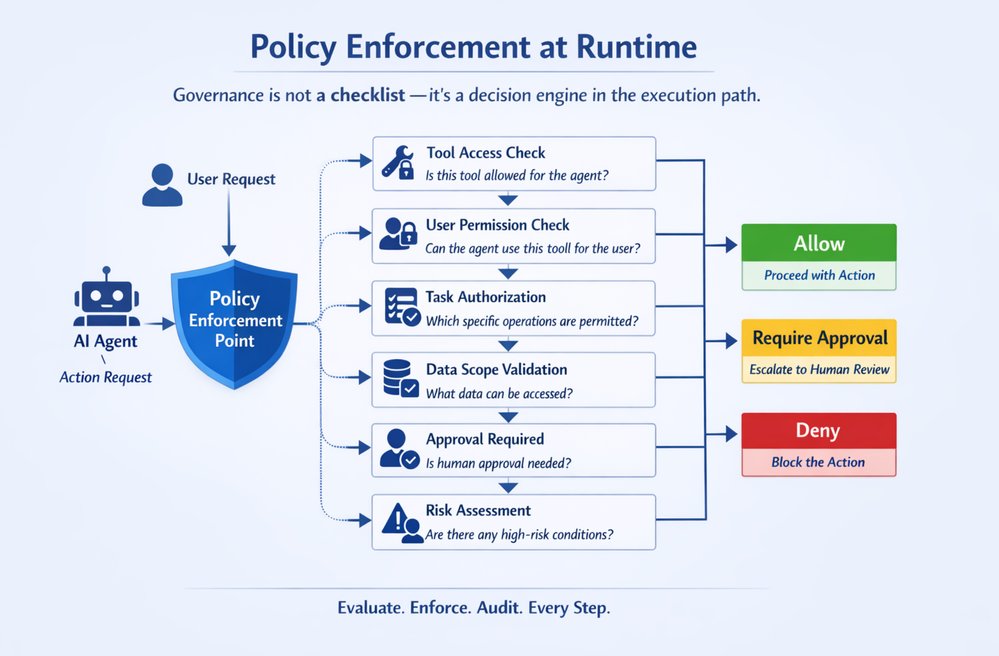
Most governance programs fail because they're implemented as late-stage checklists. In production, governance must live inside the execution path as an enforceable mechanism—a Policy Enforcement Point (PEP) that evaluates every high-impact step before it happens.
At the moment of execution, your runtime must answer a strict chain of authorization questions:
1. What tools is this agent attempting to call? Every tool invocation is a privilege boundary. Your runtime must identify the tool, the operation, and the intended side effect (read vs write, safe vs state-changing).
2. Does the tool have the right permissions to run for this agent? Even before user context, the tool itself must be runnable by the agent's workload identity (service principal / managed identity / workload credentials). If the agent identity can't execute the tool, the call is denied period.
3. If the tool can run, is the agent permitted to use it for this user? This is the missing piece in most systems: delegation. The agent might be able to run the tool in general, but not on behalf of this user, in this tenant, in this environment, for this task category. This is where you enforce:
- User role / entitlement
- Tenant boundaries
- Environment (prod vs staging)
- Session risk level (normal vs suspicious)
4. If yes, which tasks/operations are permitted? Tools are too broad. Permissions must be operation-scoped:
- Not "Jira tool allowed" but "Jira: create ticket only, no delete, no project-admin actions"
- Not "Database tool allowed" but "DB: read-only, specific schema, specific columns, row-level filters"
This is ABAC/RBAC + capability-based execution.
5. What data scope is allowed? Even a permitted tool operation must be constrained by data classification and scope:
- Public vs internal vs confidential vs PII
- Row/column filters
- Time-bounded access
- Purpose limitation ("only for incident triage")
If the system can't express data scope at runtime, it can't claim governance.
6. What operations require human approval? Some actions are inherently high risk:
- Payments/refunds
- Changing production configs
- Emailing customers
- Deleting data
- Executing scripts
The policy should return "REQUIRE_APPROVAL" with clear obligations (what must be reviewed, what evidence is required, who can approve).
7. What actions are forbidden under certain risk conditions? Risk-aware policy is the difference between governance and theater:
- If prompt injection signals are high → disable tool execution
- If session is anomalous → downgrade to read-only mode
- If data is PII + user not entitled → deny and redact
- If environment is prod + request is destructive → block regardless of model confidence
The key engineering takeaway: Governance works only when it's enforceable, runtime-evaluated, and capability-scoped:
- Agent identity answers: "Can it run at all?"
- Delegation answers: "Can it run for this user?"
- Capabilities answer: "Which operations exactly?"
- Data scope answers: "How much and what kind of data?"
- Risk gates + approvals answer: "When must it stop or escalate?"
If policy can't be enforced at runtime, it isn't governance. It's optimism.
Safe Execution Patterns
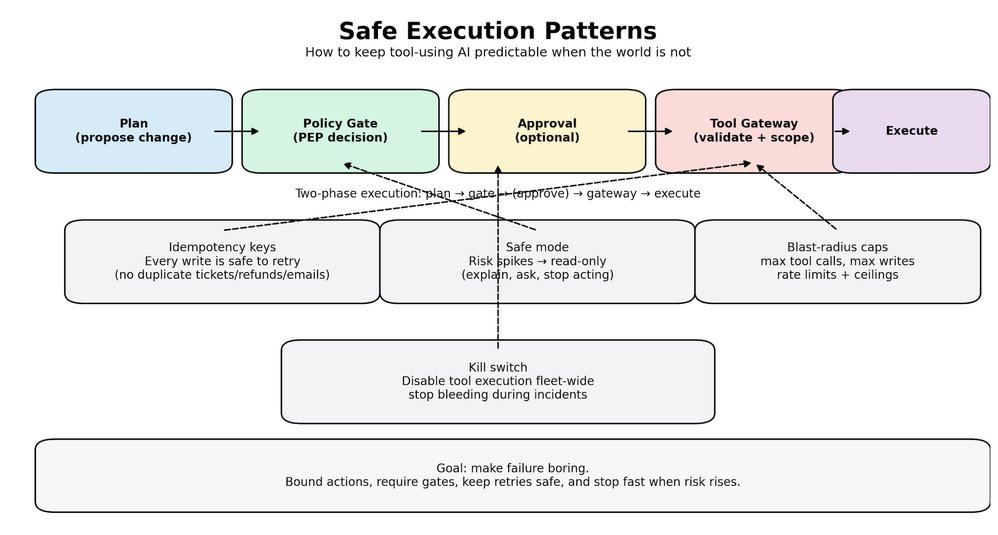
Policy answers whether something is allowed. Safe execution answers what happens when things get messy. Because they will—models time out, inputs are adversarial, people ask for the wrong thing, agents misunderstand.
When tools can change state, small mistakes turn into real incidents. These patterns keep the system stable:
Two-phase execution Do not execute directly from a model output. First phase: propose a plan and a dry-run summary of what will change. Second phase: execute only after policy gates pass, and approval is collected if required.
Idempotency for every write If a tool call can create, refund, email, delete, or deploy, it must be safe to retry. Every write gets an idempotency key, and the gateway rejects duplicates. This one change prevents a huge class of production pain.
Default to read-only when risk rises When injection signals spike, when the session looks anomalous, when retrieval looks suspicious, the system should not keep acting. It should downgrade. Retrieve, explain, and ask. No tool execution.
Scope permissions to operations, not tools Tools are too broad. Do not allow Jira. Allow create ticket in these projects, with these fields. Do not allow database access. Allow read-only on this schema, with row and column filters.
Rate limits and blast radius caps Agents should have a hard ceiling. Max tool calls per request. Max writes per session. Max affected entities. If the cap is hit, stop and escalate.
A kill switch that actually works You need a way to disable tool execution across the fleet in one move. When an incident happens, you do not want to redeploy code. You want to stop the bleeding.
If you build these in early, you stop relying on luck. You make failure boring, contained, and recoverable.
The Era of AI for AI
We are entering a phase where parts of the system can maintain and improve themselves—not in a magical way, but in a practical, engineering way.
A self-improving system can watch what is happening in production, spot a class of problems, propose changes, test them, and ship them safely, while leaving a clear trail behind it. It can improve code paths, adjust prompts, refine retrieval rules, update tests, and tighten policies.
What makes this real is the loop, not the model:
- Signals come in from logs, traces, incidents, drift metrics, and quality checks
- The system turns those signals into a scoped plan
- It passes through gates: policy and permissions, safe scope, testing, and controlled rollout
- If something looks wrong, it stops, downgrades to read-only, or asks for approval
Scale changes here. In the old world, scale meant more users and more traffic. In the AI for AI world, scale also means more autonomy. One request can trigger many tool calls. One workflow can spawn sub-agents. One bad signal can cause retries and cascades.
The question is not only "can your system handle load?" The question is "can your system handle multiplication without losing control?"
If you want self-improving behavior, you need three things to be true:
- The system is allowed to change only what it can prove is safe to change
- Every change is testable and reversible
- Every action is traceable, so you can replay why it happened
When those conditions exist, self-improvement becomes an advantage. When they do not, self-improvement becomes automated risk.
Observability: Uptime Isn't Enough
Traditional observability answers: Is the service up? Is it fast? Is it erroring? That is table stakes.
Production AI needs a deeper truth: Why did it do that? Because the system can look perfectly healthy while still making the wrong decision. Latency is fine. Error rate is fine. Dashboards are green. And the output is still harmful.
To debug that kind of failure, you need causality you can replay and audit:
Input → context retrieval → prompt assembly → model response → tool invocation → final outcome
Without this chain, incident response becomes guesswork. People argue about prompts, blame the model, and ship small patches that do not address the real cause. Then the same issue comes back under a different prompt, a different document, or a slightly different user context.
The practical goal is simple. Every high-impact action should have a story you can reconstruct later. What did the system see? What did it pull? What did it decide? What did it touch? And which policy allowed it?
When you have that, you stop chasing symptoms. You can fix the actual failure point, and you can detect drift before users do.
RAG Governance and Data Provenance
Most teams treat retrieval as a quality feature. In production, retrieval is a security boundary. The moment a document enters the context window, it becomes part of the system's brain for that request.
If retrieval pulls the wrong thing, the model can behave perfectly and still lead you to a bad outcome. I have seen systems where the model was not the problem at all. The problem was a single stale runbook that looked official, ranked high, and quietly took over the decision. Everything downstream was clean. The agent followed instructions, called the right tools, and still caused damage because the truth it was given was wrong.
I keep repeating one line in reviews: Retrieval is where truth enters the system. If you do not control that, you are not governing anything.
What makes retrieval safe enough for enterprise use?
Provenance on every chunk Every retrieved snippet needs a label you can defend later: source, owner, timestamp, and classification. If you cannot answer where it came from, you cannot trust it for actions.
Staleness budgets Old truth is a real risk. A runbook from last quarter can be more dangerous than no runbook at all. If content is older than a threshold, the system should say it is old, and either confirm or downgrade to read-only. No silent reliance.
Allowlisted sources per task Not all sources are valid for all jobs. Incident response might allow internal runbooks. Customer messaging might require approved templates only. Make this explicit. Retrieval should not behave like a free-for-all search engine.
Scope and redaction before the model sees it Row and column limits, PII filtering, secret stripping, tenant boundaries. Do it before prompt assembly, not after the model has already seen the data.
Citation requirement for high-impact steps If the system is about to take a high-impact action, it should be able to point to the sources that justified it. If it cannot, it should stop and ask. That one rule prevents a lot of confident nonsense.
Monitor retrieval like a production dependency Track which sources are being used, which ones cause incidents, and where drift is coming from. Retrieval quality is not static. Content changes. Permissions change. Rankings shift. Behavior follows.
When you treat retrieval as governance, the system stops absorbing random truth. It consumes controlled truth, with ownership, freshness, and scope. That is what production needs.
Security: API Keys Aren't a Strategy
The highest-impact AI incidents are usually not model hacks. They are architectural failures: over-privileged identities, blurred trust boundaries, unbounded tool access, and unsafe retrieval paths.
Once an agent can call tools that mutate state, treat it like a privileged service, not a chatbot:
- Least privilege by default
- Explicit authorization boundaries
- Auditable actions
- Containment-first design
- Clear separation between user intent and system authority
This is how you prevent a prompt injection from turning into a system-level breach.
What "Production-Ready AI" Actually Means
Production-ready AI is not defined by a benchmark score. It's defined by survivability under uncertainty. A production-grade AI system can:
- Explain itself with traceability
- Enforce policy at runtime
- Contain blast radius when wrong
- Degrade safely under uncertainty
- Recover with clear operational playbooks
If your system can't answer "how does it fail?" you don't have production AI yet. You have a prototype with unmanaged risk.
How Azure Helps You Engineer Production-Grade AI
Azure doesn't "solve" production-ready AI by itself—it gives you the primitives to engineer it correctly. The difference between a prototype and a survivable system is whether you translate those primitives into runtime control points: identity, policy enforcement, telemetry, and containment.
1. Identity-first execution A production AI runtime should not run on shared API keys or long-lived secrets. Give each agent/orchestrator a dedicated identity (least privilege by default). Separate identities by environment (prod vs staging) and by capability (read vs write). Treat tool invocation as a privileged service call.
2. Policy as enforcement Create an explicit Policy Enforcement Point (PEP) in your agent runtime. Make the PEP decision mandatory before executing any tool call or data access. Use "allow + obligations" patterns: allow only with constraints (redaction, read-only mode, rate limits, approval gates, extra logging).
3. Observability that explains behavior Emit a trace for every request across: retrieval → prompt assembly → model call → tool calls → outcome. Log policy decisions (allow/deny/require approval) with policy version + obligations applied. Capture "why" signals: risk score, classifier outputs, injection signals, uncertainty indicators.
4. Zero-trust boundaries for tools and data Put a Tool Gateway in front of tools (Jira, email, payments, infra) and enforce scopes there. Restrict data access by classification (PII/secret zones) and enforce row/column constraints. Degrade safely: if risk is high, drop to read-only, disable tools, or require approval.
5. Practical "production-ready" checklist
- Identity: every runtime has a scoped identity; no shared secrets
- PEP: every tool/data action is gated by policy, with obligations
- Traceability: full chain captured and correlated end-to-end
- Containment: safe degradation + approval gates for high-risk actions
- Auditability: policy versions and decision logs are immutable and replayable
- Environment separation: prod ≠ staging identities, tools, and permissions
Operating Production AI
Production is not a diagram. It is a living system. Here is the operating model I look for when I want to trust an AI runtime in production.
The Few SLOs That Actually Matter
Trace completeness For high-impact requests, can we reconstruct the full chain every time, without missing steps.
Policy coverage What percentage of tool calls and sensitive reads pass through the policy gate, with a recorded decision.
Action correctness Not model accuracy. Real-world correctness. Did the system take the right action, on the right target, with the right scope.
Time to contain When something goes wrong, how fast can we stop tool execution, downgrade to read-only, or isolate a capability.
Drift detection time How quickly do we notice behavioral drift before users do.
The Runbooks You Must Have
If you operate agents, you need simple playbooks for predictable bad days:
Injection spike → safe mode, block tool execution, force approvals Retrieval poisoning suspicion → restrict sources, raise freshness requirements, require citations Retry storm → enforce idempotency, rate limits, and circuit breakers Tool gateway instability → fail closed for writes, degrade safely for reads Model outage → fall back to deterministic paths, templates, or human escalation
Clear Ownership
Someone has to own the runtime, not just the prompts:
- Platform owns the gates, tool gateway, audit, and tracing
- Product owns workflows and user-facing behavior
- Security owns policy rules, high-risk approvals, and incident procedures
When these pieces are real, production becomes manageable. When they are not, you rely on luck and hero debugging.
The 60-Second Production Readiness Checklist
If you want a fast sanity check, here it is:
- Every agent has an identity, scoped per environment
- No shared API keys for privileged actions
- Every tool call goes through a policy gate with a logged decision
- Permissions are scoped to operations, not whole tools
- Writes are idempotent, retries cannot duplicate side effects
- Tool gateway validates inputs, scopes data, and rate-limits actions
- There is a safe mode that disables tools under risk
- There is a kill switch that stops tool execution across the fleet
- Retrieval is allowlisted, provenance-tagged, and freshness-aware
- High-impact actions require citations or they stop and ask
- Audit logs are immutable enough to trust later
- Traces are replayable end-to-end for any incident
If most of these are missing, you do not have production AI yet. You have a prototype with unmanaged risk.
A Quick Note on Azure Primitives
In Azure-based enterprises, you already have strong primitives that mirror the mindset production AI requires: identity-first access control (Microsoft Entra ID), secure workload authentication patterns (managed identities), and deep telemetry foundations (Azure Monitor / Application Insights).
The key is translating that discipline into the AI runtime so governance, identity, and observability aren't external add-ons, but part of how AI executes and acts.
Closing
Models will keep evolving. Tooling will keep improving. But enterprise AI success still comes down to systems engineering.
If you're building production AI today, what has been the hardest part in your environment: governance, observability, security boundaries, or operational reliability?
If you're dealing with deep technical challenges around production AI, agent security, RAG governance, or operational reliability, feel free to connect for technical discussions and architecture reviews.
Related Resources:
- Zero-Trust Agent Architecture: How to Actually Secure Your Agents - Detailed breakdown of securing agent systems
- Microsoft Entra ID Documentation - Identity and access management
- Azure Monitor Documentation - Observability and telemetry
- Azure Policy - Governance and compliance enforcement
Comments
Please log in or register to join the discussion