
Zimperium researchers said the malware uses fake Chrome and TikTok sites, Play Protect impersonation, and Accessibility abuse to steal financial credentials, SMS messages, and lock-screen secrets.
Operators behind a new Android banking trojan named Rokarolla use malicious websites that pose as Google Chrome and TikTok download pages to infect phones and target 217 banking and cryptocurrency apps, Zimperium researchers said Tuesday.

The campaign aims at Android users who install APK files outside Google Play. Zimperium said researchers found no evidence that Rokarolla reached Google Play, but the malware still gives operators a strong path to fraud once a user installs the fake app.
Rokarolla matters because its operators combine phishing overlays, keylogging, SMS theft, contact harvesting, clipboard control, screenshots, and call blocking. That mix lets an attacker steal a password, capture a one-time code, hide a bank alert, and operate the device while the owner sees a fake screen.
Zimperium said Rokarolla supports 137 commands. The company also published those commands in its GitHub organization, giving defenders a way to build detections and compare future samples.
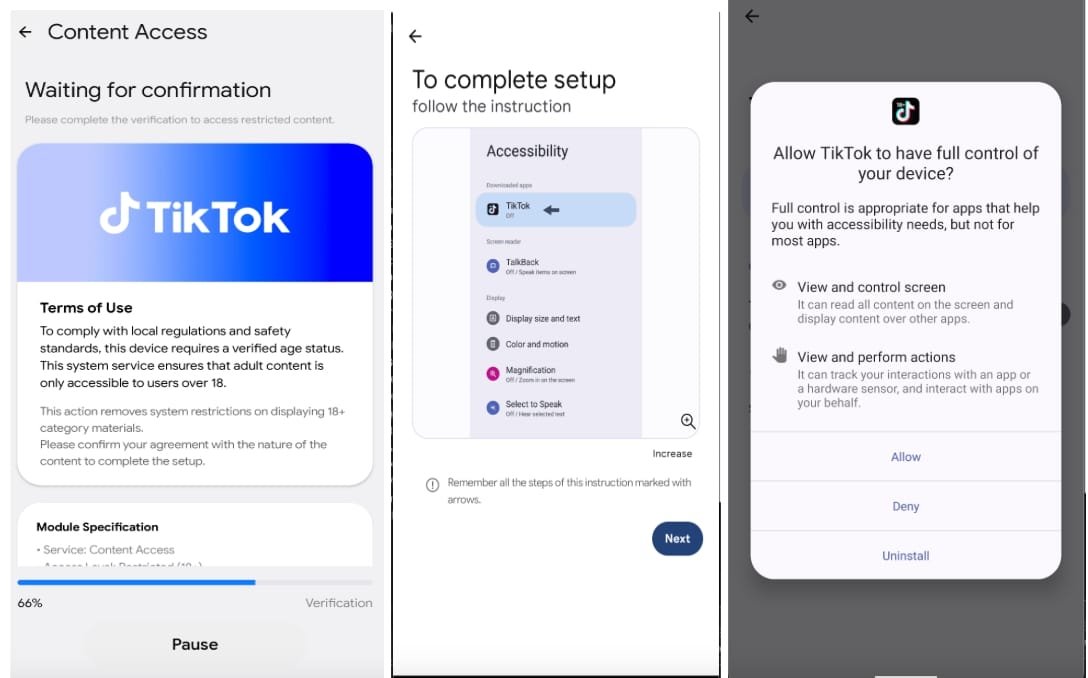
The installation flow starts with a dropper that impersonates Google Play Protect, Android's anti-malware feature. The fake interface offers Chrome or TikTok, then installs Rokarolla under that cover.
After launch, Rokarolla asks the user for Accessibility service access, notification access, SMS access, and call permissions. Android developers use Accessibility services to help users interact with apps, but malware operators prize the same access because it can read screen content, press buttons, approve prompts, and place fake views over trusted apps.
The first command-and-control exchange gives the attacker a device profile. Rokarolla sends the phone model, Android version, locale, display details, battery level, storage capacity, and available RAM. Zimperium said operators use that profile to create a victim identifier for the campaign.
The financial theft stage begins when Rokarolla checks the infected phone for apps on its target list. If the phone has a matching banking, payment, or crypto app, the malware downloads the phishing package for that app.
When the user opens the real financial app, Rokarolla places a fake login screen on top of it. The user sees a familiar brand and enters credentials, card details, or other account data. The attacker receives the information while the real app remains underneath the overlay.
Rokarolla also uses overlays against the phone itself. Zimperium said the malware can capture lock-screen PINs and patterns, then use those secrets to operate the device after the owner locks it. Operators can show fake installation screens to block user interaction and hide malicious activity.
The command list shows why mobile banking malware has moved beyond password theft. Rokarolla can steal SMS messages, extract contacts and WhatsApp contacts, capture keystrokes, record on-screen content through UI logging, copy and change clipboard contents, block incoming calls, block bank fraud alerts, and upload screenshots with timestamps.
Those features support on-device fraud. Instead of logging in from a new computer that triggers a bank's risk controls, an operator can work from the victim's phone. The bank sees the known device, the known app, and the known user session, while the attacker controls the screen.
Rokarolla also tries to weaken Android's defenses. Zimperium said it can disable Play Protect, hide its app icon, silence audio and vibration, and keep the screen awake. Google describes Play Protect as a service that checks apps and devices for harmful behavior, so attackers often try to turn it off or trick users with fake Play Protect prompts.
Users can reduce risk by installing apps through Google Play or a publisher's verified website, avoiding APK links from search ads and messages, and denying Accessibility access to apps that do not need it. A video player, browser installer, or social app clone that asks for Accessibility, SMS, notifications, and calls should raise concern.
Security teams should treat Rokarolla as a mobile endpoint threat, not a narrow banking phishing kit. Mobile device management policies can block unknown sources, restrict Accessibility grants, flag hidden app icons, and alert on Play Protect tampering. Banks and crypto platforms should watch for sessions that pair valid credentials with unusual UI automation, blocked fraud calls, rapid clipboard use, or device state changes.
Rokarolla shows how much damage a sideloaded Android app can do after a user grants high-risk permissions. The attacker no longer needs to defeat a bank's app from the outside. The attacker can sit on the phone, read the screen, steal the code, and press the buttons.
Comments
Please log in or register to join the discussion