AI gives designers probabilities, and product teams need interfaces that show uncertainty, invite review and protect users from false certainty.
AI now shapes interface copy, search results, recommendations, fraud checks, support answers and design research. Pratik Joglekar’s Smashing Magazine article, “Designing With Uncertainty: How AI Supercharges Probabilistic Thinking”, argues that designers need to treat AI output as a scored guess, then design the product around that uncertainty.
The Air Canada chatbot case shows the risk. A customer asked about bereavement fares. The bot gave a refund answer that the airline later rejected. A tribunal sided with the customer. The company let a model’s predicted text stand in for policy, and the interface gave the user no clear reason to doubt it.
Product teams face the same pattern across AI interfaces. A model gives a probability. Designers often show it as fact. Users then make decisions with more confidence than the system has earned.
What changed
Designers have worked with uncertainty for years through research samples, A/B tests, conversion forecasts and recommendation systems. AI raises the volume and speed. Product teams can now generate variants, summarize research, simulate user reactions and score possible outcomes before engineers ship a feature.
That speed helps teams, but it also hides a trap. A model can produce a polished answer with thin evidence. Users may read fluency as certainty. Teams may read a confidence score as permission to ship.
Joglekar calls for probabilistic design: a practice that treats AI output as one signal among user research, analytics, accessibility constraints and product judgment. Designers ask a better question: How likely will this help the user, and what harm follows if the system guesses wrong?
That question changes interface decisions. A checkout flow with a 60% completion forecast needs more support, such as comparison details, payment reassurance or clearer returns language. A checkout flow with a 90% completion forecast needs less friction and a shorter path to purchase.

The same screen can need two designs because the user’s intent differs. AI can help the team spot that difference, but the team still has to choose the right experience.
Developer experience
AI changes design and development workflows because teams can test assumptions earlier. A designer can ask a model to review a prototype for cognitive load, accessibility concerns or segment-specific barriers. A product manager can ask for risks by user type. An engineer can use a model to compare copy variants against known conversion and support data.
Teams should write prompts like test plans. The prompt needs context, user group, task, constraint and output format. A weak prompt asks whether a page works. A stronger prompt asks the model to inspect a checkout step for neurodivergent users, list sensory or cognitive barriers, assign a confidence score and explain the assumptions behind the score.
Developers also need to expose model limits in the product. That means confidence ranges, source links, review steps and fallback paths. A support bot that handles refund policy should cite the policy page, show the date of the policy and offer a handoff to a human when the answer affects money.
For lower-risk workflows, teams can keep the interaction light. GitHub Copilot suggests code that developers accept, edit or ignore. Gmail Smart Compose suggests text while the writer keeps control of tone and intent. The product gives speed without taking authorship away from the user.
Higher-risk workflows need more friction. Fraud systems can route low-risk activity through an automated path, send medium-risk activity to extra verification and send high-risk activity to review. Medical tools should help clinicians inspect evidence, but clinicians need final authority over diagnosis and treatment.
Developers should log accept, reject, edit and override actions with context. Those signals show where the model helps and where it fails. A high override rate points to a bad model, a weak interface or a task that needs human judgment.
Bias and model drift
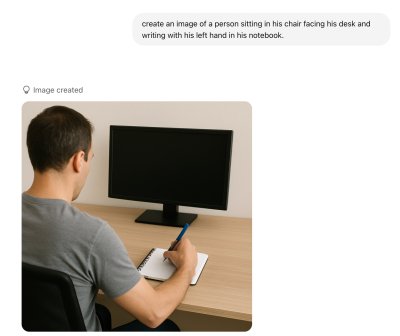
Teams train AI systems on past data, and past data carries past behavior. That creates bias. Joglekar uses Prime Minister Narendra Modi’s example from the AI Summit in France: a prompt asks for an image of a left-handed writer, yet a model may still show a right-handed person because training data contains more right-handed examples.
Amazon’s scrapped recruiting tool gives a stronger warning. The company reportedly trained the system on past hiring data, and the model penalized signals linked to women’s resumes. Recruiters had favored male candidates in the source data, so the model copied that pattern.
Designers and developers need to ask which history the model learned from. A voice interface for older adults may look weak to a model trained on mobile touch behavior. A hiring screen may look “objective” while it repeats old selection bias. A recommendation feed may raise short-term engagement while users lose trust or feel boxed in.
Confidence scores need review too. A 90% score can still mislead. A 40% score can still flag a risk worth checking. Product teams should show confidence with the reason behind it: source quality, data age, sample size, user segment and known gaps.
User impact
Users trust products that admit uncertainty with care. A delivery estimate of Friday to Monday sets a clearer expectation than a precise timestamp that slips. A face recognition feature that asks, “Does this look like Pratik?” respects the user’s judgment more than a label that states the name as fact.

Different users need different cues. Some users accept AI output too fast, so the interface should place confidence and review controls near the answer. Some users distrust AI, so the interface should show source history and accuracy rates. Some users treat AI as advice, so the product should help them compare options and decide.
Resilience matters more than a short conversion lift. A team can simplify onboarding and raise completion while users understand less. A team can increase notification clicks while users grow tired of the app. A team can tune a feed for engagement and leave users with narrower, worse recommendations.
Duolingo shows a useful trade-off through its hearts system. The product adds friction after mistakes and pushes learners to practice older material. That may reduce lessons in one session, but the product supports learning and return use.
Product teams should review AI features against long-term signals: retention quality, support contacts, override rate, user trust, fairness checks and recovery after low confidence. They should also design degraded states. If the model loses confidence, the product can ask for more input, show a manual path or send the task to a reviewer.
Probabilistic design gives teams a practical standard for AI products. Name the assumption. Show the confidence. Give users control. Test the outcome. Change the design when the evidence changes.
Comments
Please log in or register to join the discussion