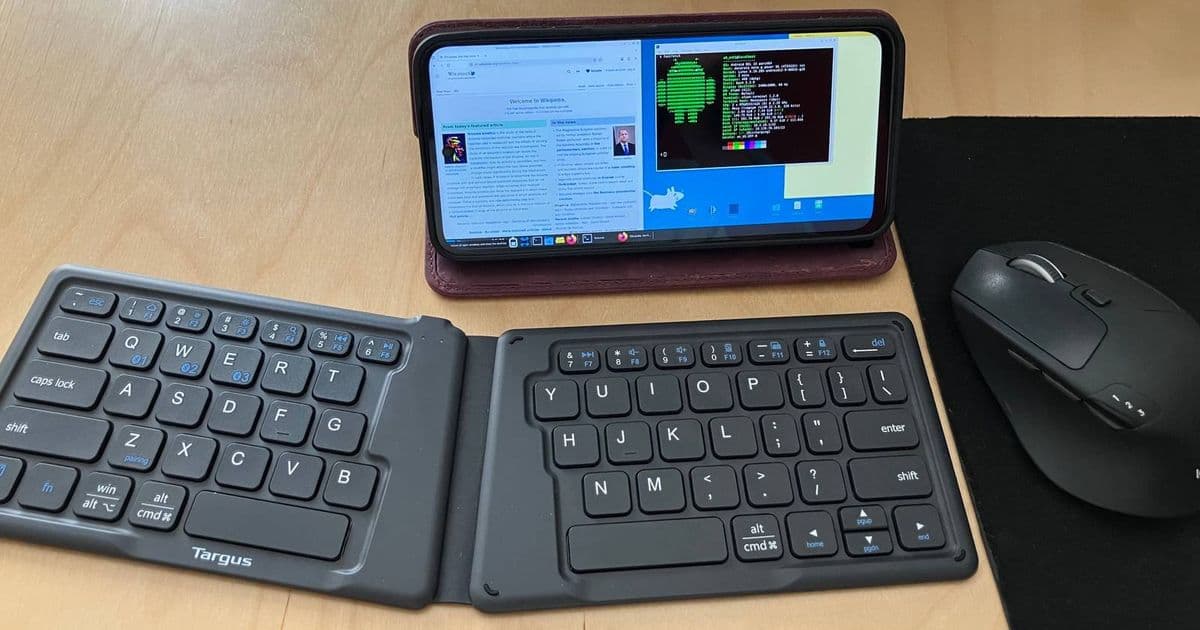
A developer successfully transformed a budget Moto G Power 2024 smartphone into a functional Linux laptop using Termux, XFCE, and Bluetooth peripherals, demonstrating how affordable mobile hardware can serve as a capable PC alternative.
In an era where RAM and storage shortages have driven up PC prices, one developer has found an innovative solution that's both budget-friendly and surprisingly effective. By converting a $50 Moto G Power 2024 smartphone into a Linux laptop, Gabriel Broussard Korr has created a compact computing device that challenges our conventional understanding of what constitutes a 'computer'.
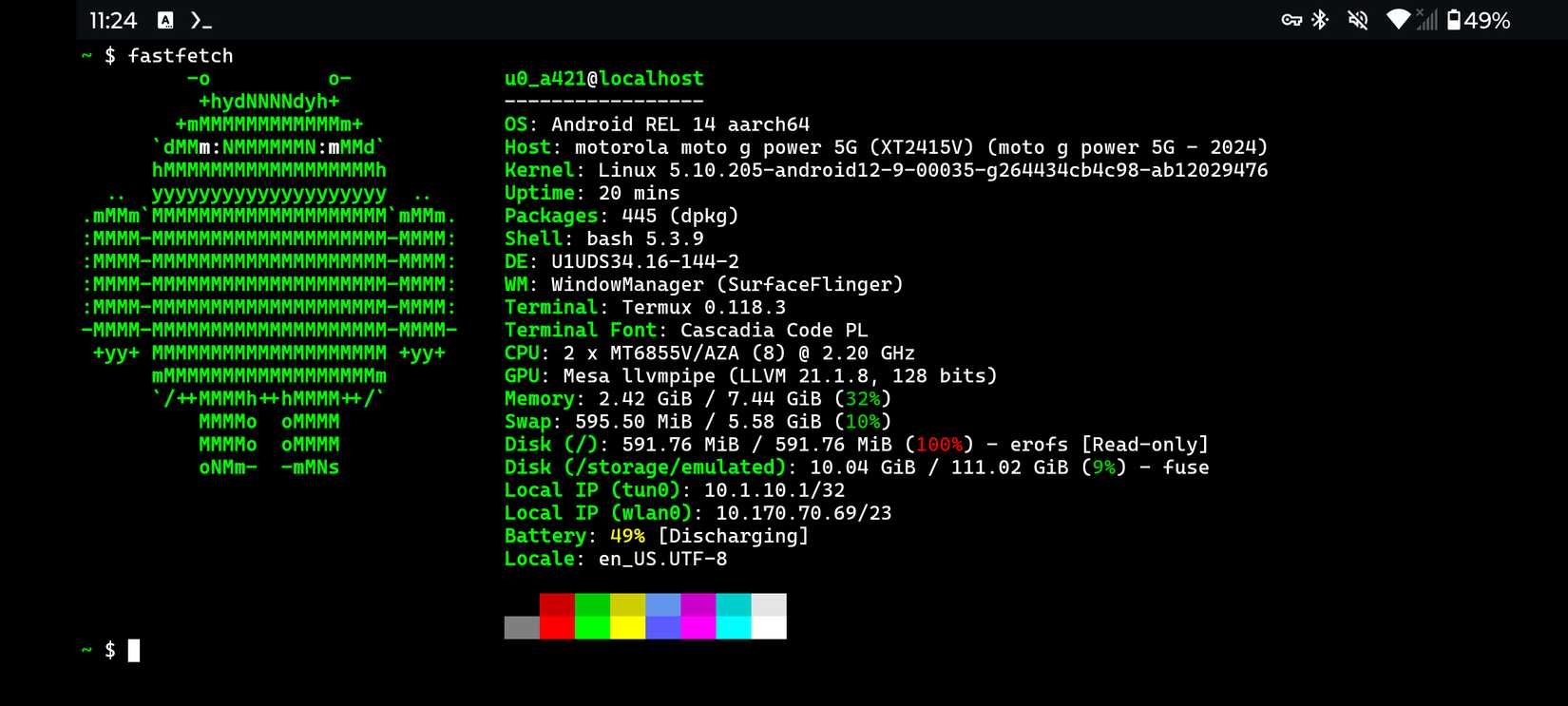 Fastfetch running on the modified Moto G Power 2024
The Hardware Foundation: A $50 Smartphone
The project centers around the Moto G Power 2024, an entry-level smartphone available for an astonishing $50. While modest in specifications by modern smartphone standards, this device packs enough power to run a full Linux desktop environment when paired with the right software and peripherals.
Korr's choice of hardware is particularly interesting because it represents the sweet spot between affordability and capability. The Moto G Power 2024 features a decent processor, sufficient RAM for lightweight Linux operations, and adequate storage for essential applications. What makes this project compelling is that it leverages hardware that's already mass-produced and widely available, rather than requiring specialized components.
Software Transformation: From Android to Linux Desktop
The magic of this project lies in the software transformation. Korr employed a multi-step process to convert the Android device into a Linux laptop:
Termux Installation: Termux is an Android terminal emulator and Linux environment app that provides a command-line interface on Android devices. It serves as the foundation for running Linux tools and applications on the smartphone.
XFCE Desktop Environment: Using Termux, Korr installed XFCE, a lightweight desktop environment designed for systems with limited resources. XFCE provides the familiar desktop interface with panels, menus, and window management that users expect from a traditional Linux desktop.
X Server Setup: The project requires running an X server on Android to display the XFCE desktop. This involves configuring X11 forwarding through Termux to render the desktop interface on the phone's screen.
Application Installation: With the desktop environment in place, Korr installed full Linux applications including GIMP (image editing), Shotcut (video editing), and other productivity tools.
The complete setup process, including code snippets and detailed instructions, has been documented on Korr's blog R Bites, making this project accessible for developers interested in replicating the experiment.
Performance and Practical Applications
What makes this project particularly noteworthy is the performance of the Linux applications on the smartphone hardware. Korr reports that applications like GIMP and Shotcut run at "a very reasonable speed," defying expectations about what can be achieved on entry-level mobile hardware.
This Linux laptop setup offers several practical applications:
Lightweight Development: The device can handle basic coding tasks, making it suitable for web development, scripting, and lightweight programming.
Media Editing: The ability to run GIMP and Shotcut opens up possibilities for basic image and video editing tasks.
Portable Productivity: When paired with a Bluetooth keyboard and mouse, the smartphone transforms into a compact workstation that can be easily transported.
Educational Tool: The project serves as an excellent educational resource for understanding Linux environments, Android internals, and cross-platform development.
Technical Considerations and Limitations
While the project demonstrates impressive functionality, several technical considerations should be noted:
Thermal Management: Running a desktop environment on hardware designed primarily for mobile use can generate significant heat. Continuous use may lead to thermal throttling, affecting performance.
Battery Life: The power requirements of a full desktop environment will drain the phone's battery much faster than typical smartphone usage.
Input Method: While Bluetooth peripherals work, the small screen size of a smartphone makes it less than ideal for traditional desktop computing tasks.
Application Compatibility: Not all Linux applications will run smoothly on the limited hardware of an entry-level smartphone.
Storage Constraints: The modest storage capacity of budget smartphones will limit the number and size of applications that can be installed.
Broader Implications
This project highlights several interesting trends in computing:
Convergence of Mobile and Desktop: The blurring lines between mobile and desktop computing continue as developers find new ways to leverage mobile hardware for traditional computing tasks.
Resource Efficiency: The project demonstrates how efficient software can extract maximum performance from modest hardware, a valuable lesson in an era of increasing resource scarcity.
DIY Innovation: The project exemplifies the creativity of the DIY computing community, finding novel uses for consumer electronics in unintended ways.
Getting Started with Your Own Linux Laptop Smartphone
For developers interested in replicating this project, here's a high-level overview of the process:
- Acquire a Moto G Power 2024 or similar Android device
- Install Termux from the Google Play Store or F-Droid
- Install X11 packages through Termux
- Set up XFCE desktop environment
- Configure X server for display
- Install desired Linux applications
- Pair Bluetooth keyboard and mouse
- Customize the desktop environment for your workflow
The detailed instructions and code are available on Korr's blog, providing a comprehensive guide for those looking to undertake this project.
 Accessing a Raspberry Pi from a smartphone - related concept of mobile computing
Conclusion
Gabriel Broussard Korr's project demonstrates that with creativity and technical skill, even the most modest hardware can be transformed into a functional computing device. By turning a $50 smartphone into a Linux laptop, Korr has not only created an interesting proof-of-concept but also highlighted the potential for alternative computing solutions in an increasingly expensive tech market.
As RAM and storage shortages continue to impact PC prices, projects like this offer a glimpse into a future where devices serve multiple purposes and boundaries between traditional computing categories continue to blur. While this particular setup may not replace a full desktop or laptop for most users, it represents an innovative approach to computing that challenges our assumptions about hardware limitations and software possibilities.
Comments
Please log in or register to join the discussion