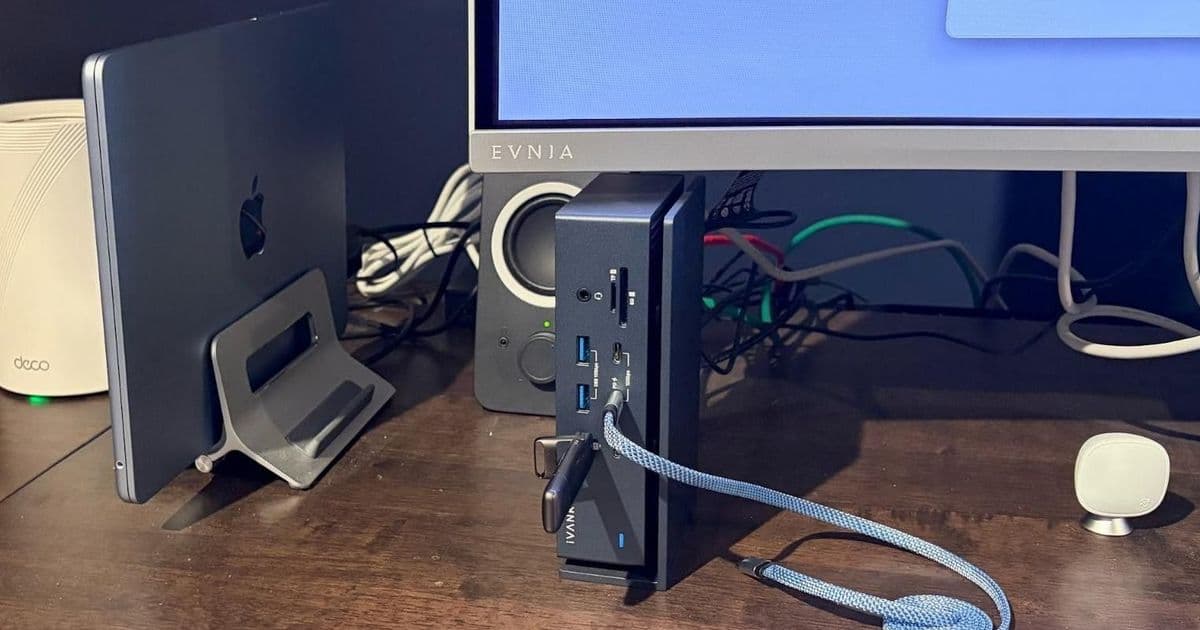
Thunderbolt 4 docks provide essential connectivity expansion for modern Macs, with dual-cable solutions like the Ivanky FusionDock Max 1 offering 20 ports versus more affordable single-cable options like the Amazon Basics Thunderbolt 4 Pro Dock.
Modern Macs, particularly the MacBook Air and Mac Mini, have become increasingly powerful but suffer from limited port availability. This connectivity constraint has driven many users to adopt Thunderbolt 4 docks as essential desktop accessories. These docking solutions transform compact laptops into full-featured workstations while maintaining the portability benefits that make Apple devices so appealing.
The Port Limitation Problem
Apple's design philosophy for recent Mac models prioritizes sleekness and minimalism, often at the expense of connectivity options. The MacBook Air, despite its impressive M4 processor and all-day battery life, typically ships with only two USB-C ports. This limitation becomes particularly frustrating when users need to connect multiple peripherals, external displays, and network connections simultaneously.
The Mac Mini faces similar challenges, though its stationary nature makes it slightly more manageable. However, even desktop users benefit significantly from consolidated connectivity solutions that reduce cable clutter and simplify their setup.
Dual-Cable Innovation: The Ivanky FusionDock Max 1
Among the most ambitious Thunderbolt 4 docking solutions is the Ivanky FusionDock Max 1, which takes an unconventional approach by using two Thunderbolt 4 cables instead of the standard single connection. This design choice enables the dock to incorporate two Thunderbolt 3 chips onboard, dramatically expanding its port offerings to an impressive twenty total connections.
The dual-cable configuration delivers:
- 2x Upstream USB-C ports
- 4x Downstream USB-C (40 Gbps each)
- 1x USB-C (10 Gbps with 30W PD)
- 1x USB-C (10 Gbps)
- 5x USB-A (10 Gbps each)
- 2x HDMI 2.0 ports
- 1x SD 4.0 (UHS-II) slot
- 1x microSD 4.0 (UHS-II) slot
- 1x 2.5 Gigabit Ethernet
- 1x Front audio in/out (3.5mm)
- 1x Rear audio out (3.5mm)
- 1x Optical audio
This extensive port selection transforms a MacBook Air from a minimalist laptop into a comprehensive desktop replacement capable of handling virtually any peripheral setup.
Design and Compatibility Considerations
The FusionDock Max 1's dual-cable design creates both advantages and limitations. The spacing between the two USB-C connectors is specifically engineered to match Apple's port configuration, making the dock exclusively compatible with Mac systems. Furthermore, the dock only works with Apple Silicon Macs, though this limitation affects relatively few users since Apple Silicon has been standard since late 2020.
The dock features an aluminum chassis with what Ivanky terms a "floating cooling design." This construction includes an air gap between the stand and the component unit, whether mounted vertically or horizontally, to enhance thermal management. The vertical orientation proves particularly space-efficient for desktop setups.
Real-World Performance and Usage
In practical application, the FusionDock Max 1 delivers exceptional performance across various use cases. When connected to a MacBook Air, the setup provides immediate access to expanded connectivity. A 49-inch Philips Evnia 49M2C8900 DQHD QD-OLED monitor connects via DisplayPort, achieving its native 240Hz refresh rate. The monitor's onboard USB hub connects through one of the rear USB-A ports, along with peripherals like a 1080p Logitech webcam.
Audio connectivity utilizes the rear 3.5mm audio jack for budget Logitech speakers, while the dock's 2.5 GbE LAN port automatically overrides the MacBook Air's Wi-Fi 6E when docked. This configuration enables full utilization of high-speed internet connections, such as 2 Gbps fiber services.
Storage and Transfer Performance
The dock's high-bandwidth ports excel at data transfer tasks. A SSK 512GB USB-C thumb drive, when connected through the dock, achieves write speeds of up to 512 Mbps and read speeds of 432 Mbps. These speeds are comparable to direct connections to the MacBook Air's native Thunderbolt 4 port, demonstrating the dock's ability to maintain performance across its extensive port selection.
The front-mounted microSD 4.0 (UHS-II) slot proves particularly useful for transferring files to 3D printers and media from devices like the DJI Mavic Air 2 drone. The USB-C port with 30W Power Delivery enables fast charging for mobile devices such as iPhones.
Multi-Monitor Capabilities
Despite using a single 49-inch monitor in this setup, the FusionDock Max 1 supports extensive multi-monitor configurations. Users can connect up to four displays simultaneously: three 6K monitors at 60Hz and one 4K monitor at 60Hz. This capability makes the dock suitable for professional workflows requiring extensive screen real estate.
Pricing and Value Considerations
Thunderbolt docks command premium prices, with the FusionDock Max 1 retailing at $299 direct from Ivanky. However, the market for open-box and refurbished units provides opportunities for significant savings. One user reported purchasing the dock for $177 on eBay, representing substantial value for the extensive feature set.
The Amazon Basics Alternative
For users seeking more modest connectivity expansion, the Amazon Basics Thunderbolt 4 Pro Dock offers a streamlined alternative. This single-cable solution provides ten ports:
- 2x Thunderbolt 4 (40 Gbps with 15W PD)
- 1x HDMI 2.1
- 3x USB-A (10 Gbps each)
- 1x 2.5 Gigabit Ethernet
- 1x SD 4.0 (UHS-II) slot
- 1x 3.5mm audio out
The dock supports Power Delivery 3.0 with up to 96 watts for laptop charging and can drive either two 4K monitors at 60Hz or a single 8K monitor at 30Hz.
Cost-Effective Acquisition
The Amazon Basics dock demonstrated exceptional value during a Woot.com sale, where new units sold for $34.99 with free shipping. This dramatic discount, compared to the current $134.99 Amazon price, highlights the importance of monitoring sales and promotions for premium accessories.
Market Alternatives and Options
The Thunderbolt 4 dock market offers numerous alternatives across various price points:
Mid-Range Options ($150-$250):
- UGREEN Thunderbolt 4 Dock – $169.99
- Plugable Thunderbolt 4 Dock – $199.95
- WAVLINK Thunderbolt 4 Dock – $249.99
- Lenovo ThinkPad Universal Thunderbolt 4 Dock – $238.99
- Anker 778 Thunderbolt Docking Station – $229.99
Premium Thunderbolt 5 Solutions:
- UGREEN Thunderbolt 5 Dock – $299.99
- Ivanky FusionDock Pro 3 Thunderbolt 5 Dock – $224.99
- Ivanky FusionDock Max 2 – $399.99
- Anker Prime Thunderbolt 5 Dock – $399.99
- Kensington SD50000T5 Thunderbolt 5 Dock – $209.99
- WAVLINK TB5 Thunderbolt 5 Dock – $299.99
- CalDigit E5 Thunderbolt 5 Dock – $249.99
Practical Benefits and Workflow Enhancement
Both docking solutions significantly improve user workflows by consolidating multiple adapters into single, elegant solutions. Before adopting the Amazon Basics dock, one user relied on a collection of adapters including USB-C-to-USB-A converters for external hard drives and USB-C-to-2.5 GbE adapters for networking. The Thunderbolt 4 dock eliminated this cable clutter while improving reliability and performance.
The convenience factor cannot be overstated. With a dock-based setup, users simply connect one or two cables to instantly access their complete workstation configuration. Monitors activate, network connections establish, and peripherals become immediately available without the need to manually connect individual devices each time.
Future-Proofing Considerations
As Thunderbolt 5 docks enter the market, users must weigh the benefits of cutting-edge technology against current needs and budget constraints. Thunderbolt 5 offers significantly higher bandwidth, enabling support for multiple high-resolution displays and faster data transfer rates. However, the substantial price premium and limited availability of Thunderbolt 5 peripherals may make Thunderbolt 4 solutions more practical for many users in the near term.
Conclusion
Thunderbolt 4 docks have become essential accessories for modern Mac users, transforming limited-port laptops into comprehensive desktop workstations. Whether opting for the expansive connectivity of dual-cable solutions like the Ivanky FusionDock Max 1 or the streamlined approach of single-cable docks like the Amazon Basics Thunderbolt 4 Pro Dock, these accessories significantly enhance productivity and user experience.
The market offers solutions for every need and budget, from cost-effective options found through sales and promotions to premium docks with extensive port selections and advanced features. As Thunderbolt technology continues to evolve, these docking solutions will remain crucial components in maximizing the potential of modern computing devices.
For users struggling with port limitations on their Macs, investing in a quality Thunderbolt 4 dock represents one of the most impactful upgrades available, delivering immediate improvements in connectivity, convenience, and overall workflow efficiency.
Comments
Please log in or register to join the discussion