
WhatsApp is widening the release of multi-account support on iOS, letting users run two numbers in a single app install. The feature reached the stable App Store build, though Meta is still gating it behind its typical staggered rollout.
WhatsApp is now pushing multi-account support to a wider pool of iPhone users through the public App Store build, closing a long gap with Android, where the capability has been available for some time. If you maintain a personal and a work number, or juggle accounts across regions, you can now keep both inside one installation instead of resorting to a second device or a clone app.

What actually changed
The feature itself is not new in code. WABetaInfo first spotted references to multi-account groundwork well before any public testing, bundled alongside the plumbing for WhatsApp's upcoming username system. Beta users on iPhone got hands-on access starting last November. What changed now is distribution: the stable, App Store version of the app is exposing the option to more accounts, rather than restricting it to TestFlight beta participants.
Meta officially announced multi-account a few months back, but as WABetaInfo noted, "not all users were able to add a second account immediately," because it remained "available only to a limited number of users." That is standard operating procedure for WhatsApp. The Liquid Glass redesign took more than seven months to move from initial testing to broad availability, and it still has not landed for everyone. Server-side gating means two people on the same app version and the same iOS build can see different feature sets.
How to check and set it up
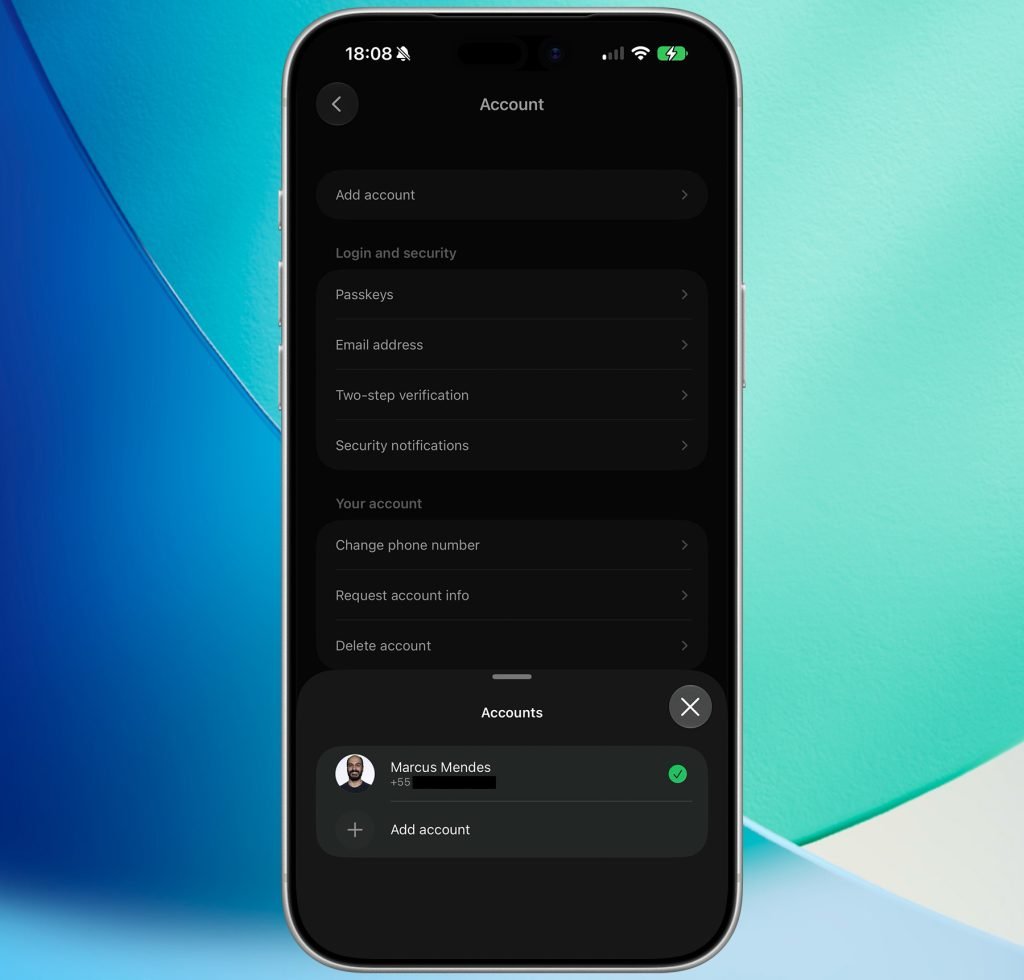
The entry point lives in Settings > Account. If your account is in the rollout, an Add account option appears there. Tapping it walks you through the same registration flow used when you first set up WhatsApp. You have two paths:
- Register a fresh phone number directly on the device.
- Link an existing account by scanning a QR code, similar to how WhatsApp's linked-device system works.
Once a second account is configured, switching between them happens from the Account menu. There is no separate app icon or background process you manage manually; the toggle is built into the existing settings surface.
Why this matters for the platform parity story
For anyone who builds or supports mobile apps across iOS and Android, WhatsApp's rollout is a useful reminder of how messaging features ship asymmetrically. Android picked up dual-account support earlier, partly because the platform's looser model around multiple user profiles and app cloning made the pattern more familiar to users. iOS has no system-level app cloning, so Meta had to build account switching entirely inside its own app sandbox. That means the account state, notification routing, and encryption keys for each number all need to coexist within a single process and a single keychain footprint.
That architectural difference is the reason the iOS version took longer and why it arrives as an in-app account switcher rather than a duplicated install. On Android, a user might run a second copy through the OS or a vendor's dual-app feature. On iOS, the only viable route was first-party support, and Apple's sandboxing rules left WhatsApp no shortcut.
The staggered server-side activation also reflects a practical reality of operating at WhatsApp's scale. A flag-controlled rollout lets Meta watch for problems with notification delivery, end-to-end encryption session handling, and backup behavior before exposing the feature to billions of accounts. If your own users report that the option is missing, the answer is almost always patience rather than a reinstall or a settings change.
What to watch next
The username system that shipped alongside multi-account in the codebase is still in development. Usernames would let people reach each other without exchanging phone numbers, which pairs naturally with running multiple accounts. Once both features are widely live, the practical shape of a WhatsApp identity starts to look less tied to a single SIM and more like a portable account you carry across numbers and devices.
For now, the actionable step is straightforward: update to the latest App Store build, open Settings > Account, and look for Add account. If it is not there yet, it is coming through the same slow, phased process WhatsApp uses for nearly everything. You can read WhatsApp's own help documentation for the current setup steps as the feature reaches your account.
Comments
Please log in or register to join the discussion