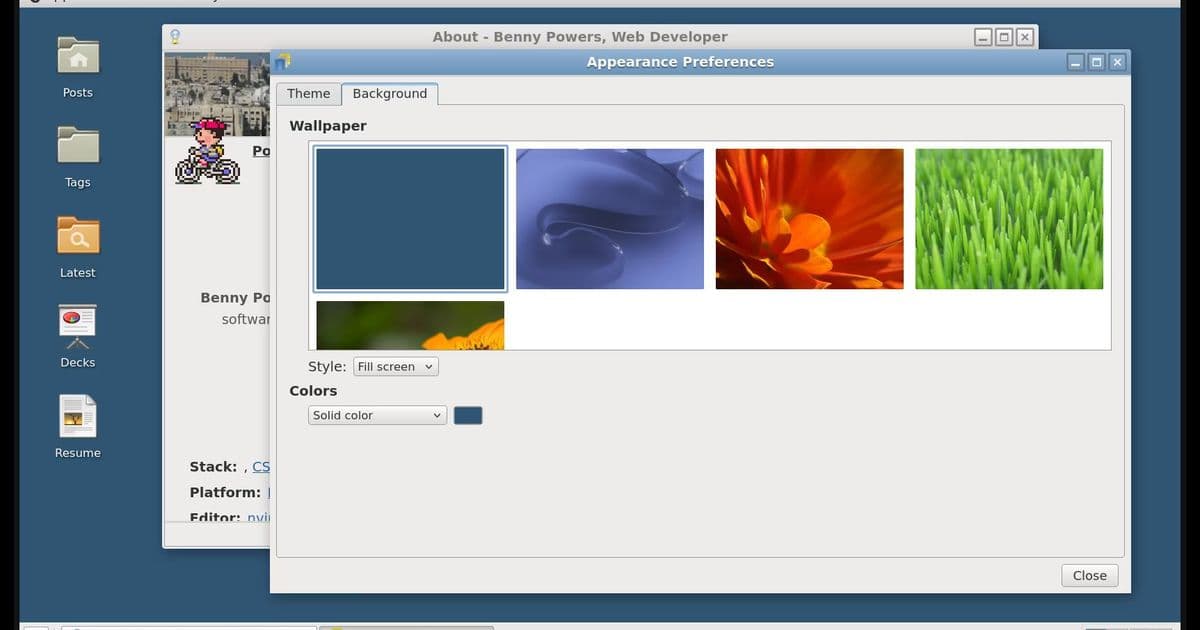
A developer transforms a personal website into an interactive homage to GNOME 2, using web components, Lit‑SSR, and the View Transitions API. The project blends nostalgic UI metaphors with modern web standards, offering themes, classic GNOME wallpapers, and even mini‑apps like Minesweeper, while inviting the community to shape its next feature via webmentions.
When the Web Becomes a Retro Desktop: Recreating GNOME 2.20 with Lit and View Transitions
A few days ago a YouTube essay by Onion Boots resurfaced an old memory of the early‑2000s web: sites that felt more like playful sandboxes than the sterile, content‑first pages we see today. The video reminded the author of the "tinkerer's network"—those personal sites that mixed widgets, animated cursors, and a palpable sense of experimentation. Inspired, the author asked a simple question: What if my own website were itself a nostalgic desktop environment?
The Core Idea: A Desktop‑Metaphor in the Browser
Rather than a static collection of articles, the site now presents itself as a GNOME 2‑style desktop from circa 2002. Every page is a "window" that can be opened, focused, and closed, while the overall layout mimics the classic panel, taskbar, and icon grid. The ambition is not merely cosmetic; the implementation leans on modern web technologies that make the experience feel fluid and responsive.
Web Components as the Building Blocks
The author chose Lit—a lightweight library for creating standards‑based web components—as the foundation. Each UI element (panel, window frame, icon, menu) is encapsulated in its own component, allowing for clear separation of concerns and easy reuse. This mirrors the modularity of GNOME's original widget set, but with the benefit of native browser support and no runtime overhead.
Server‑Side Rendering with lit-ssr
To keep initial load times snappy, the site uses lit-ssr to pre‑render the component tree on the server. The resulting HTML is sent to the client, where Lit hydrates the components, preserving interactivity without a full client‑side render pass. This approach yields the perceived speed of a native desktop while still delivering a dynamic, component‑driven UI.
View Transitions API: The Secret Sauce for Fluid Navigation
The View Transitions API, still in its early adoption phase, provides a declarative way to animate layout changes between navigations. By wrapping each navigation event in a document.startViewTransition() call, the author creates a seamless “focus” animation that feels like dragging a window to the foreground. The result is a tactile sense of depth that static page loads simply cannot achieve.
Design Choices: From Clearlooks to Pidgin‑Style Mentions
Two themes are shipped out of the box:
- Clearlooks – a faithful recreation of the original GNOME 2 theme, using the same color palette and widget shapes.
- Clearlooks Dark – a night‑mode reinterpretation that retains the classic aesthetic while easing eye strain.
The author also reimagined the webmentions section as a Pidgin instant‑messaging conversation, complete with timestamps and avatar bubbles. This playful nod to early‑2000s UI conventions reinforces the overall nostalgic mood.
The slide decks page adopts the look of OpenOffice Impress, with a toolbar that mimics the classic icon set and a preview pane that feels like a miniature presentation window.
Extra Touches: Wallpapers, Mini‑Apps, and Community Involvement
True to the spirit of a desktop environment, the site includes the default GNOME wallpapers; users can select their favorite as the background for the entire site. Additionally, tiny utilities—Minesweeper and a calculator—are implemented as web‑component apps, accessible from the panel just like in the original OS.
The project is deliberately open‑ended. The author invites visitors to send a webmention to suggest the next built‑in app, turning the community into co‑designers of this evolving digital playground.
Implications for Web Design
- Nostalgia as a Design Lever – By framing a website as a familiar desktop, the author demonstrates how cultural memory can be harnessed to create engaging experiences that stand out from the sea of minimalist blogs.
- Web Components Meet OS‑Level Metaphors – The project shows that component‑based architecture is flexible enough to model complex UI metaphors, not just isolated widgets.
- Emerging APIs in Production – Leveraging the View Transitions API illustrates that early adopters can safely experiment with new browser capabilities to achieve effects previously reserved for native applications.
Counter‑Perspectives
Critics might argue that such a heavy visual theme could hinder accessibility or performance on low‑end devices. While lit-ssr mitigates initial load costs, the continuous animation of view transitions may tax older GPUs. Moreover, the nostalgic UI could confuse users unfamiliar with GNOME 2, potentially increasing the learning curve.
Nevertheless, the author’s approach includes graceful degradation: if the View Transitions API is unavailable, navigation falls back to a simple page change, ensuring functional parity across browsers.
Conclusion
Transforming a personal website into a GNOME 2‑inspired desktop is more than a whimsical art project; it is a proof‑of‑concept that modern web standards—Lit, server‑side rendering, and the View Transitions API—can together recreate the tactile, playful spirit of early web experiences. By inviting community input through webmentions, the project remains a living experiment, reminding us that the web, at its heart, is still a sandbox for tinkerers.
Which classic desktop app should appear next? Send a webmention and watch the retro desktop evolve.
Comments
Please log in or register to join the discussion