Apple's Visual Intelligence feature in iOS 26 revolutionizes screenshot interactions, but integrating Reminders could transform it into a universal task-capture tool for mobile workflows.
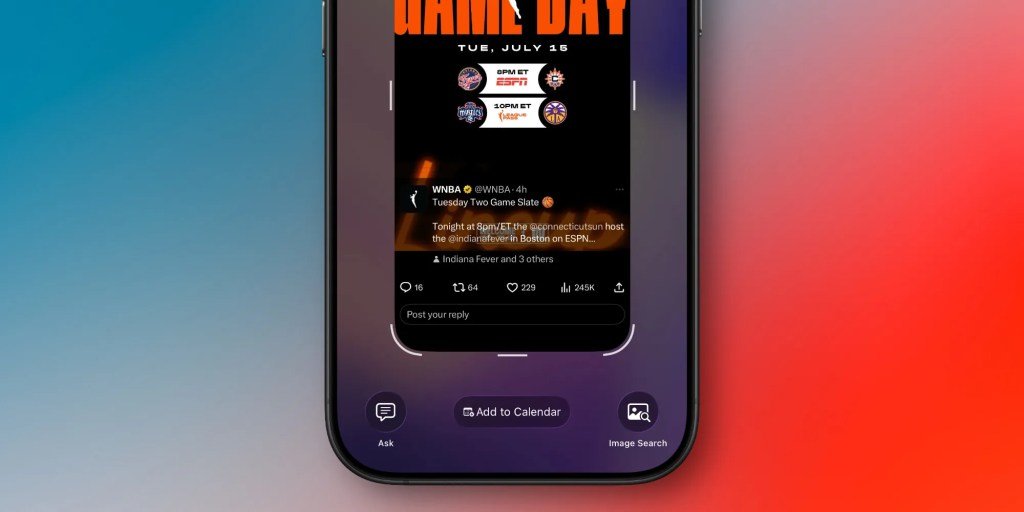
When Apple introduced Visual Intelligence in iOS 26, it marked a significant evolution in contextual AI for mobile users. Building upon the foundational Camera Control features, this technology now enables users to extract actionable insights directly from screenshots. Currently, it supports three core functions: instant calendar event creation, visual product searches, and ChatGPT-powered screenshot analysis. While these features demonstrate Apple's ambition to make static images interactive, one critical productivity gap remains unaddressed – seamless integration with Reminders.
As an iOS developer and daily user, I've found the calendar creation feature particularly transformative. When viewing event details in apps or messages, tapping the AI button overlayed on screenshots automatically parses dates, times, and event names to populate Calendar entries. This eliminates tedious manual input, and according to Apple's Human Interface Guidelines, reduces cognitive load by keeping users within their current context. The efficiency gains are tangible: tasks that took 30 seconds now require one tap.
Yet this functionality highlights a missed opportunity. Reminders handles fundamentally different use cases than Calendar – tracking tasks, follow-ups, and informal notes rather than scheduled events. Consider these practical scenarios where Visual Intelligence could extend to Reminders:
Research bookmarking: When browsing articles or products, screenshotting could instantly generate a reminder like "Review this patio furniture set next weekend" with source links preserved
Message-based tasks: Parsing text conversations (e.g., "Remind me to call Dave Thursday") could auto-create time-bound reminders, eliminating manual transcription errors
Visual context capture: Photographing physical objects (using Camera Control) could generate reminders like "Buy replacement batteries for this remote" with attached images
Technically, implementing this demands more sophisticated natural language processing than calendar integration. While date/time extraction relies on structured data patterns, Reminders require understanding intent and abstract concepts. Apple's on-device semantic index (documented in CoreML) could interpret phrases like "next week" or "when back from trip," while differential privacy would maintain message confidentiality. Early tests with Siri Suggestions show Apple already categorizes reminder-worthy phrases in messages.
For developers, this expansion would unlock new workflow automation possibilities. Using Shortcuts APIs, third-party apps could trigger reminder creation from screenshots without leaving their interfaces. Imagine scanning a recipe screenshot and having Ingredients automatically populate a Reminders list, or converting meeting notes into actionable bullet points. This interoperability would solidify iOS as a hub for cross-app productivity.
The migration path seems clear: Apple could deploy this as an opt-in feature in iOS 27's first beta, initially supporting Messages and Safari. User testing would refine its understanding of ambiguous requests – perhaps adding a confirmation step ("Create reminder for 'Call Dave Thursday'?"). Given Reminders' integration with Apple's ecosystem (syncing via iCloud across macOS, watchOS, and visionOS), this would create a unified task-management layer powered by visual context.
As we approach WWDC 2026, extending Visual Intelligence beyond calendars into Reminders isn't just logical – it's necessary. It transforms passive screenshots into proactive productivity tools, reducing friction in daily digital workflows. For Apple, it represents the next step in making AI feel less like a feature and more like an intuitive extension of user intent.
Comments
Please log in or register to join the discussion