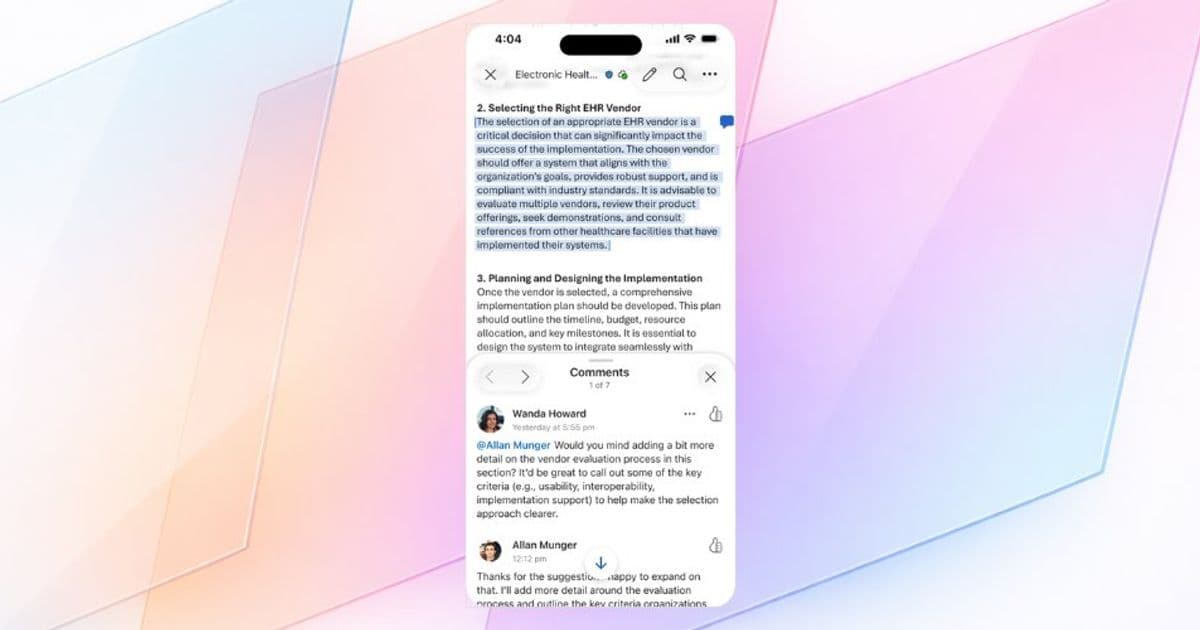
Microsoft has rolled out a modernized commenting interface for Word, Excel, and PowerPoint on iPhone, designed to streamline mobile collaboration workflows and improve user experience.
Microsoft has introduced a significant update to its commenting functionality across Word, Excel, and PowerPoint for iOS, specifically targeting iPhone users. This enhancement represents Microsoft's ongoing commitment to improving mobile collaboration capabilities within its productivity suite.
The updated Comments pane focuses on improving clarity and usability by making comment threads easier to find, read, and act upon. With a more modern, streamlined user interface, users can quickly identify items requiring attention, respond efficiently, and maintain engagement in collaborative workflows while reviewing documents on the go.
Key improvements in this update include:
- A redesigned Comments pane that improves visual hierarchy and information density
- Enhanced navigation between comment threads and responses
- More intuitive access points for commenting functionality
- Improved readability of comment text and metadata
Users can access the new Comments pane by opening any Word, Excel, or PowerPoint file on their iPhone and tapping on any comment icon within the file or through the Review tab. For Word and PowerPoint users, an additional access point has been added to the bottom task bar, providing more flexibility in how users interact with comments.
This update is currently rolling out to iPhone users running Version 2.106 (Build 26022013) of the Microsoft Office apps. Microsoft has indicated that further enhancements are planned for the coming months, including the addition of filtering capabilities, a new drafting sheet for composing comments, and an improved method for adding comments from an empty state.
From a business perspective, this update addresses several pain points in mobile document collaboration. The modernized interface reduces cognitive load for users who need to review and respond to feedback while away from their desks. By making the commenting experience more intuitive and efficient, Microsoft aims to accelerate decision-making cycles and maintain productivity momentum across distributed teams.
When compared to previous versions of the iOS apps, the new commenting interface demonstrates Microsoft's recognition of mobile-first work patterns. The company has invested in making collaboration features as accessible and efficient on mobile devices as they are on desktop platforms, acknowledging that critical business decisions often happen outside traditional office environments.
For organizations using Microsoft 365, this update contributes to a more consistent cross-platform experience. While the desktop and web versions of Office have offered sophisticated commenting capabilities, the mobile experience has historically lagged behind. This update helps bridge that gap, ensuring that users can participate in document reviews regardless of their device or location.
Microsoft's approach to this update also reflects a broader industry trend toward enhancing mobile productivity tools. As remote and hybrid work models continue to dominate, the ability to effectively collaborate on documents from smartphones has transitioned from a convenience to a necessity. Microsoft's investment in this area positions it competitively against other productivity suites that have traditionally offered stronger mobile experiences.
The timing of this update also coincides with Microsoft's continued focus on its Apple ecosystem integration. By delivering a polished, native-feeling experience on iPhone, Microsoft reinforces its commitment to serving users across platforms rather than confining them to the Windows ecosystem.
For organizations evaluating productivity suites, this update highlights an important consideration: the maturity of mobile collaboration features. While core document editing capabilities are now well-established across platforms, the nuances of collaboration features like commenting often determine overall user satisfaction and adoption rates.
Microsoft has encouraged users to provide feedback on the new commenting experience through the Help & Feedback tool, accessible via the user account icon in the top-left corner of the apps. This feedback mechanism will likely inform future iterations of the feature as Microsoft continues to refine the mobile collaboration experience.
As remote and hybrid work models continue to evolve, updates like this one demonstrate how productivity software providers are adapting to changing work patterns. The enhanced commenting experience on iOS represents Microsoft's acknowledgment that effective collaboration cannot be confined to traditional office environments or desktop computers.
This update is part of Microsoft's broader strategy to enhance its productivity suite across all platforms, ensuring that users can seamlessly transition between devices while maintaining productivity and collaboration momentum. For organizations heavily invested in Microsoft 365, these incremental improvements collectively contribute to a more cohesive and efficient digital workplace experience.
Comments
Please log in or register to join the discussion