Microsoft has launched Windows 365 in the New Zealand North region, enabling organizations to benefit from reduced latency, local data residency, and improved compliance with national regulations.
Today, Microsoft announced the availability of Windows 365 in the New Zealand North region, marking a significant expansion of its Cloud PC service to better serve customers in and around New Zealand. This new region brings Microsoft's global Cloud PC footprint to 20+ locations worldwide, enabling organizations to deliver secure, flexible, and high-performance virtual desktops with reduced latency and local data residency.
The expansion to New Zealand North addresses growing demand for cloud-based computing solutions that meet both performance and compliance requirements. Organizations operating in New Zealand often face strict data sovereignty regulations that require certain types of data to remain within national borders. By establishing a local region, Microsoft enables these organizations to maintain compliance while still benefiting from the scalability and flexibility of cloud-based desktop infrastructure.
Key Benefits for New Zealand Organizations
The New Zealand North region offers several advantages for organizations adopting Windows 365:
Lower Latency and Improved Performance: With Cloud PCs now hosted locally, users experience faster response times and smoother performance, particularly for graphics-intensive applications and real-time collaboration tools. This is especially important for organizations with distributed workforces or those supporting remote employees across different time zones.
Local Data Residency: Organizations can now ensure their data remains within New Zealand's borders, meeting regulatory requirements and providing peace of mind for businesses handling sensitive information. This is particularly relevant for government agencies, financial institutions, and healthcare providers operating under strict data protection laws.
Enhanced Compliance: The local region helps organizations meet industry-specific compliance requirements and government regulations that mandate data storage within national boundaries. This eliminates the complexity of navigating cross-border data transfer regulations.
Business Continuity: With regional redundancy, organizations can implement disaster recovery strategies that keep their workforce productive even during regional outages or disruptions.
Getting Started with Windows 365 in New Zealand North
Microsoft has provided clear guidance for organizations looking to take advantage of the new region, with different approaches depending on how your Windows 365 environment is configured.
For Microsoft Hosted Network (MHN) Customers
Organizations using Microsoft Hosted Network can start benefiting from the New Zealand North region immediately. Since Microsoft manages the networking infrastructure, the service automatically optimizes Cloud PC placement for performance and resilience.
To enable the new region:
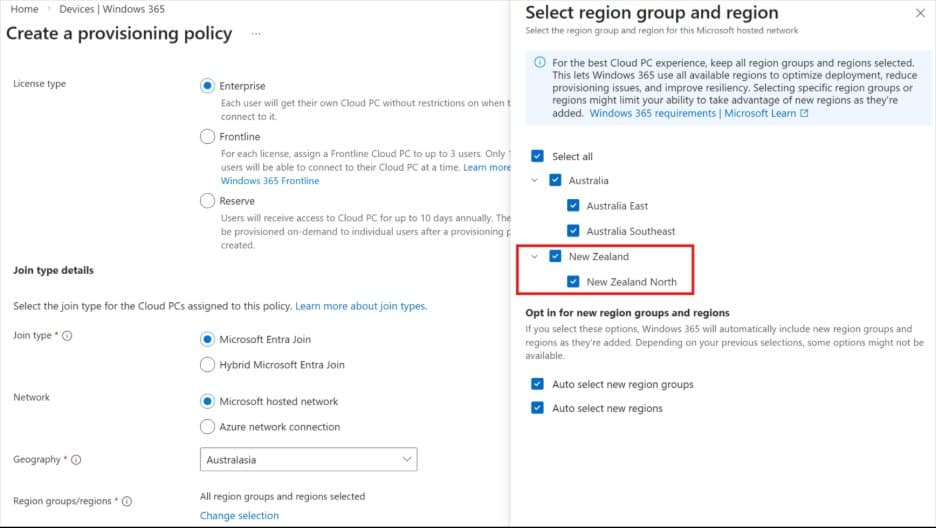
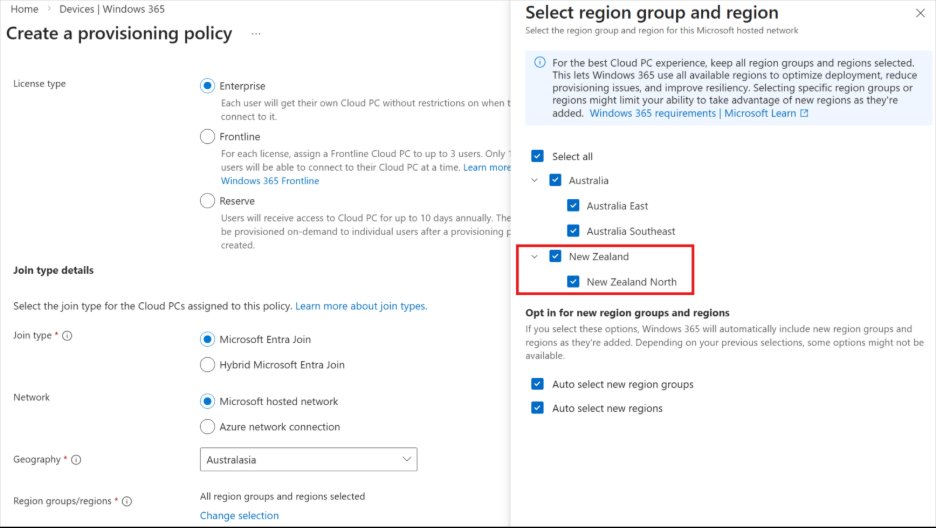
- Navigate to your provisioning policy settings
- Select the Australasia geography
- Choose the New Zealand region group
- Select New Zealand North as your target region
- Ensure "Auto select new region groups" and "Auto select new regions" options are enabled
This automatic optimization ensures your Cloud PCs are placed in the most appropriate region based on availability and performance metrics, providing a seamless experience for end users.
For Azure Network Connection (ANC) Customers
Organizations using Azure Network Connection maintain more control over their network topology and will need to perform some additional configuration steps. This approach is typically chosen by organizations that require specific network configurations or have existing Azure infrastructure investments.
To enable the New Zealand North region:
- Review the Azure Network Connection documentation for region-specific requirements
- Confirm your ANC setup supports New Zealand North, including virtual networks and necessary service endpoints
- Update your provisioning policies to target the new region
- Validate network connectivity and performance
Strategic Implications for Digital Transformation
The availability of Windows 365 in New Zealand North represents more than just a technical expansion—it's a strategic enabler for digital transformation across the region. Organizations can now move away from traditional desktop infrastructure and embrace cloud-native approaches without compromising on performance or compliance.
This expansion aligns with broader trends in the enterprise technology landscape, where organizations are increasingly adopting hybrid and remote work models. Cloud PCs provide a consistent user experience regardless of location, enabling organizations to support flexible work arrangements while maintaining security and compliance standards.
Looking Ahead
As more organizations in New Zealand adopt Windows 365, Microsoft's investment in local infrastructure demonstrates its commitment to supporting regional digital transformation initiatives. The New Zealand North region joins a growing network of global locations, providing organizations with the flexibility to deploy Cloud PCs where their users are located.
Organizations considering Windows 365 should evaluate their current desktop infrastructure, compliance requirements, and workforce distribution to determine the optimal deployment strategy. With the New Zealand North region now available, there's never been a better time to explore how Cloud PCs can transform your organization's approach to desktop computing.
For more information about getting started with Windows 365 in New Zealand North, visit the Windows 365 documentation or connect with Microsoft partners who can provide guidance on migration and deployment strategies.
{{IMAGE:2}}
The expansion to New Zealand North is part of Microsoft's ongoing commitment to providing localized cloud services that meet the unique needs of organizations around the world. As the Cloud PC market continues to evolve, organizations that embrace these technologies early will be well-positioned to deliver the flexible, secure, and performant computing experiences that modern workforces demand.
Comments
Please log in or register to join the discussion