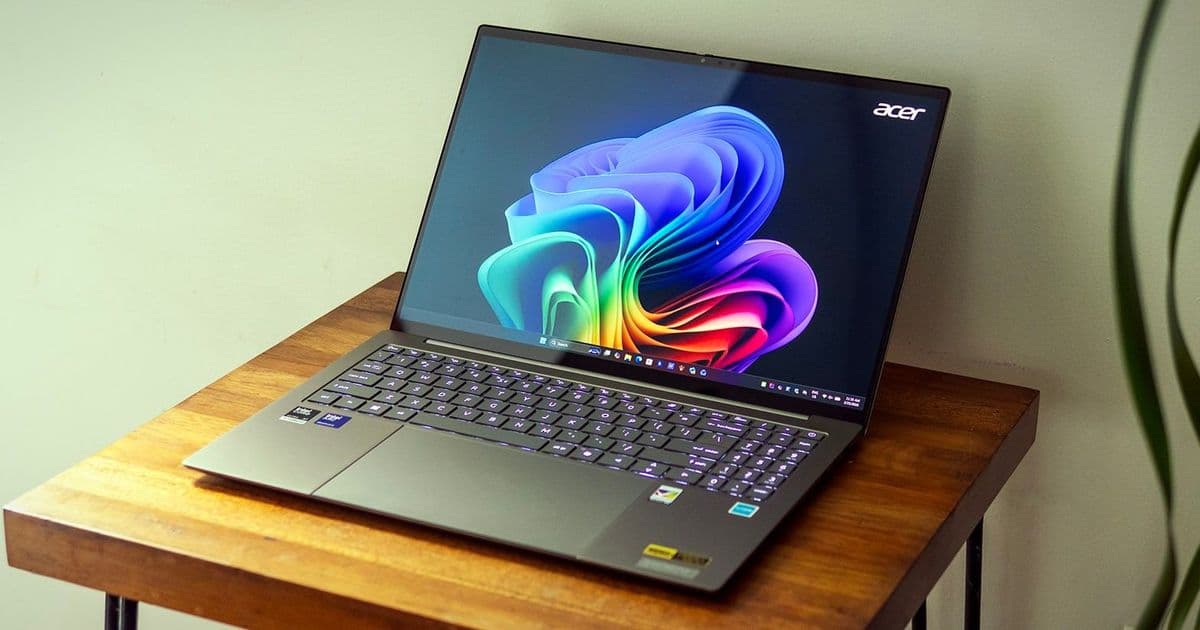
Acer's Swift 16 AI delivers premium build quality and strong performance, but middling battery life and an awkward stylus integration keep it from true flagship status.
The Acer Swift 16 AI arrives as a premium ultrabook contender, packing Intel's latest "Panther Lake" processor, a stunning OLED display, and what Acer claims is the world's largest haptic touchpad. At $1,899 as tested, it positions itself against heavyweights like the Dell 16 Premium and Apple's 15-inch MacBook Air, offering Windows users a sleek 16-inch alternative with practical port selection and solid build quality.
Design and Build Quality
The Swift 16 AI sports a modern aluminum chassis with thin bezels and a premium aesthetic. While the pre-production model we received featured a lighter color scheme, production versions will come in darker gray with gold highlights. The laptop feels substantial at 3.42 pounds, undercutting Dell's 4.65-pound offering while being slightly heavier than Apple's 3.3-pound MacBook Air.
The lid demonstrates impressive rigidity despite some lateral flex in the chassis. Acer's MIL-STD-810 testing suggests durability beyond what the flexible chassis might indicate. The 180-degree hinge and one-handed opening capability add practical touches for everyday use.
Port selection stands out as a strength, with two Thunderbolt 4 ports, two USB-A ports (5 Gbps and 10 Gbps), HDMI 2.1, and a microSD card reader. This variety is increasingly rare in premium laptops that often limit users to USB-C only.
Display Excellence
The 16-inch OLED display delivers the rich colors and deep contrast OLED technology is known for. With full DCI-P3 coverage and a 120Hz refresh rate, it excels at both color-critical work and smooth scrolling. The glossy surface does create some reflectivity, but the visual quality remains impressive.
In testing, the display averaged 364 nits of brightness—solid for an OLED panel but trailing some competitors. The 16:10 aspect ratio provides extra vertical space compared to traditional 16:9 displays, though the resolution of 2880 x 1800 means some UI elements may appear smaller than on lower-resolution panels.
Performance: Strong but Not Class-Leading
Our review unit featured Intel's Core Ultra X7 358H processor with 16 cores (4 Performance, 8 Efficient, 4 Low-Power Efficient) and Arc B390 integrated graphics. Paired with 32GB of LPDDR5X-7467 RAM and a 1TB SSD, it delivers solid productivity performance.
In Geekbench testing, the Swift 16 posted middling scores: 2,789 in single-core and 15,926 in multi-core performance. While these results beat the MacBook Air in multi-core tests, they trailed the Asus Zenbook Duo and Dell 16 Premium in most benchmarks.
Storage performance impressed, with a leading 1,745 MBps in our 25GB file transfer test. However, Handbrake 4K-to-1080p transcoding took 4 minutes and 25 seconds—respectable but not class-leading.
Thermal management proved effective during extended workloads. The Cinebench stress test showed initial performance dips but stabilized around 900 points for subsequent runs, indicating no significant throttling once cooling fans spun up.
The Oversized Touchpad: Innovation or Gimmick?
Acer's claim of the "world's largest" haptic touchpad (6.9 by 4.3 inches) is technically accurate but practically questionable. The massive surface area rarely gets utilized during normal use, as most users keep their fingers centered on the pad.
The real purpose becomes clear: stylus support. The included MPP stylus works on the touchpad surface, which shares the 16:10 aspect ratio with the main display for intuitive drawing. However, in practice, this feature feels more like a bonus than a core capability.
Writing and drawing on the touchpad proved awkward. Palm rejection wasn't always reliable, forcing unnatural hand positions. The experience lacked the precision artists would expect, making dedicated drawing tablets or 2-in-1 convertibles better choices for creative work.
Keyboard and Audio
The full-size keyboard delivers excellent typing experience with soft but precise feedback and ample key travel. White backlighting ensures visibility in all lighting conditions. The layout includes a number pad, though the arrow keys are oddly sized.
Typing speed tests showed impressive results, with nearly 114 words per minute achieved on the first try. The keyboard alone makes this laptop appealing for productivity-focused users.
Audio performance exceeds expectations for laptop speakers. Dual downward-firing speakers produce clear instrument separation and noticeable bass. The DTS:X Ultra app's equalizers significantly improve sound quality, with the Music preset offering the most balanced output.
Battery Life: The Achilles' Heel
With 12 hours and 12 minutes in our battery test, the Swift 16 AI falls into the "good but not great" category. This trails the MacBook Air by over three hours and the dual-screen Asus Zenbook by more than two hours. While usable for a full workday, it doesn't match the longevity of class leaders.
The OLED display likely contributes to the shorter runtime, as these panels typically consume more power than traditional LCDs. The 120Hz refresh rate automatically drops to 60Hz on battery to conserve power.
Webcam and Software
The 1080p webcam delivers average performance. While sharper than older 720p cameras, it shows soft details and struggles in low light. An IR sensor enables Windows Hello facial recognition, and a sliding privacy shutter adds security.
Software includes Acer Sense for system management, offering performance profiles, battery optimization, and display settings. However, the inclusion of trial apps like Dropbox feels out of place on a premium laptop.
Competition and Value Proposition
At $1,899, the Swift 16 AI faces stiff competition. The MacBook Air M4 offers better battery life and potentially superior performance for similar money, though it lacks the Swift's OLED display and Windows flexibility.
The Dell 16 Premium provides comparable performance with a traditional LCD display and longer battery life. The Asus Zenbook Duo offers unique dual-screen functionality but with a smaller main display.
For users prioritizing display quality and Windows compatibility over battery life, the Swift 16 AI represents a solid choice. The premium build, excellent keyboard, and practical port selection add value beyond raw specifications.
Bottom Line
The Acer Swift 16 AI delivers a premium ultrabook experience with some notable strengths and weaknesses. The OLED display, build quality, and keyboard excellence make it appealing for users who value these features. However, middling battery life and the somewhat gimmicky stylus integration prevent it from achieving true flagship status.
For Windows users seeking a sleek 16-inch laptop with a stunning display and practical features, the Swift 16 AI is worth considering. Just be aware that you're trading some battery longevity for display quality, and that the oversized touchpad's main selling point—the stylus—may not justify its inclusion for most users.
Those open to macOS will find better battery life and potentially superior overall value in Apple's offerings. But for die-hard Windows users who prioritize display quality and premium build over marathon battery life, Acer's Swift 16 AI is a polished, capable machine that should satisfy.
Comments
Please log in or register to join the discussion