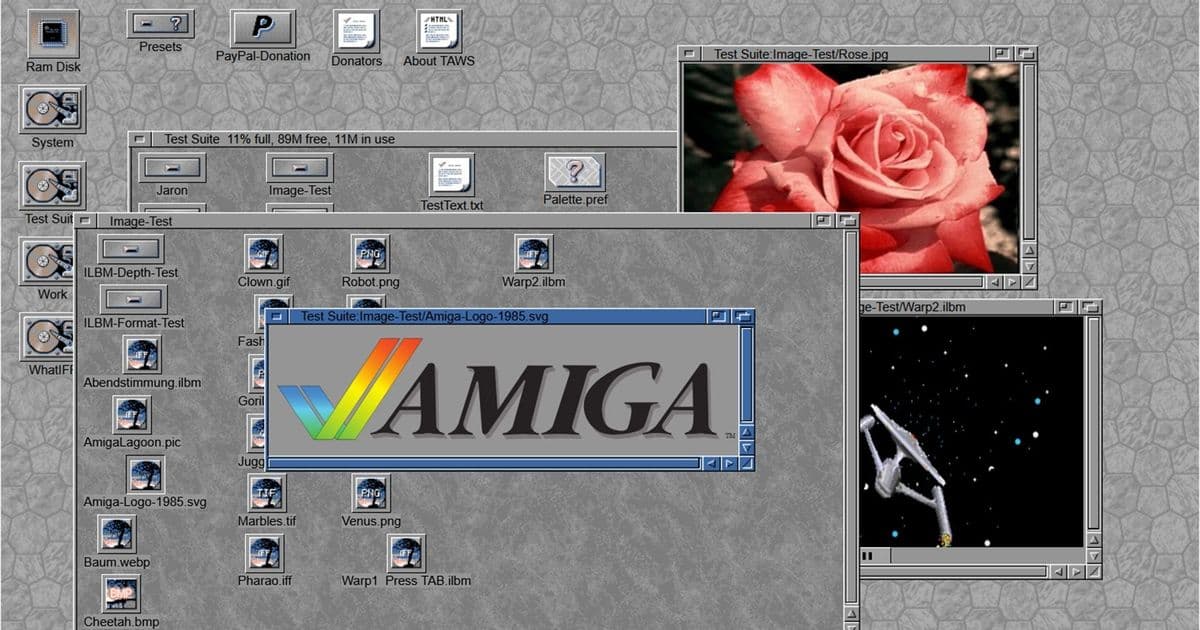
TAWS (The Amiga Workbench Simulation) receives major update adding refined OS 3.2 support and AmiBench performance testing presets, offering retro computing enthusiasts unprecedented access to classic Amiga environments through modern web browsers.
The Amiga Workbench Simulation (TAWS) has received a significant update, bringing enhanced support for OS 3.2 and new AmiBench performance testing presets to this popular JavaScript-based emulator. Developed by Michael Rupp, TAWS continues to evolve as a comprehensive platform for experiencing classic Amiga environments without requiring original hardware or complex emulator setup.
Enhanced OS 3.2 Support
The latest TAWS update refines the OS 3.2 experience, addressing accuracy concerns and improving compatibility with Workbench 3.2's expanded feature set. OS 3.2 represented a major milestone for the Amiga platform, introducing numerous enhancements over previous versions including improved filesystem support, expanded hardware compatibility, and modernized system utilities.
For users who may have last interacted with Amiga systems during the A500 era, the progression to OS 3.2 represents substantial evolution in the platform's capabilities. The Workbench interface, while maintaining its distinctive aesthetic, gained considerable functionality through these updates, including support for larger hard drives, improved memory management, and enhanced multimedia capabilities.
AmiBench Performance Testing Integration
Perhaps the most significant addition in this update is the integration of AmiBench presets, allowing users to benchmark different Amiga OS versions directly within their web browser. AmiBench, a popular benchmarking tool for the Amiga platform, provides standardized performance metrics that enable meaningful comparisons between different system configurations and OS versions.
This addition transforms TAWS from a purely experiential tool into a valuable research platform for understanding the performance characteristics of various Amiga OS iterations. Users can now observe how different versions handle computational tasks, providing insight into the platform's evolution over time.
Technical Implementation and Browser Compatibility
According to Rupp, TAWS is "a pure JavaScript simulation of the Amiga Workbench 1.0 - 4.1 FE for Firefox and Apple-WebKit-based browsers (Chrome, Opera, Edge, etc. incl. Odyssey)." This cross-browser compatibility ensures broad accessibility, allowing users on virtually any modern platform to experience classic Amiga environments without specialized software installation.
The JavaScript implementation achieves remarkable accuracy in reproducing the Amiga Workbench experience. Users with actual Amiga hardware experience confirm that the simulation captures the essence of the original interface, from color schemes and icon designs to system behavior and response patterns.
Preset System and Version Coverage
TAWS offers an extensive range of Workbench versions, spanning from the original 1.0 release through to OS 4.1 and even AROS, an open-source AmigaOS-like operating system. This comprehensive coverage allows users to explore the platform's evolution across multiple decades of development.
The preset system provides quick switching between different OS versions, with each preset loading a specific configuration of the Workbench environment. This approach differs significantly from full system emulators, focusing specifically on the graphical interface and core system utilities rather than providing a complete emulation of underlying hardware.
Comparison with Full System Emulators
While TAWS shares some superficial similarities with projects like Infinite Mac, the two approaches serve different purposes. TAWS concentrates on presenting the Workbench GUI and a limited but common set of system utilities, creating a focused experience centered on the user interface.
In contrast, full system emulators like those used by Infinite Mac provide complete system emulation with extensive software libraries and data transfer capabilities. TAWS' approach offers advantages in terms of accessibility and resource requirements, as the JavaScript implementation runs efficiently in modern web browsers without demanding significant system resources.
Practical Applications and User Experience
The simulation proves particularly valuable for users who want to explore classic Amiga environments without investing in original hardware or navigating the complexities of traditional emulator setup. The ability to quickly switch between different OS versions and test various configurations makes TAWS an excellent educational tool for understanding the Amiga platform's development.
For users with nostalgic connections to specific Amiga versions, TAWS provides an opportunity to revisit familiar environments with modern display quality and responsiveness. The superior monitor resolution and performance compared to original hardware creates an enhanced experience while maintaining the authentic look and feel of the classic interface.
Future Development Considerations
The continued development of TAWS suggests ongoing interest in preserving and exploring classic computing platforms through modern web technologies. The addition of performance testing capabilities indicates a potential direction toward more analytical and comparative features, possibly including expanded benchmarking tools or detailed system analysis features.
As web technologies continue advancing, future versions of TAWS might incorporate even more sophisticated emulation capabilities while maintaining the project's focus on accessibility and ease of use. The successful implementation of complex Amiga OS features in pure JavaScript demonstrates the potential for similar preservation efforts across other classic computing platforms.
Community Impact and Preservation Value
Projects like TAWS play a crucial role in digital preservation, ensuring that historical computing interfaces remain accessible to new generations of users and researchers. By lowering the barrier to entry for exploring classic Amiga environments, TAWS helps maintain interest in the platform and contributes to the broader ecosystem of retro computing preservation efforts.
The accuracy and comprehensiveness of the simulation make it a valuable resource for both casual users interested in experiencing classic computing and serious researchers studying the evolution of graphical user interfaces and operating system design.
Technical Specifications and Requirements
The JavaScript-based implementation means TAWS runs entirely within web browsers, requiring no installation or specialized hardware. This approach provides several advantages:
- Cross-platform compatibility across Windows, macOS, Linux, and mobile operating systems
- No system resource overhead beyond what's required by the web browser
- Automatic updates through the web interface
- Easy sharing and collaboration through URL-based access
Performance characteristics will vary based on the user's browser and hardware, but the pure JavaScript implementation is optimized for modern web standards and should run smoothly on most contemporary devices.
The latest TAWS update represents a significant enhancement to an already valuable tool for retro computing enthusiasts, researchers, and anyone interested in exploring the history of personal computing through one of its most influential platforms.
Comments
Please log in or register to join the discussion